Skip to: |

Newegg.com - A great place to buy computers, computer parts, electronics, software, accessories, and DVDs online. With great prices, fast shipping, and top-rated customer service - once you know, you Newegg.

If you are reading this message, Please click this link to reload this page.(Do not use your browser's "Refresh" button). Please email us if you're running the latest version of your browser and you still see this message.

Newegg.com - Computer Parts, Laptops, Electronics, HDTVs, Digital Cameras and More!

  • | Wish List
  • Help
Home
Home > 
Computer Hardware > 
Networking > 
Modems > 
Netgear Inc. > 
Item#: N82E16825124006

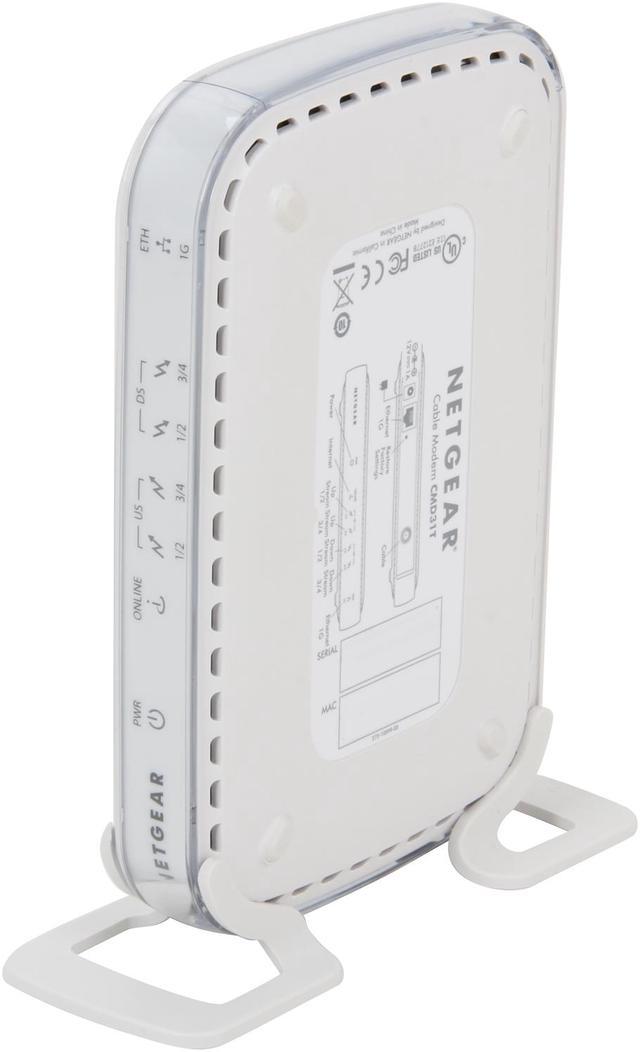
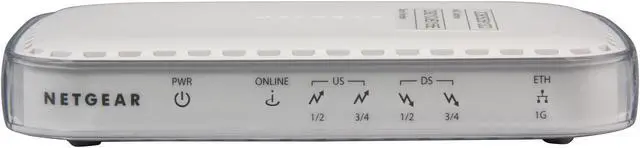
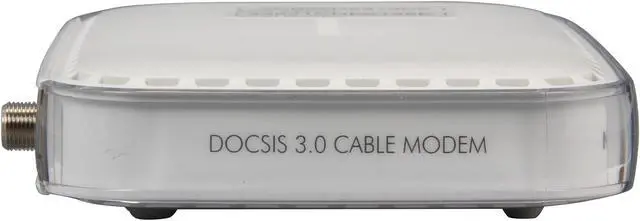
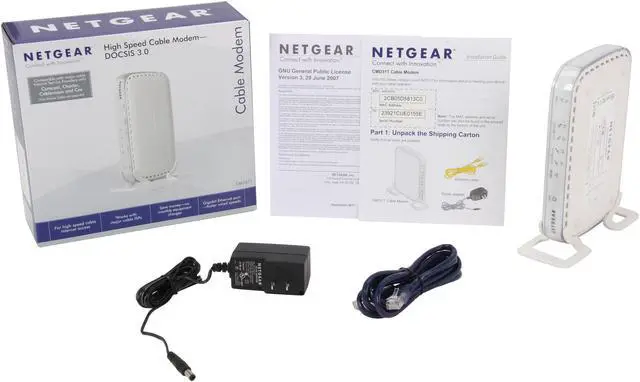
NETGEAR CMD31T-100NAS High Speed Cable Modem - DOCSIS 3.0 Ethernet Port DOCSIS 3.0

  • Compatible with Time Warner, Comcast, Charter, Cablevision, and others
  • Up to 150 Mbps download and upload speed
  • Docsis 3.0
  • Gigabit Ethernet port
  • Support IPv6
  • CD-less installation
  • Pin It
  • Email this page
ICON Loading...


Learn more about the Netgear Inc. CMD31T-100NAS

Model

Brand
NETGEAR
Model
CMD31T-100NAS

Spec

Type
Cable Modem
Interface
Ethernet Port
Cable Interface
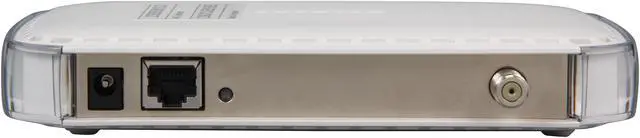
One (1) LAN Gigabit Ethernet port
One (1) WAN Female F connector
Standards
DOCSIS 3.0

Features

Features
For high-speed cable Internet access

Works with major cable ISPs

Save money-no monthly equipment charges

Designed to meet DOCSIS 3.0 specifications and backward compatible with DOCSIS 2.0 networks

IPv6 Next Generation Internet addressing support

Gigabit Ethernet port with auto-sensing technology

System Requirements:
Cable Broadband Internet service
Microsoft Windows 7, Vista, XP, 2000, Mac OS, or other operating systems running a TCP/IP network
Microsoft Internet Explorer 5.0, Firefox 2.0, Safari 1.4, or Google Chrome 11.0 browsers or higher

CD-less installation.

Packaging

Package Contents
High Speed Cable Modem - DOCSIS 3.0 (CMD31T)
Stand
Ethernet cable
Power adapter, localized to country of sale

Quick Info

Warranty

  • Limited Warranty period (parts): 1 year
  • Limited Warranty period (labor): 1 year


Customer Reviews of the Netgear Inc. CMD31T-100NAS

Do you own this product? Write a Review

Filter Results

Go
  • dangithien
  • 4/24/2013 11:58:27 AM
  • Tech Level: High
  • Ownership: less than 1 day
  • Verified Owner

5 out of 5 eggsWorks well

Pros: It's very easy to setup. The whole thing can be up in about 30 minutes including activation from the ISP. I'm using Comcast in PA and it works fine.

I called to Comcast to activate it. It was faster and more efficient to let the modem prompt you to activate it automatically. That only took about 15 minutes.

Cons: Not a whole lot of instructions. Not that I needed it but less savvy users may be scratching their head a bit.

Did you find this review helpful? Yes No

  • N/A
  • 3/5/2013 12:19:06 PM
  • Tech Level: Average
  • Ownership: 1 week to 1 month
  • Verified Owner

4 out of 5 eggsWorked right out of the box with comcast

Pros: I hooked up the modem and it connected right into comcast's xfinity internet service and has been working like a charm sicne

Cons: none yet

Other Thoughts: would definitely purchase again

1 out of 1 people found this review helpful. Did you? Yes No

  • Clydefrog
  • 2/11/2013 12:57:06 AM
  • Tech Level: Somewhat High
  • Ownership: 1 month to 1 year

4 out of 5 eggsUpdate from Clydefrog

Pros: Just added an older Netgear wireless router and it works with the modem perfectly.

Cons: The modem does get a little warm.

1 out of 1 people found this review helpful. Did you? Yes No

  • Lightman
  • 1/23/2013 7:55:30 AM
  • Tech Level: High
  • Ownership: 1 month to 1 year
  • Verified Owner

1 out of 5 eggsOnly works with limited ISPs

Pros: Works at slower speed, DOCSIS 2.0 speeds, good looks.

Cons: Does NOT work with many ISPs, even brand new Software update is incompatible. Unless your ISP is Comcast, avoid.

Other Thoughts: Upgraded from DOCSIS 2.0 to 3.0 to future proof myself last March but keep running at the same speed. Trying recently to upgrade to 50 MBs DOCSIS 3.0 speed has been a disaster. Netgear admits there is an issue with V501D, they sent me a new V502A under warranty that still does not work with my ISP.

Did you find this review helpful? Yes No

  • Clydefrog
  • 12/23/2012 3:19:12 AM
  • Tech Level: Average
  • Ownership: 1 day to 1 week

4 out of 5 eggsGreat so far

Pros: It self installed and is somewhat faster than the modem it replaced.

Cons: It isn't as fast as I thought it would be. It gets warm.

Other Thoughts: Painless install on the Comcast network in the SF Bay Area.

1 out of 1 people found this review helpful. Did you? Yes No

  • jlboan
  • 12/18/2012 7:45:50 AM
  • Tech Level: High
  • Ownership: 1 month to 1 year
  • Verified Owner

1 out of 5 eggsShould have known better

Pros: Speeds were fast and it got the job done. It's on the approved list of modems for Cox at a cheaper price than they offer.

Cons: I went against my better judgement and bought a Netgear product based on the price. I took a chance and lost. After a couple weeks the unit died. It still powers on, but will not receive upstream or downstream from Cox. I had a Cox tech come onsite which cost me $50 because it wasn't purchased from them, and I had to purchase a working modem from them so I lost a lot of money in the long run. Don't waste your time and money with this, it will not last long.

Did you find this review helpful? Yes No

  • mike
  • 12/9/2012 7:17:58 AM
  • Tech Level: High
  • Ownership: 1 week to 1 month
  • Verified Owner

5 out of 5 eggsGood Modem, Works with TWC

Pros: It works like a modem should. Owning your own modem cuts paying your ISP any extra money to lease theirs (looking at you Time Warner).

Cons: Took a few calls to get TWC to activate it, but after speaking to a third tech it's up and working.

Other Thoughts: For some reason even after rebooting and resetting my router I had to renew DCHP on the router to get it to talk with the modem.

Did you find this review helpful? Yes No

  • Justn519
  • 10/27/2012 4:34:42 PM
  • Tech Level: High
  • Ownership: 1 week to 1 month
  • Verified Owner

1 out of 5 eggsNo Longer Compatible

Pros: Worked great after setup and registering with my isp Cox - Phoenix, AZ

Cons: After about a week my isp issued a system update for the network and the router firmware was then incompatible. Returned for a refund, very disappointing but not a problem with the product itself.

1 out of 5 people found this review helpful. Did you? Yes No

  • airspeed400
  • 10/23/2012 7:20:20 PM
  • Tech Level: Somewhat High
  • Ownership: less than 1 day
  • Verified Owner

5 out of 5 eggsNetgear Comcast Rocks!

Pros: Plugged it in, connected it to my cable, home LAN network & power...opened a browser window on my PC & automatically got a Comcast activation page. I didn't even have to type in the MAC address, it was detected for me. A 5-minute "upgrade" to the modem (I assume the Comcast firmware update) and I was online. Cable modem stands on a nice, stable base, big, twisty coax cable doesn't make it fall over (like old Linkysys/Cisco modem did). Netgear design is very cool...white, sleek, good-lookin' (did I say that about network hardware!?!?) It matches my Netgear 8-port network switch (which also does not fall over). It arrived fast, and I spent less than 5 minutes opening the box and connecting it. I live in South Florida and the Comcast worked flawlessly. I have 4 channels linked downstream, and 3 upstream.

Cons: I wish it had been free (sigh).

Other Thoughts: I was put off when so many said Comcast did not support this modem. I bought it anyway, because prices are about equal, and I wanted a modem that would look better (I can see it under my computer desk), and my Netgear switch (same design) stands up when my old cable modem (Cisco/Linksys CM100), Vonage box (Motorola VT-2142) and print server (D-Link DP-300U, no stand) do not always. Speeds test the same, but the power comes from the separate channels...I have a lot connected to my LAN: 4 computers, 2 laptops, 3 Netflix devices, Nintendo Wii, 3 wireless N300 AP's...this is gonna be great!

1 out of 1 people found this review helpful. Did you? Yes No

  • N/A
  • 10/11/2012 7:56:45 AM
  • Tech Level: High
  • Ownership: 1 week to 1 month
  • Verified Owner

5 out of 5 eggsWorks Good

Pros: Worked right out of the box with Comcast. No update needed. I have the extreme 50 plan with Comcast and through this modem I am recieving between 76-78 Megabits down and 30-35 Megabits up.

Cons: The modem will lose signal if you unplug the ethernet cord and plug it back in. This causes you to power cycle the modem everytime you unplug the ethernet cable either on the modem side or the router side. Also this modem did not have any mounting points on the bottom.

Other Thoughts: The modem works as advertised. It is fast and gets the job done. Just keep in mind if you have Comast, you will have to power cycle it anytime you need to disconnect the ehterrnet cord.

1 out of 1 people found this review helpful. Did you? Yes No

ICON Loading...
Are you an E-Blast Insider? Subscribe Newegg e-Blast

Buzz

Recommend this to anyone

5 out of 5 eggs
-This cable modem is very reliable.
-Docsis 3.0 has me at speeds of 30Mbps, with my plan at 15Mbps.
-Includes easy ...
— Jim 5/4/2012

Not compatible with Comcast

1 out of 5 eggs
Despite the claims on the packaging, and it's listing on the Comcast site as a compatible modem, it is not compatible ...
— 10For2 3/27/2012


PayPal
Shop without retyping payment details. Secure shopping made faster.
Check out with PayPal.

Financing


Home
Home > 
Computer Hardware > 
Networking > 
Modems > 
Netgear Inc. > 
Item#: N82E16825124006
LOADING... LOADING...
Shop by Region: United States | Canada | China
Follow us:   RSS Feeds Youtube
VeriSign Reliability Seal1This site protected by Trustwave's Trusted Commerce program Inc500
Policy & Agreement | Privacy Policy  © 2000-2013 Newegg Inc.  All rights reserved.
If the Adobe Reader does not appear when you click on a link for a PDF file, you can download Adobe Reader from the Adobe web site. nassau