Skip to: |

Newegg.com - A great place to buy computers, computer parts, electronics, software, accessories, and DVDs online. With great prices, fast shipping, and top-rated customer service - once you know, you Newegg.

If you are reading this message, Please click this link to reload this page.(Do not use your browser's "Refresh" button). Please email us if you're running the latest version of your browser and you still see this message.

Newegg.com - Computer Parts, Laptops, Electronics, HDTVs, Digital Cameras and More!

  • | Wish List
  • Help
Home
Home > 
Computer Hardware > 
Networking > 
Modems > 
TP-LINK > 
Item#: N82E16825165003

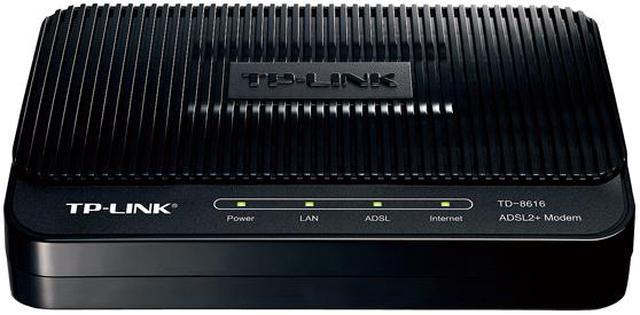
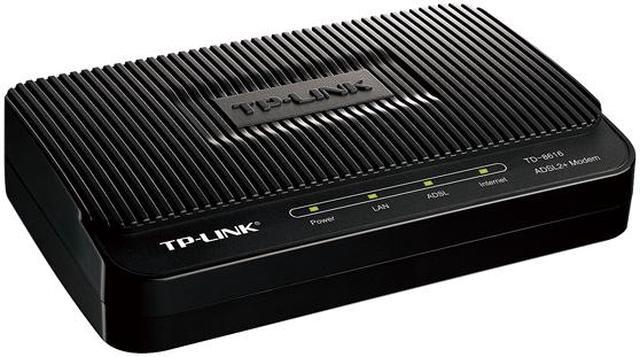
TP-LINK TD-8616 ADSL2+ Modem Up to 24Mbps downstream ADSL/ADSL2/ADSL2+ Standards 1 x RJ11 Port, 1 x RJ45

  • Up to 24Mbps downstream
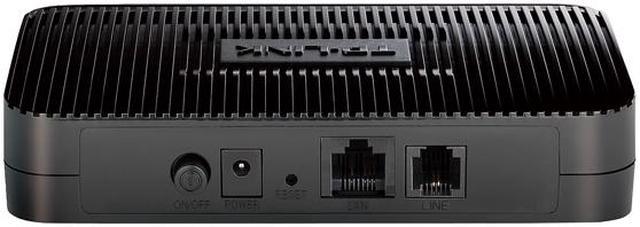
  • 1 x 10/100Mbps RJ45 Port
  • 1 x RJ11 Port
  • IEEE Standards: IEEE 802.3, 802.3u
  • ADSL Standards:
  • Full-rate ANSI T1.413 Issue 2, ITU-T G.992.1(G.DMT), ITU-T G.992.2(G.Lite)
  • I
  • Pin It
  • Email this page
ICON Loading...


Learn more about the TP-LINK TD-8616

Model

Brand
TP-LINK
Model
TD-8616

Spec

Type
DSL Modem
Interface
1 x 10/100Mbps RJ45 Port
Cable Interface
1 x RJ11 Port
Standards
IEEE Standards: IEEE 802.3, 802.3u

ADSL Standards:
Full-rate ANSI T1.413 Issue 2, ITU-T G.992.1(G.DMT), ITU-T G.992.2(G.Lite)
ITU-T G.994.1 (G.hs), ITU-T G.995.1 , ITU-T G.996.1, ITU-T G.997.1, ITU-T K.2.1

ADSL2 Standards: ITU-T G.992.3 (G.dmt.bis), ITU-T G.992.4 (G.lite.bis)

ADSL2+ Standards: ITU-T G.992.5
Max Transmission Rate
Up to 24Mbps downstream

Features

Features
Button: 1 Power On/Off Switch

External Power Supply: 5VDC/1A

ATM Features:
UNI 3.1, ATM Adaptation Layer Type 5-AAL5
Multiprotocol encapsulation over ATM (RFC 1483)
Supports 8 PVCs

Management: Administration and operation software (firmware) upgradable locally by web

System Requirements: Microsoft Windows 98SE, NT, 2000, XP, Vista or Windows 7, MAC OS, NetWare, UNIX or Linux.

Support the latest ADSL/ADSL2/ADSL2+ standards, up to 24Mbps downstream


Support 8 PVCs, fit for most of the network environment around the world.

Packaging

Package Contents
TD-8616
External Splitter
RJ-11 Telephone Cable
RJ-45 Ethernet Cable
Quick Installation Guide
Resource CD
Power Adapter

Quick Info

Warranty

  • Limited Warranty period (parts): 2 years
  • Limited Warranty period (labor): 2 years


Customer Reviews of the TP-LINK TD-8616

Do you own this product? Write a Review

Filter Results

Go
  • Nvorzula
  • 5/15/2013 7:05:01 PM
  • Tech Level: High
  • Ownership: 1 week to 1 month
  • Verified Owner

5 out of 5 eggsJust Works

Pros: Simple, practically invisible. No deterioration of speeds compared to other modems.

Cons: None.

Other Thoughts: This was perfect. PPPoE is handled by my pfSense box. What I needed was a simple, dumb, modem that would never even think to get in the way and this was it.

If you have other equipment to handle the PPPoE/DHCP/NATing/etc. then pick this up. It'll plug and play while staying out of the way of your other equipment.

Did you find this review helpful? Yes No

  • Jackie
  • 4/17/2013 7:06:04 PM
  • Tech Level: Average
  • Ownership: 1 day to 1 week

5 out of 5 eggsGood modem

Pros: I plugged it in and it worked without any additional configuration at all. I input my UN and PW into my router and I'm getting DSL speeds just as good as the provider supplied modem.

Cons: Only con is a modem/router from TP-Link costs the same. I wish it was cheaper and I had noticed this before buying.

Other Thoughts: But since I have a router already this being just a modem is OK. And still, less than 30 bucks is great. Especially compared to paying a rental fee to the DSL provider. My leased modem was failing and the replacement they sent was even worse. So far this is a great modem. I was on the internet in about 5 minutes.

Did you find this review helpful? Yes No

  • Steve
  • 3/19/2013 3:44:35 PM
  • Tech Level: High
  • Ownership: less than 1 day
  • Verified Owner

1 out of 5 eggsAnother Bad ADSL Modem

Pros: Just a dumb modem for use with a separate router. No setup required on Verizon DSL network.

Cons: Continually dropped connection within seconds or minutes. (Line integrity verified with another modem.) When connected, was not able to negotiate connection at > 8 MBS when failed Westell 7500 was steady at 11MBS. Unable to change default IP address. I just RMA's it.

Other Thoughts: Doesn't look like anyone makes a fast, stable and reliable ADSL modem which can handle a 10 - 15 MBS connection. I've had failures using Westell, Dlink, Zyxel and now TP-Link. I've got a used Efficient Speedstream on order and another Zyxel which I know will give me a few weeks of high-speed access, but not likely any more.

Manufacturer Response:

Hi Steve,
We're happy to hear that you set it up on Verizon line easily.
For the dropping and slow speed issues, may I suggest you to switch the spliter for another try?
1. Use the Westell 7500 spliter;
2. Without any Spliter;
3. Use the TP-LINK spliter;

If you need further information, please feel free to contact me:
howard.he@tp-link.com

Best Regards!
TP-LINK Support Team
support@tp-link.com
(866) 225-8139
http://www.tp-link.com/us/support
http://www.facebook.com/TPLINK

Did you find this review helpful? Yes No

  • N/A
  • 2/28/2013 3:39:37 PM
  • Tech Level: High
  • Ownership: 1 week to 1 month
  • Verified Owner

5 out of 5 eggsTruly plug-and-play

Pros: No useless stuff, just a plain ADSL modem. Plug and play. Fast and stable connection. Heat well controlled. Cheap.

Cons: None.

Other Thoughts: Do not purchase the device if you need a router or even a PPPoE or PPPoA client. It does not do any of that. The device is a simple RFC 1483 bridge (layer 2), nothing more and nothing less.

I might be weird but I like to tweak my devices. As such I connect to the outside world using a dedicated Linux box which takes care of PPPoE and the such, so all I need is an ADSL modem. I started by using a modem-router with the router part disabled (wasteful). I then switched to a PCI ADSL modem. The card eventually died and the respective company does not make those anymore. I was therefore happy to discover this minimal modem, and even happier to see that it performs as advertised. It is truly a plug-and-play device; the only thing that may be needed is changing the VPI and VCI values but in my case I did not even need to do this, I just put it in between my router and the wall plug and it started to work.

The device is reasonably cool in a partially enclosed server rack (that hosts two server-class machines and a Nortel Baystack switch), meaning that it is slightly warm but does not add significantly to the overall rack temperature.

Overall I would have preferred a PCI modem like I had earlier, but this device is definitely the next best thing. I am very happy.

1 out of 1 people found this review helpful. Did you? Yes No

  • bigdaddy
  • 2/13/2013 11:31:15 AM
  • Tech Level: Somewhat High
  • Ownership: 1 month to 1 year
  • Verified Owner

3 out of 5 eggsDecent

Pros: This thing works 24/7 and can handle all the downloading and gaming I can throw at it. NEVER drops my connection.

Cons: It is slower than my previous modems. I use to get 18mbps/.799 with my netgear but I get 16/.755 with this. I have centurylinks 20/.876..

Other Thoughts: Its cheap and works. Great for the price.

Manufacturer Response:

Hello Bigdaddy,

We are happy to see that this device is working out for you. It's really good to see that you never loose connection, especially given the amount of bandwidth and resources that games and downloading can take up. Unfortunately there isn't much you can do to increase the speed as far as configuration settings go, but you may upgrade the Firmware to make sure your your Software is up to date. We enjoy your feedback and hope you will be able to check out our other devices in the future.

support@tp-link.com
(866) 225-8139
http://www.tp-link.com/us/support
http://www.facebook.com/TPLINK

Did you find this review helpful? Yes No

  • winchest
  • 2/9/2013 9:20:03 AM
  • Tech Level: High
  • Ownership: less than 1 day
  • Verified Owner

5 out of 5 eggsGood

Pros: Works very well. Easy connect.

Cons: nothing

Did you find this review helpful? Yes No

  • mattersinmotion
  • 2/4/2013 7:55:57 AM
  • Tech Level: High
  • Ownership: 1 week to 1 month
  • Verified Owner

5 out of 5 eggsSimple and just works!

Pros: I was tired of having to setup a full DSL/router into bridge mode to use with my SonicWALL router. This DSL modem just plugs in and works. SonicWALL handles PPPoE logon via the modem.

Cons: They are getting harder to find. Stock up!

1 out of 1 people found this review helpful. Did you? Yes No

  • mpfrench
  • 1/19/2013 7:10:36 AM
  • Tech Level: High
  • Ownership: 1 day to 1 week
  • Verified Owner

1 out of 5 eggsPoor Upload Speed

Pros: Download speed OK. Low cost.

Cons: Poor upload speed. No PPOE interface in modem.

Manufacturer Response:

Dear Customer,

Thank you for your feedback. We are happy that you enjoy the TD-8616.

This model is a bridge modem, so it is actually meant to be very simple to configure, if any configuration is necessary. That is why there is no PPPOE interface. This modem is best used in conjunction with a router, or a host PC that sets any necessary PPPOE information locally.

We hope you continue to support TP-LINK and we thank you again for your feedback!


Best Regards!
marc.elliott@tp-link.com
TP-LINK Support Team
support@tp-link.com
(866) 225-8139
http://www.tp-link.com/us/support
http://www.facebook.com/TPLINK

Did you find this review helpful? Yes No

  • creed3020
  • 1/2/2013 10:47:54 AM
  • Tech Level: High
  • Ownership: 1 month to 1 year
  • Verified Owner

4 out of 5 eggsWorking well!

Pros: Simple to use ADSL modem working very well. Reaching advertised speed of the connection (6Mbps/800Kbps) is not possible due to distance to the CO but the stability of the connection has been excellent since the modem was turned on. Real work speeds are 2.2Mbps down and 640Kbps up which is better than anything else offered in the area.

Cons: Unit had to factory reset before router's PPPoE settings actually worked. Not sure why this was necessary but it helped to get the connection up and urnning.

Did you find this review helpful? Yes No

  • QuarterSwede
  • 12/29/2012 9:02:18 AM
  • Tech Level: High
  • Ownership: less than 1 day

5 out of 5 eggsFast, Reliable ADSL+ Modem

Pros: Very fast ADSL+ modem with a low price.
Reliabe
Very easy setup

Cons: Very basic options

Other Thoughts: Beware that it is only a modem and doesn't have anywhere to log you in with your ISP's login and password. Your OS or bridged router will have to log you into your ISP for you. I simply didn't understand that when buying and my wireless router doesn't allow bridged mode (lame 2Wire); it's not the products fault.

I'm returning it for the TPLink 8817 which is does allow PPPoE logins in hardware and a ton more configuration options. It's currently only $5 more. Totally worth it.

1 out of 1 people found this review helpful. Did you? Yes No

ICON Loading...

Protect Your Investment!

    • (more options) read warranty details
Are you an E-Blast Insider? Subscribe Newegg e-Blast

Buzz

Works fine with a router running DD-WRT

4 out of 5 eggs
Worked right out of the box using PPPoE with a Asus wireless router running DD-WRT software on Qwest DSL. All I had to do ...
— 6/12/2011

Definitely works with Qwest

4 out of 5 eggs
Comes with a line splitter/DSL filter. I should've known but didn't realize that when I bought it so was pleasantly ...
— FrostByten 6/30/2011


PayPal
Shop without retyping payment details. Secure shopping made faster.
Check out with PayPal.

Financing


Home
Home > 
Computer Hardware > 
Networking > 
Modems > 
TP-LINK > 
Item#: N82E16825165003
LOADING... LOADING...
Shop by Region: United States | Canada | China
Follow us:   RSS Feeds Youtube
VeriSign Reliability Seal1This site protected by Trustwave's Trusted Commerce program Inc500
Policy & Agreement | Privacy Policy  © 2000-2013 Newegg Inc.  All rights reserved.
If the Adobe Reader does not appear when you click on a link for a PDF file, you can download Adobe Reader from the Adobe web site. nassau