Skip to: |

Newegg.com - A great place to buy computers, computer parts, electronics, software, accessories, and DVDs online. With great prices, fast shipping, and top-rated customer service - once you know, you Newegg.

If you are reading this message, Please click this link to reload this page.(Do not use your browser's "Refresh" button). Please email us if you're running the latest version of your browser and you still see this message.

Newegg.com - Computer Parts, Laptops, Electronics, HDTVs, Digital Cameras and More!

  • | Wish List
  • Help
Home
Home > 
Computer Hardware > 
Networking > 
Wireless Networking > 
Wireless AP > 
ENGENIUS TECHNOLOGIES > 
Item#: N82E16833168089

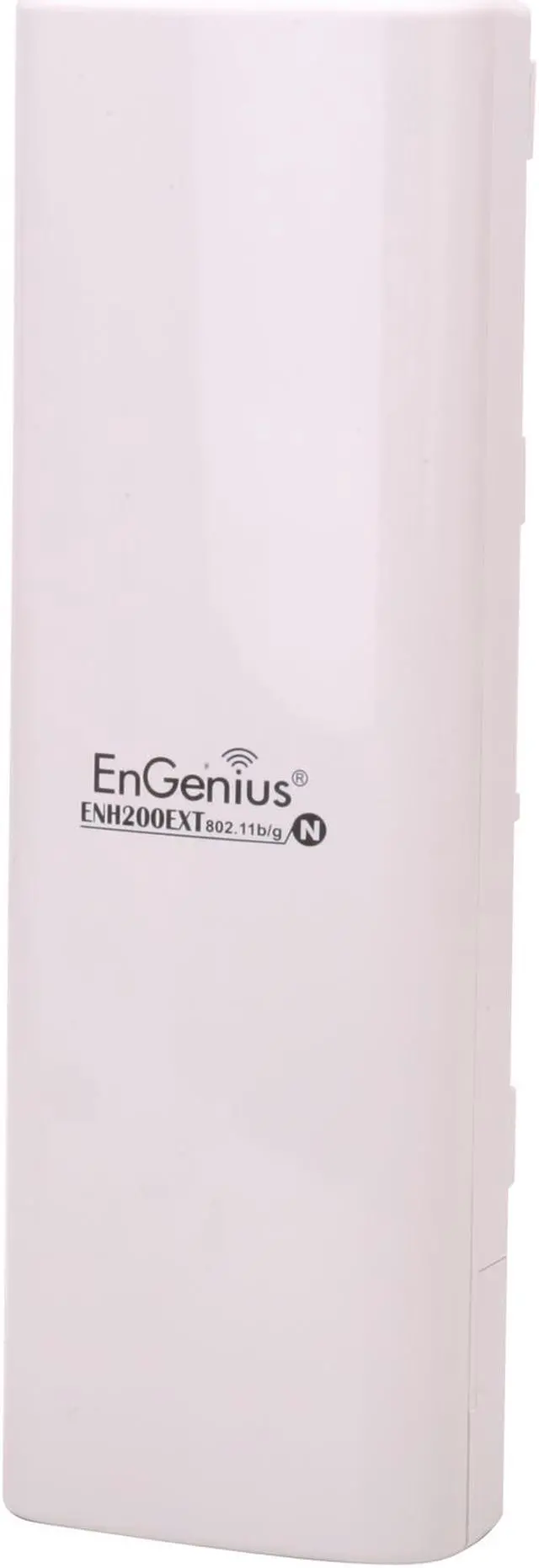
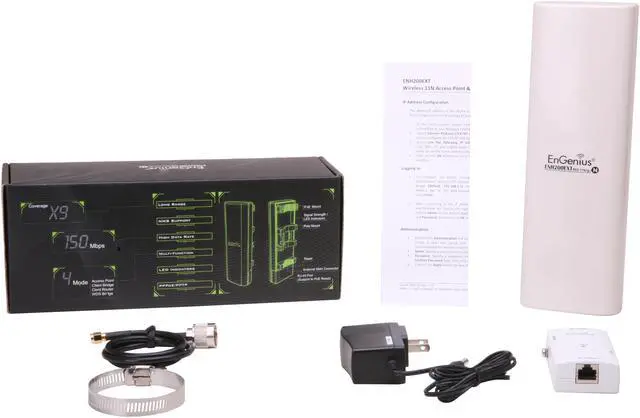
EnGenius ENH200EXT Scalable Antenna Business Class Outdoor Wireless-N Long Range Access Point

  • Up to 150Mpbs, IP65
  • Solution kit for IP camera installation
  • PoE kit included
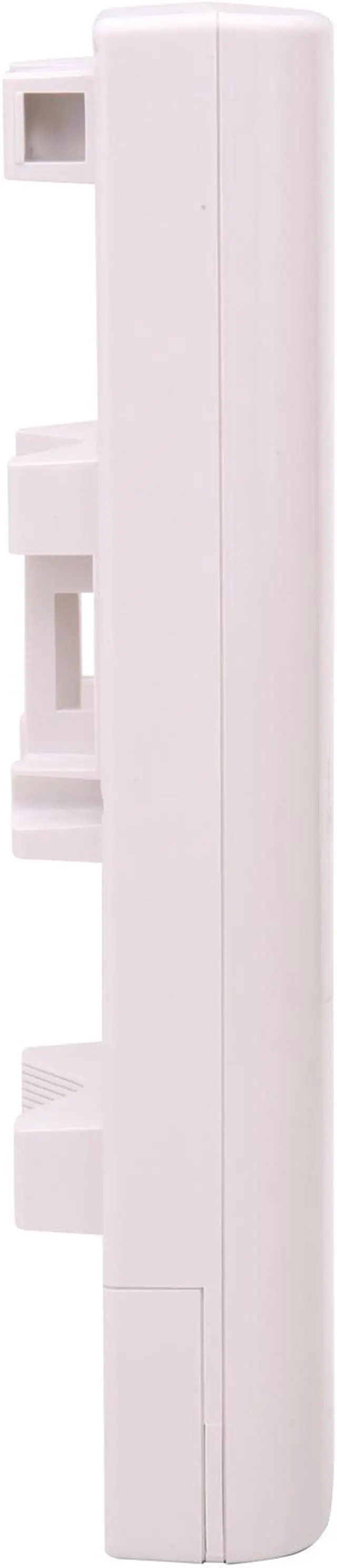
  • Pole Mount kit included
  • Pin It
  • Email this page
ICON Loading...

ENH200EXT is a long-range, high power outdoor wireless Access Point/Bridge that operates on 2.4GHz frequency spectrum provides high wireless data rate up to 150Mbps. The ENH200EXT features 500mW high output power, high receivable sensitivity to extend wireless range coverage.

Supporting highly secure WPA/WPA2 encryption and MAC address filter ensure an uncompromised network security. Furthermore the MAC address filter allows administrator select exactly which client stations can access the network. Furthermore, By supporting multiple SSID and VLAN binding provides extra security in business environment. 

Using ENH200EXT as access point and ENH200 as client is a perfect match for installer to establish building-to-multiple buildings wireless network connection. The available external antenna connector & SMA-N type converter work with EnGenius EAG2408 omni directional antenna

  • newegg Wireless-N Designed for outdoor usage with IP65 rated housing, EnGenius ENH200EXT is fully interoperable with IEEE 802.11b/IEEE 802.11g/IEEE 802.11n-compliant devices. High-speed data rates up to 150 Mbps make the ENH200EXT ideally suited for handling heavy data payloads such outdoor security camera, video streaming, etc. High-output power up to 27 dBm delivers superior range and coverage.
  • newegg High Wireless Security The ENH200EXT supports WPA2/WPA/ WEP/ IEEE 802.1x encryption, as well as MAC address filtering to ensure secure network connections.
  • newegg Multiple SSIDs Four SSIDs provides different wireless network accesses with the same access point
  • newegg QoS (WMM) Capability QoS (WMM) support enhances performance and user experiences.
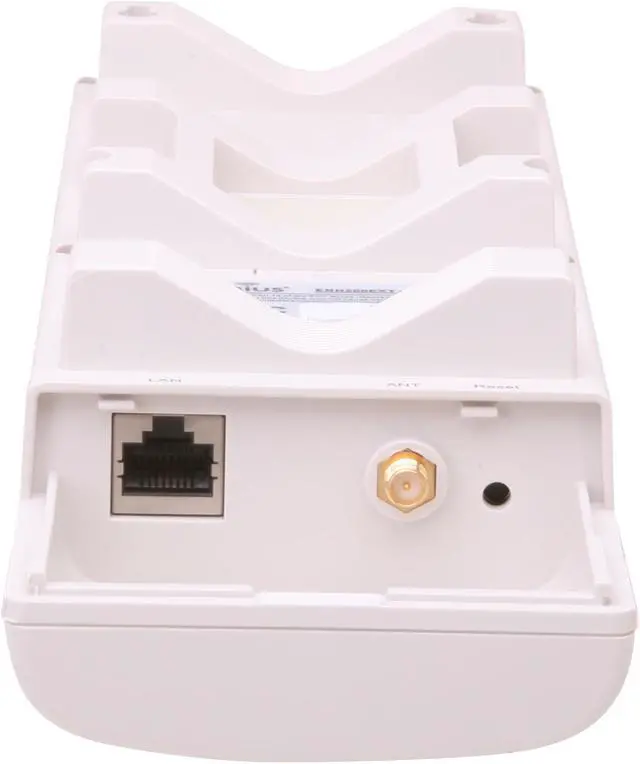
  • newegg Built-in SMA Connector Built-in RP SMA connector & SMA-N-type conversion cable give installer to choose the type of antenna w/ different gains that perfectly fit the project.
  • newegg Multi-function operation RSSI indicator makes it easy to select the best signal for Access Point connections. Multi-function operation (Access point/Client/WDS bridge/WDS AP) modes provide extremely flexible deployment.

Learn more about the ENGENIUS TECHNOLOGIES ENH200EXT

Model

Brand
EnGenius
Model
ENH200EXT

Spec

Standards
IEEE 802.11b/g/n, IEEE 802.3/3u
Device Management
Interface: Web-based configuration
Firmware upgrade via browser
Administrator password change
Reboot, reboot to factory default
Configuration backup, configuration retore
Ping & Trace Route
Remote management: MIB I, MIB II(RFC1213), Private MIB
SNMP:v1, v2c
Time setting: Manual; Auto: NTP
Wireless Data Rates
Up to 150Mbps
Security
WEP encryption – 64/128/152 bit
WPA/WPA2 personal (WPA PSK uses TKIP or AES)
WPA/WPA2 enterprise (WPA-EAP usesTKIP)
802.1x Authenticator
Hide SSID in beacons
MAC address filtering, up to 50 field
Wireless STA (Client) connected list
WPA/WPA2
WPA2
Frequency Band
2.412GHz - 2.472GHz
Channels
11 Channels
Antenna
External SMA connector with additional SMA-N-type converter (Antenna is not included)
Transmitted Power
IEEE802.11 b:
27 dBm @ 1Mbps
27 dBm @ 2Mbps
27 dBm @ 5.5Mbps
27 dBm @ 11Mbps

IEEE802.11 g:
26 dBm @ 6Mbps
26 dBm @ 9Mbps
26 dBm @ 12Mbps
26 dBm @ 18Mbps
25 dBm @ 24Mbps
24 dBm @ 36Mbps
23 dBm @ 48Mbps
22 dBm @ 54Mbps

IEEE802.11 n:
26 dBm @ MCS0/MCS8
26 dBm @ MCS1/MCS9
26 dBm @ MCS2/MCS10
26 dBm @ MCS3/MCS11
24 dBm @ MCS4/MCS12
23 dBm @ MCS5/MCS13
22 dBm @ MCS6/MCS14
21 dBm @ MCS7/MCS15
Receiver Sensitivity
IEEE802.11 b:
-97 dBm @ 1Mbps
-95 dBm @ 2Mbps
-92 dBm @ 5.5Mbps
-89 dBm @ 11Mbps

IEEE802.11 g:
-96 dBm @ 6Mbps
-93 dBm @ 9Mbps
-89 dBm @ 12Mbps
-85 dBm @ 18Mbps
-81 dBm @ 24Mbps
-79 dBm @ 36Mbps
-76 dBm @ 48Mbps
-75 dBm @ 54Mbps

IEEE802.11 n:
-95 dBm @ MCS0/MCS8
-92 dBm @ MCS1/MCS9
-87 dBm @ MCS2/MCS10
-85 dBm @ MCS3/MCS11
-80 dBm @ MCS4/MCS12
-79 dBm @ MCS5/MCS13
-74 dBm @ MCS6/MCS14
-73 dBm @ MCS7/MCS15
Modulation
IEEE 802.11b: DBQSK, DQPSK, CCK
IEEE 802.11g: BQSK, QPSK, 16-QAM, 64-QAM
IEEE 802.11n: BQSK, QPSK, 16-QAM, 64-QAM
Interface
Ethernet Port
LEDs
Power Status
LAN1 (10/100Mbps)
WLAN (Wireless is up)
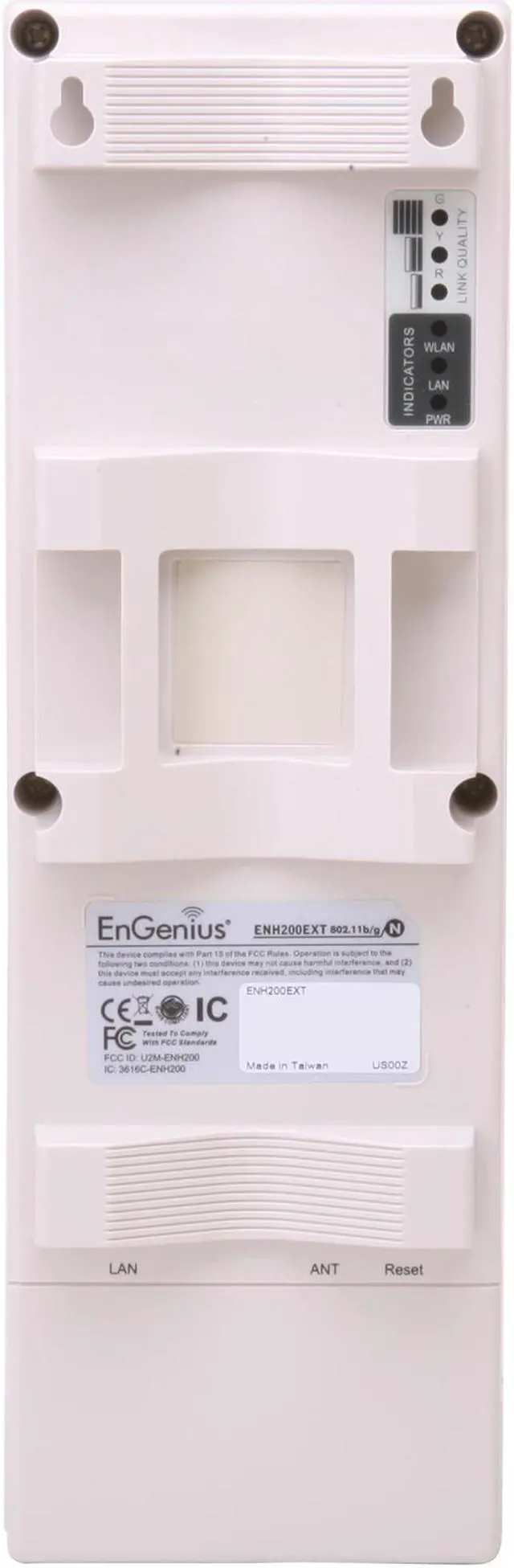
3 x Link Quality (Client Bridge mode)
Buttons
Reset Button
Ports
1 x 10/100M
Power Adapter
Power Adapter 24VAC / 0.6A
Dimensions
10.24" x 3.31" x 2.17"
Weight
1.7 Ibs.
Temperature
-20°C - 70°C
Humidity
0% - 90%, Non-Condensing

Features

Features
MCU/RF: Atheros AR7240

Memory: 32 MB

Flash: 8 MB

Operation Mode: Access Point/WDS/ Client Bridge/Client Router

VPN: VPN Pass-through

LAN: DHCP server/client

Networking:
PPPoE
PPTP, DHCP client, spanning tree
Channel bandwidth

Power requirement:
Active Ethernet (Power over Ethernet)
Proprietary PoE design

IP55 waterproof housing

Packaging

Package Contents
1 x Wireless Access Point/Client Bridge (ENH200EXT)
1 x 24V/0.6A Power Adapter
1 x PoE Injector (EPE-24R)
1 x Pole Mount Kit
1 x QIG
1 x CD (with copy of User Manual on)

Quick Info

Warranty

  • Limited Warranty period (parts): 1 year
  • Limited Warranty period (labor): 1 year


Customer Reviews of the ENGENIUS TECHNOLOGIES ENH200EXT

Do you own this product? Write a Review

Filter Results

Go
  • N/A
  • 2/2/2013 12:13:10 AM
  • Tech Level: Somewhat High
  • Ownership: 1 day to 1 week

4 out of 5 eggs1 Mile PtP

Pros: -Solid Construction
-Easy Mount to a Pole
-PoE Injector Included
-Simple GUI
-Excellent value

Cons: -GUI requires you to click "SAVE" on the left hand sidebar after "saving" changes that you already made.

This extra step confused the hell outta me for a while until I saw it sitting there with about 10 changes to take effect (you'll see).

Anyway, I updated the firmware and got it working in a half hour, after wasting 20 minutes by not seeing the "save" button on the left hand sidebar.

Other Thoughts: Excellent value piece that has been rock solid so far.

Here is my network setup:
-Modem with 25mbps connection
-Asus RT-N12 router with 500mw Alfa voltage booster to a 50' LMR400 cable and 24db TP Link antenna. Running DD-WRT fw.
-ENH-200 in Client Bridge mode on a static IP connected to router 1 MILE AWAY. I have the ENH-200 at only 15db boost and am getting -50db signal. Noise is -90+. The ENH-200 is also hooked up to a 24db TP Link grid antenna.
Speed: I'm getting 14mbps internet speed on speedtest from a mile away on a 25mbps connection at the modem.
Security: WPA2-PSK (AES)

Did you find this review helpful? Yes No

  • N/A
  • 1/30/2013 1:12:16 PM
  • Tech Level: Somewhat High
  • Ownership: more than 1 year
  • Verified Owner

2 out of 5 eggsProprietary PoE is Not Your Friend

Pros: Easy setup and everything you need is in the box.

Cons: PoE injectors on 2 units were dead out of the box.

Other Thoughts: I wouldn't remind replacing the dead PoE injectors, but these are proprietary and EnGenius doesn't make replacements for this particular model. You have to return or buy another AP and so far I've been unable to find a replacement PoE made by another manufacturer that will work. Just imagine the joy you'll have in having to replace an AP because of a dead PoE.

Manufacturer Response:

Dear Valued Customer,

We apologize for any inconvenience this might have caused you. Please contact us at 888-735-7888 or e-mail us at support@engeniustech.com for any issues regarding the proprietary PoE injectors. Our customer support team would be glad to provide solutions for you.

Sincerely,

Mike
Engenius Customer Support Team

1 out of 1 people found this review helpful. Did you? Yes No

  • Toby.Latham
  • 1/17/2013 1:10:24 PM
  • Tech Level: High
  • Ownership: 1 day to 1 week

1 out of 5 eggsDon't use in enterprise network

Pros: Not sure at this point

Cons: When using as client bridge it killed my domain controller DHCP server. It filled all the available IP addresses with BAD_ADDRESS. Called tech, went to forums, and no one had a solution for me. Ended up using the antennas from the kit and netgear WG103's for a client bridge. AP's are useless.

Manufacturer Response:

Dear Toby.Latham,

We apologize for any inconvenience this might have caused you. Please allow our customer support team to help you in troubleshooting. You can contact our support team at 888-735-7888 or e-mail us at support@engeniustech.com.

Sincerely,

Mike
Engenius Customer Support Team

0 out of 1 people found this review helpful. Did you? Yes No

  • N/A
  • 9/19/2012 8:06:05 AM
  • Tech Level: High
  • Ownership: 1 week to 1 month

5 out of 5 eggsVery satisfied

Pros: Good power, love the option to add an external antenna of my choice. I have also had the ENH200 with a built in antenna that worked very well. From what I can tell, this is identical except for the antenna.

Cons: May be a bit confusing if you don't research the settings a bit and have some basic knowledge about antennas.

Other Thoughts: I'm not sure why this is rated so poorly. It has no internal antenna, thus the "EXT" in the model name. If you want something with an internal antenna you should get the ENH200. This is a great buy and gives you lots of flexibility by adding the right antenna for the job. I replaced an ENH200 with this setup and my signal is much better. I'm connecting this to another ENH200 about 2300' away through some trees and uphill! The signal is rock solid. It's not the fastest connection, but I will probably replace the ENH200 at the other end of the link with one of these setups as well to get every bit of speed I can. Also remember that more transmission power does not mean more speed, you have to experiment and find the right balance. I was able to get 2-3MB/sec on a low transmit setting which is plenty for what I use it for. If I went higher the speed dropped. Be sure to test!

1 out of 1 people found this review helpful. Did you? Yes No

  • Chuck Wagon
  • 9/11/2012 5:57:15 PM
  • Tech Level: High
  • Ownership: 1 week to 1 month
  • Verified Owner

1 out of 5 eggsBusiness class, I don't think so

Pros: easy to mount

Cons: Business class???? It has no Business and is in a class of it own.

1-no punch (long range AP)
Outside on a pole shooting to some work trailer it was a joke, All most lost the job. You get what you pay for.

Manufacturer Response:

Dear customer,

Thank you for giving us the chance by trying to use our outdoor wireless product for your project. Based on the product's design, the user has the choice to select different types and different gain of antennas to attach to the device. The choice is based on the project. May we know what antenna you use to connect to the ENH200EXT?

Secondly, can you let us know whether you are using the device inside of a trailor or outside? What type of material the trailor is made of? Because Wi-Fi signal will be reflected by metal. The correct way to mount these outdoor wireless device is to mount them outside of trailors or outside of buildings.

We have technical support hotline for you to ask questions during the installation of our wireless product, the toll free number is 1-888-735-7888 extension 517. Feel free to call us.

Thanks,

EnGenius Technologies

0 out of 1 people found this review helpful. Did you? Yes No

  • N/A
  • 8/9/2012 2:33:18 PM
  • Tech Level: Somewhat High
  • Ownership: 1 week to 1 month

2 out of 5 eggsWDS non-functional, Client Bridge buggy

Pros: As an access point it's adequate assuming u get an external antenna

Cons: WDS is non-functional (and no way to tell if it's working thru the UI) - also Client Bridge is bugged/intermittent. This is with latest FW of 1.08

Other Thoughts: Dont buy products that dont do what they say and make sure to tell others about them... This way all products like this will eventually disappear and only functional, wroking products will be left.

Manufacturer Response:

Dear customer,

Thank you for recognizing ENH200EXT as an adequate outdoor wireless access point. With access point mode, high power output and our EAG2408 8 dBi Omni directional antenna makes it a large coverage outdoor public Wi-Fi AP.

We have released a new firmware on line, version 1.1.8, for both ENH200EXT and ENH200. In which we have added the WDS bridge signal indicator function. By taking advantage on the new feature, customer can better aim one ENH200 to another ENH200EXT or aim two ENH200 to each other therefore to build a strong wireless link.

We have technical support hotline for you to ask questions during the installation of our wireless products. The toll free number is 1-888-735-7888 please dial extension 517 for business products. Feel free to call us.

Thanks,

EnGenius Technologies

0 out of 1 people found this review helpful. Did you? Yes No

Compare Offers from All Sellers

Seller Name & Rating Offer Details  
ICON Loading...
Are you an E-Blast Insider? Subscribe Newegg e-Blast

Buzz

Proprietary PoE is Not Your Friend

2 out of 5 eggs
PoE injectors on 2 units were dead out of the box.
— 1/30/2013

Very satisfied

5 out of 5 eggs
Good power, love the option to add an external antenna of my choice. I have also had the ENH200 with a built in antenna ...
— 9/19/2012


PayPal
Shop without retyping payment details. Secure shopping made faster.
Check out with PayPal.

Financing


Home
Home > 
Computer Hardware > 
Networking > 
Wireless Networking > 
Wireless AP > 
ENGENIUS TECHNOLOGIES > 
Item#: N82E16833168089
LOADING... LOADING...
Shop by Region: United States | Canada | China
Follow us:   RSS Feeds Youtube
VeriSign Reliability Seal1This site protected by Trustwave's Trusted Commerce program Inc500
Policy & Agreement | Privacy Policy  © 2000-2013 Newegg Inc.  All rights reserved.
If the Adobe Reader does not appear when you click on a link for a PDF file, you can download Adobe Reader from the Adobe web site. nassau