

Your Browsing History


Matthew G.
Joined on 10/25/03
0
0
product reviews
- 26
Jack of all trades

Raspberry Pi 83-14421 Computer - Model B (512M RAM)
Pros: Amazingly functional for the price, power consumption, and footprint. What I love most is that it looks and acts almost exactly like any Ubuntu box on my network. All of the packages are there, and everything pretty much just works (the main exception being some of the harware packages, like lm_sensors). Unless you try to run a bunch of desktop/GUI apps on it (web browsers, etc.), you can get away with just thinking of it as just another Linux box. This thing only burns 2-3 Watts, making it far more efficient than any NAS or even most WiFi routers. You can really afford to leave it on 24/7 without a second thought.
Cons: The only major difference between this and a mainstream PC is that it really is a bit slow. Worse than the CPU speed is actually the I/O performance. Both the SD card or USB seem to top out somewhere around 16-18 MB/sec, and the bottleneck is definitely not the flash memory, which I benchmarked on another system. The RAM size also becomes a significant limitation, if you start trying to use it like a desktop or build large software packages on it. I configured swap, just in case, but I think I'd be pretty sad if it were swapping on any kind of regular basis. I hope they put more RAM, USB3, and a mSATA connector on its successor.
Overall Review: I've had a Pi running Raspbian for about 3-4 months, and it's worked flawlessly. I use it for automated internet radio recording, and I'm about to setup automated HD broadcast recording. I'm also planning to use it to serve up my music collection for in-home streaming to my various devices. It would be great for home automation, too. Note that I've never used its video outputs, so I can't comment on any aspects related to its graphics performance, etc. I log into it using ssh - even for the initial setup.
11/19/2013See more detail
Better than 100mbps, once you get it working
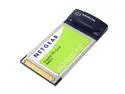
NETGEAR GA511 Gigabit PC Card with Jumbo Frame support 1 x RJ45
Comments: http://www.realtek.com.tw The shipping drivers are junk. This product has been out nearly a year, and Netgear had no newer ones on their website! I had to download the RTL8169/8110 drivers from Realtek's site, before I could even get the card to work. The problem I had with the shipping drivers is that the card kept switching to different speeds (even though the 1000mbps led on the card was solid). I tried 2 different cat 5e cables, and different ports on a known-good switch. Disabling auto-negotiation caused the card to go catatonic, unless I set it to 10mbps. Once I upgraded to the Realtek drivers, all of those problems magically disappeared and it's been running stably, at 1gbps, for weeks. However, the reason I'm rating this only 3 stars is because the card runs HOT (can't touch it, after ejecting it), I can't get more than 200mbps (even when a large file is 100% in cache and I'm sending to a server capable of much more than that), and it maxes out my CPU (1.4 GHz Pentium M - though this could be more the fault of my cardbus driver or chipset). Also, it has jumbo frame support, but only to 3 KB MTU (in spite of the fact that the drivers list options up to 7 KB). Still, it's a pretty good deal - particularly given Newegg's awesome prices!
6/25/2005See more detail
Random shutdowns when PC is just idling.
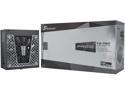
Seasonic PRIME TX-750, 750W 80+ Titanium, ATX Form Factor, Full Modular, Low Noise, Premium Japanese Capacitor, 12 Year Warranty, Nvidia RTX 30/40 Super, AMD GPU Compatible, Ref# SSR-750TR
Pros: - Top-rated PSU - 80+ Titanium efficiency - Quiet - 12-year warranty
Cons: - Random shutdowns while machine is just idling, every few days or weeks - Not ATX 3.0 - A bit long
Overall Review: Worked fine for a couple months. Then, the trouble started. The PC would just randomly turn off, without warning. My machine draws around 35W from the wall, at idle. So, I know I wasn't exceeding its power limits. In fact, the most I've ever seen that machine draw from the wall was about 230W or so, making this PSU overkill for it. Over time, the random shutdows got more frequent. I eliminated all other possibilities, which included removing all peripherals besides the a single SSD. Then, I swapped motherboards and it still happened. Finally, I got a different PSU and the shutdowns haven't happened for about 6 months now. Just to be sure, I tried it in an old machine I no longer used and the same thing happened. Then, I tried moving the power cord from my "pure sinewave" UPS to a simple surge protector that was plugged directly into the wall and it happened several more times. I haven't yet filed a warranty claim, but I did contact the manufacturer and the support person who responded did encourage me to pursue the warranty claim process. After this incredibly frustrating process, Seasonic has forever been tarnished in my mind. They used to be my go-to PSU brand, but they failed on the most basic of requirements I have for my components, which is simple reliability. All the efficiency in the world isn't worth anything if my machine is randomly rebooting. I guess it'd be worse if I got blue screens due to noisy power causing my other components to malfunction. And it didn't fry any other components in my machine, which is probably the worst thing a PSU could do (other than catching fire).
8/23/2026See more detail
Not really a 150 mm fan. There's a newer replacement for this.
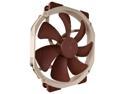
Noctua NF-A15 PWM, Premium Quiet Fan, 4-Pin (140mm, Brown)
Pros: * Has mounting holes compatible with those of a 120 mm fan. * Relatively quiet.
Cons: * Obsolete. * Not really 150 mm, as the name implies. It's really just a 140 mm fan.
Overall Review: If you have something like a heatsink with holes spaced for a 120 mm fan, you could probably use this. However you should get the NF-A14x25r G2, instead of this one. The specs on that are exactly the same as their NF-A14x25 G2 with the square frame, which is one of the better 140 mm fans out there (and the best for noise-sensitive applications).
3/23/2026See more detail
DoA
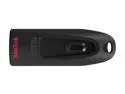
SanDisk 32GB Ultra CZ48 USB 3.0 Flash Drive, Speed Up to 130MB/s (SDCZ48-032G-UAM46)
Cons: * Couldn't even write 4 GB worth of data to the drive without it failing.
Overall Review: I bought 4 of these drives (this single-pack and a 3-pack), separated by a few months, and only one of the drives in the 3-pack actually worked. All of the others were DoA. After that experience, I switched to Samsung BAR Plus. Much more expensive, but they actually work.
3/23/2026See more detail
Wish I could give it 5 stars, but cooling performance lags towers too much.
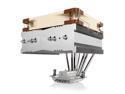
Noctua NH-C14S, Premium CPU Cooler with NF-A14 PWM 140mm Fan (Brown)
Pros: * Provides cooling for your VRM and a little bit of memory cooling, which is why I still use down-draft coolers. * Relatively quiet fan. * Sufficient for i5/R5 X/K-tier CPUs. Great for anything with a 65 W TDP. * Flexible mounting options for different orientations - important for some server boards! * Fit and finish on the product are top notch. * Packaging and instructions are well-thought out.
Cons: * Overdue for a design update to cope with higher-end CPUs. * Still includes old (G1) 140 mm fan. * No offset mount for those running only the P-cores on Raptor Lake.
Overall Review: I haven't quite dialed it in, but my testing so far suggests it can sustain about 150 W. I did replace the fan with a G2 and got a couple degrees of improvement. Note that the black NF-A14 G2 fans are now available! I also used Arctic MX-7, rather than the included paste. Note that some server boards have sockets that are rotated 90 degrees from how most desktops are setup. This is where such a top-down cooler can really shine. In general, you should orient it so that the heat pipes run perpendicular to the long axis of Intel CPUs. On AMD CPUs, look at how the chiplets are arranged and get as many heat pipes to intersect with them as possible.
3/23/2026See more detail
seller reviews
- 1
Great deal; smooth transaction
Item arrived in new condition, with all accessories, safe & sound. Great deal! Thanks! :)
On-time
Delivery
Product
Accuracy
Customer Service
Satisfactory
6/14/2011See more detail