
Your Browsing History


Martin W.
Joined on 07/24/03
1
0
product reviews
- 36
VERY GOOD Writing Quality
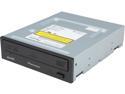
Pioneer Internal Blu-ray Burner, Black, Supports BDXL media, SATA - BDR-2209
Pros: VERY Good writing quality. This drive DOES indeed write to Verbatim DVD+R DL discs with VERY good quality . Tested writing them at 4x and at 8x, very good burns as indicated by quality scans on 2 different Lite-On drives and the Pioneer itself using Opti Drive Control.
Cons: Can't do Blu-Ray quality scanning.
Overall Review: The drive uses Zone Level recording for the 8X Burning on the DVD+R DL discs. This means that for the first layer about 2/3 is burned at 6x and the other 1/3 at 8x. Then it switches to the 2nd layer and burns the 1st 1/3 at 8x and the remaining 2/3 at 6x. Some discs it uses CAV recording and some it uses Zone Level recording. Depends on the disk and the speed written at. As far as the varying speeds the previous user was seeing. It uses an 'Intelligent' Burning algorithm where it checks the writing quality every so often (the speed fluctuations) as it is writing, and based on the checking, it then lower the overall burning speed if it finds the disc can't handle the current speed. Only Firmware released so far is v1.10. I have verified the writing speeds and VERY GOOD or BETTER writing quality on the following discs so far; Verbatim DVD+R 16x (MCC-004) - written to at 8x, 12x, & 16x. Verbatim DVD+R DL 8x (MKM-003) - written to at 4x, 6x, & 8x Verbatim CD-R 52x - written to at 16x, 24x, 32x, & 40x Verbatim Blu-Ray SL 6x (VERBATIMe) - written to at 6x, 8x, 10x, & 12x. Optical Quantum Blu-Ray SL 4x (PHILIPR04) - written to at 4x, 6x, & 8x. Verbatim Blu-Ray DL 4x (VERBATIMd) - written to at 4x, 6x, & 8x Verbatim Blu-Ray DL 4x (MEI-T02 really Panasonic) - Written to at 4x, 6x, & 8x. Optical Quantum DL 6x (CMCMAG-DI6) - written to at 4x, 6x, & 8x.
2/20/2014See more detail
DON'T COUNT ON GETTING YOUR REBATE!
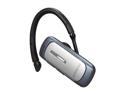
Samsung Over-The-Ear Bluetooth 3.0 Headset w/ Dual Mic / Multipoint / Noise Reduction / Echo Cancellation (HM3600)
Pros: The unit would be a great deal IF SAMSUNG actually sent you a rebate.
Cons: Never received rebate. Received email indicating rebate was missing info. Indicated I could send in missing info and stil get rebate. Sent missing info in 2X now...no rebate.
Overall Review: NewEgg was great and did their job just fine. Samsung however DID NOT FULFILL THIER PROMISE. So this appears to me more of a marketing scheme than an honest rebate. Or its luck of the draw on who happens to process your rebate that day.
9/19/2011See more detail
Good Board but DO NOT load the new BIOS (7B98v1B) for it. It can break the PCI-E slots.
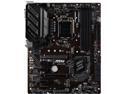
MSI PRO Z390-A PRO LGA 1151 (300 Series) Intel Z390 ATX Intel Motherboard
Pros: Good quality board. Nice Heat spreaders on the main heat producing chips. Comes with built in graphics as long as you use the right processor. Comes with built in VGA and DVI connectors so you can still use your older monitors if necessary, Lots of overclocking options for both the RAM and CPU. Usable as a mining rig board. It has 6 PCI-E slots.
Cons: Kind of an ugly brown color. I prefer the blue or black boards. Slight film on the bottom of the board, looks like flux residue not completely washed off. Won't hurt anything, just cosmetic. MAJOR PROBLEM with new BIOS (7B98v1B) on thier web site. It can/will break the functioning PCI-E slots, making the board get caught in a boot/reset loop if you have an external graphics card installed.
Overall Review: I would have given this board a 5 star rating, but had to take 1 star off after the 1st board I got suddenly quit working after the BIOS update. If the board you get comes with BIOS 7B98v1A or on the post screen E7B98IMS.1A0 06/10/2020, then DO NOT try to update it to the 7B98v1B BIOS. If you did try to upgrade it and the upgrade broke the PCI-E slots. Take out all cards in any PCI-E slots, use the onboard video, flash the board back to the 1A BIOS and you will be OK again. Put cards back in and go.
9/20/2020See more detail
Using this in an MSI PRO Z390-A PRO LGA 1151 motherboard with Corsair Vengeance RAM
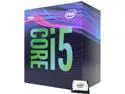
Intel Core i5 9th Gen - Core i5-9400 Coffee Lake 6-Core 2.9 GHz (4.1 GHz Turbo) LGA 1151 (300 Series) 65W BX80684I59400 Desktop Processor Intel UHD Graphics 630
Pros: Worked great right out of the box. Using an EVO Cooler Hyper 212 Black Edition CPU Cooling System! Overclocking is unlocked, although I haven't seen how high it will go. Running at 2.9GHz. Will Turbo Boost to 4.0GHz right out of the box.
Cons: The stock coolers that Intel provides have REALLY went on the budget/low quality side of things nowadays. Would HIGHLY recommend an aftermarket cooler if your going to use this for any serious computing/gaming/etc.
Overall Review: This is DEFINITELY a good middle of the road processor that can handle the everyday tasks, as well as the high end gaming.
9/20/2020See more detail
Using with Intel Core i5-9400 Coffee Lake 6-Core 2.9 GHz & MSI PRO Z390-A PRO LGA 1151
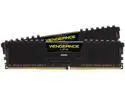
CORSAIR Vengeance LPX 8GB (2 x 4GB) DDR4 3000 (PC4 24000) Desktop Memory Model CMK8GX4M2C3000C16
Pros: Plugged in and worked right out of the box at 2133MHz. Enabled XMP and it went to 2930MHz. Boosted DRAM voltage to 1.350 and set to 3200MHz. No Problems so far. Nice low profile, so works well with motherboards with memory sockets close to the CPU. Nice aluminum heat spreaders encase entire stick, not just a small strip with dbl stick tape.
Cons: Nothing to report yet.
Overall Review: I would definitely recommend this memory. Appears to work well with Intel as well as AMD processors. I am currently running it slightly overclocked to 3200MHz and no problems encountered so far. Might be able to take it even higher if you wanted. Definitely good budget priced RAM and GOOD QUALITY too.
9/20/2020See more detail
GREAT open air case/rig/shelf. Especially if on sale!
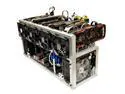
MintCell TITAN-8 Open Air GPU Mining Rig Frame Computer Case Chassis - Ethereum ETH Zcash ZEC Monero XMR
Pros: VERY Easy to put together. All parts included. Light weight Motherboard Power / Rig Power On/OFF Switch included Spots for 2 Power Supplies Fairly compact for an 8GPU mining rig.
Cons: Needs rubber strips or rubber feet to keep it from scratching whatever its set on. Could stand-offs for a hard drive bay Was shorted about 20 or so of the stand-off screws. CAN NOT use 008S risers due to stand-off hole pattern. Need to use 006S Risers.
Overall Review: This is a GREAT open air type mining rig/case/frame. It can easily accommodate 2 Power Supplies (1000W+), 8 video cards, 4 fans (120mm), motherboard, etc. About the only thing missing is a spot/stand-offs to mount a hard drive. I was able to get an MSI Z390-A Pro motherboard with a EVO 212 Black edition CPU Cooler in it (just barely). Have to mount the motherboard, then put upper shelf in place. Leaves you about 1/4 to 1/2 clearance between the cooler and the upper shelf. If you want to spread out video cards will need 2 Power supplies or 1 with really long cords. I am using EVGA SuperNova 1000W G+ Power Supply. Works GREAT! Can't go wrong with this unit. Would DEFINITELY RECOMMEND!!!
9/6/2020See more detail
seller reviews
- 1
Great case, especially if on sale.
This is a GREAT open air type mining rig/case/frame. Can easily accommodate 2 Power Supplies, 8 video cards, 4 fans, motherboard, etc. About the only thing missing is a spot/stand-offs to mount a hard drive. I was able to get a MSI Z390-A Pro motherboard with a EVO 212 Black edition CPU Cooler in it (just barely). Have to mount it, then put upper shelf in place. Leaves you about 1/4 to 1/2 clearance between the cooler and the upper shelf. If you want to spread out video cards will need 2 Power supplies or 1 with really long cords. I am using EVGA SuperNova 1000W G+ Power Supply. Works GREAT! Can't go wrong with this unit. Would DEFINITELY RECOMMEND!!! Now the bad, I was shorted about 20 of the standoff screws. Suggestion - instead of bag of screws, just put one screw in each standoff. Also either include rubber strips for bottom (like for the hand lift spots) or rubber corners for bottom so it won't scratch everything it is set on.
On-time
Delivery
Product
Accuracy
Customer Service
Satisfactory
9/5/2020See more detail