
Your Browsing History


Wesley T.
Joined on 05/13/10
0
0
product reviews
- 41
Nice successor to the HD204UI
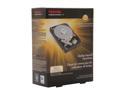
TOSHIBA PH3300U-1I72 3TB 7200 RPM 64MB Cache SATA 6.0Gb/s 3.5" Internal Hard Drive Retail Kit
Pros: - Huge capacity (3.0 TB -> 2.7 TiB NTFS 32k) - Price (Shell Shocker w/ promo code) - Good R/W speeds - Preliminary user reports show drive is reliable - Quiet even without AAM - Runs at 36 C (below avg. HDD temp in my comp) CDM 3 Bench (5 Runs, 100MB, SATA II, Drive ~60% filled): Sequential Read : 136.867 MB/s Sequential Write : 127.428 MB/s Random Read 512KB : 59.909 MB/s Random Write 512KB : 49.680 MB/s Random Read 4KB (QD=1) : 1.030 MB/s [ 251.5 IOPS] Random Write 4KB (QD=1) : 0.794 MB/s [ 193.9 IOPS] Random Read 4KB (QD=32) : 1.152 MB/s [ 281.2 IOPS] Random Write 4KB (QD=32) : 0.833 MB/s [ 203.4 IOPS]
Cons: - Large capacity might mess with some older and/or less-robust software - Not the fastest 3TB drive out there
Overall Review: Transferred 1.67 TB of mixed data (small documents, audio, applications, and large video files) to this drive in 4h50m. That's a 100.64 MiB/s write speed, which was unheard of for all but the most expensive drives just a couple years ago. As others have stated, initialize the drive with GPT, not MBR. MBR will only result in a fraction of the drive showing up. Use GPT to get the full 3 TB (~2.7 TiB). Stablebit Drivepool crashes upon accessing this drive. Not a con for the drive. Issue with the software, obviously, but good to know for those using that software or something similar to make sure the software is capable. I've been waiting for a good high-capacity drive to purchase since Seagate bought out Samsung and I couldn't get a decent HD204UI anymore. This looks to be that drive. It's a good balance between reliability, speed, and price.
4/12/2013See more detail
Great while it lasts
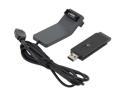
NETGEAR WNA3100-100NAR Wireless Adapter IEEE 802.11b/g/n USB 2.0 Up to 300Mbps Wireless Data Rates
Pros: -Fast N-300mbps capable -USB cradle/extension looks nice -Fully-featured for advanced users -Up to date security protocols
Cons: -Flimsy construction -Only 2.4GHz, no 5GHz. -High failure rate (check out more reviews online, or for the non-refurb model, WNA3100-100ENS) -Standard 30 day refurb warranty means no returns/repairs despite high failure rate. - Newegg's stated 1 year warranty might be incorrect. As of 4 months ago, Netgear warranty was only 30 days. -Does not come with software disk. Must be downloaded from Netgear site via another computer or via wired connection.
Overall Review: Bought mine elsewhere (Dec '11) before Newegg was carrying them. It broke after about 45 days of very light use. Blue light would turn on, but PC would no longer recognize it. Wouldn't show up in Device manager either. Up until that point, it was working well, and had plenty of TX power for a 35ft., ~205mbps connection to a Linksys E-2000. Ended up replacing it with a slower, but similar and more reliable Rosewill RNX-N150HG.
4/18/2012See more detail
On my second RMA
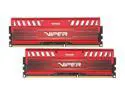
Patriot Viper 3 16GB (2 x 8GB) DDR3 1600 (PC3 12800) Desktop Memory Model PV316G160C0KRD
Pros: I wrote my first review for this product on 12/20/2012. Fast. Was cheap when I bought it over a year ago (before memory prices tripled). Works well when it actually works. Lifetime warranty.
Cons: First kit failed within 11 months. RMA. Second kit DOA. RMA again. Now awaiting my second replacement.
Overall Review: To their credit, Patriot has been very quick with support every time I've contacted them. However, I'm really getting tired of shipping RAM back to them. I've now paid 40% of what the RAM initially cost me just in shipping costs. I'm normally a RipJaws guy, but when this kit went on sale in a Shell Shocker, I couldn't resist. I've had good experiences with Patriot USB drives in the past, so I gave them a shot with RAM. After this experience, I guess I'm back to being a RipJaws guy.
2/7/2014See more detail
Update the drivers!
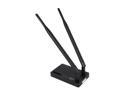
Rosewill RNX-N600UBE Wireless N600 Dual Band USB 2.0 Adapter
Pros: - Solid connection on 2.4 GHz - No signal drops anymore (see other thoughts) - 5 GHz is good, but haven't thoroughly tested it. - Good enough speeds to stream HD vids from a server, like so: Server --(gigE)-> Linksys E2000 --(N600UBE)-> PC
Cons: Pre-update, the adapter would intermittently drop the connection. It would be terrible for large downloads, since it would cut out and the download would have to be restarted, even on download managers. It also had a weak connection, despite being only 15 feet away from the router.
Overall Review: Updated the drivers directly from the Rosewill site. Did not install the software. Just downloaded the latest software package (3.2.11.0), and selected the "install drivers only" option. Now, all the problems have been fixed. And it's working as it should.
3/10/2013See more detail
High quality KB
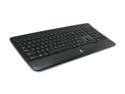
Logitech K800 2.4GHz Wireless Slim Illuminated Keyboard - Black
Pros: - Good tactile feels to the keys. - Adjustable back-lighting - Some programmable keys. - Rechargeable batteries (AA replaceable). - Works while charging. - Beautiful design. It looks way more expensive than it is. - Solid construction. - Unifying receiver. The keys are full-sized, and have a nice travel to them. They look like laptop keys but type like a high quality, full-sized keyboard. The design is very sleek, with nice curves all around and a clear plastic trim. Battery life averages about 2 weeks with daily use on a gaming /programming / school PC and with automatic back-lighting settings despite being left on all the time. The keyboard feels solid. It's plastic construction, but nothing creaks. I can pick it up by one end and wave it through the air horizontally and there are no creaks.
Cons: - Squeaky "i" and space keys. - Cleaning is difficult, even with an air canister. The "i" and space keys will squeak like they need WD-40 after heavy use when the air gets cold and dry. I've been able to replicate the issue several times. It might be the spring mechanism that is causing it. It's mildly annoying, but rare enough where it isn't a big problem. Because the keys are small and tightly packed and there isn't much room underneath the keys, cleaning could be hard if you're the type that gets their keyboard messy.
Overall Review: I got this on sale from Newegg for $40 a while back and it was a steal at that price. I have a K350 (MK550 combo) as well, and here's how they stack up. Compared to the Logitech K350, this keyboard lacks the extra media keys, but adds back-lighting and much better construction. The K350 uses alkaline AA batteries whereas this one uses rechargeables. (Yes, I know you could use rechargeables in the K350 too, but read on). The K350, being low-power-draw, gets 1.5 years battery life out of a pair of alkalines, and thus are not ideal for power-leaking rechargeables. The K800 gets 2 weeks or so under the same type of usage. Their back-lighting makes them fairly high-draw devices, making them ideal for rechargeables. The K350's construction leaves something to be desired. The plastic creaks when lifting the keyboard, and creaks when you rest your wrists on the wrist-pad. The K800 has no such problems. The layout of the K350 is more comfortable to type on due to the wave design. The K800 has flat, low-lying keys arranged quite linearly. It's about as close to a laptop keyboard as they could have gotten while still maintaining full-sized keyboard feel and functionality. The keys on the K800 feels great. I haven't had a single dropped key yet, and no keys have gotten "stuck" while being depressed. The K350 occasionally has problems with sticky keys and will drop keys every now and then, possibly due to a lower transmit power resulting from low power draw. They're both good keyboards, but I personally love this one, whereas I wouldn't be too bothered if the K350 broke tomorrow. But they feel so different that I would recommend you try them out in person if you can before you buy either one.
11/26/2012See more detail
Terrific budget monitor
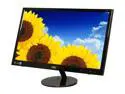
AOC 23" 60 Hz Active Matrix, TFT LCD LCD Monitor 5 ms D-Sub, DVI-D e2351F
Pros: 1080p Picture quality 5ms response time LED backlighting Touch controls Sale price Super thin (< 0.5 in) Separate power supply Thin bezel (0.75 in) 3 year warranty Sleek glossy black finish
Cons: Regular price (I purchased elsewhere during a sale). Wobbly stand No HDMI No Speakers No VESA mounts No tilt Viewing angles could be better
Overall Review: You have to know what you are getting, and that you're compromising features for picture quality. Superb picture quality. No HDMI, no speakers, no VESA, no tilt. If you can live with that, this is the best budget monitor I've seen. For media viewing, it looks great. For high-end media production (photography, film, etc), you might want to spring for a better monitor. When it's on sale, it's one of the best values around. At regular price, it starts to compete with Acer and Asus monitors with comparable features. Looks great when gaming. 67Hz horiz and 60Hz vert refresh rate helps to prevent excessive screen-tearing compared to a 60Hz HDTV. Thin bezel makes it suitable for multi-monitor setups for programmers and gamers. No VESA mount, so monitors would have to stand on their own. The screen is completely vertical (perpendicular to desk/table). There is no tilt to it, and the stand lacks a tilt option. Good for multi-monitor setups or direct viewing. Bad for elevated v
8/31/2012See more detail