
Your Browsing History


Mr. S.
Joined on 10/31/04
0
0
product reviews
- 24
Works good for a basic router
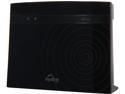
D-Link Wireless AC750 Dual Band Cloud Router (DIR-810L)
Pros: -Second one work flawlessly. -2.4 range good. -Easy install, in my case did not even need to run wizard. Basic settings in router are easy to find and set. -It has the ability to back up your settings.
Cons: First one was bad, needed to be returned. No usable activity lights for troubleshooting. I know 5mhz has less range but I would expect better performance 25 feet away.
Overall Review: My netgear router went out after about 3 years and I needed something quickly. I went to a local club and purchased the router. Spent an hour on the phone with AT&T changing DSL and router settings an could not get it to work. I help friends with their routers and rarely have a problem. I returned it the next day and go another. This one worked like a charm. I unplugged the modem per the Dlink instructions, put everything in place and plugged everything back in according to the order in the Dlink instructions. Turned on the computer and the internet worked. I didn't even need to go through the setup wizard. I changed the settings on the router to match the old router so that my wireless printers would work. I had to use the WPS code to install them again and then everything worked as expected. I don't think the 2.4 range is any better or worse than my old router. I did note very limited range on the 5mhz frequency. I gave up using it and stick to 2.4mhz. The router has all of the basic you settings your would expect. It also comes with a card that gives you the wireless settings that are preconfigured if you choose to use them. It does not have lights indicating activity for the wired and wireless connections separately. I miss this for trouble shooting. If you are looking for a basic router for home use on the cheap this fits the bill. I would however buy it locally in case you get a bad one (sorry Newegg).
3/2/2015See more detail
Motorola will not update to 4.0
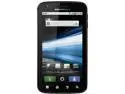
Motorola Atrix 4G Black Unlocked GSM Smart Phone w/ Android OS / 5MP Camera / Wi-Fi Hotspot
Pros: Smaller phone (which I like). Is not lightning fast but it is usable. No problem installing and using apps. Battery setting is maximum power savings I get through the day without a problem.
Cons: Motorola said that it would be upgraded to 4.0 and then changed there mind. This is the second Motorola phone I own that they did this. When introduced it was the flagship AT&T phone but has been sent to the wayside by Motorola. Stuck on 2.3. This is NOT a 4G phone. It runs on their 3G system. I mainly surf
Overall Review: Burned twice by Motorola. Time to move on to a different brand.
12/20/2012See more detail
Better than most remotes
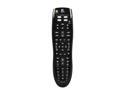
Logitech Harmony 300i Infrared Universal Remote - 3rd party
Pros: I am using the remote to control a Sony TV, Comcast (Motorola) cable box and a Hauppauge HVR 1600 card in a desktop computer. Sony TV works great.
Cons: Comcast box is more confusing cannot get directly to DVR function, need to go into menu first to select DVR functionality. I have only used the remote for playback, I have not tried to program a recording. The Hauppauge was more difficult. I need to reprogram the most important function which was the volume control. You need the old remote to do this. I purchased the remote specifically for the Hauppage functionality. The software is online (you need to remember your user name and password) I would have much rather had software that ran on the computer. Connecting to their website is hit or miss. One time it took a half hour of trying. It is also programmed in Microsoft Silverlight (never seen anything on the web or otherwise using this). It is not reliable. Once into the software it is confusing but I was able to eventually figure out the how to assign buttons and add the volume functions.
Overall Review: Overall this remote is better than most if you have time to fiddle with it.
12/20/2012See more detail
Would not buy another
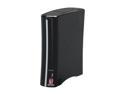
BUFFALO LS-V2.0TL 2TB LinkStation Pro LS-VL Network Storage
Pros: The concept is great. Firmware not easy to use but not that difficult to figure out. When it works, it is great way to back up files or store files you don't need very often. Setting up password protection is not straightforward and only one computer can access password protected data at one time.
Cons: The unit failed after 2 years. The firmware crashed and could not be recovered (even after following some complicated instructions from their web site). I was copying files to the unit when it just stopped. Error code indicated it was the firmware. I also had a Linkstation Duo fail after about 9 months. Only a one year warranty. I will try to remove drive (no easy way to do so) and see what I can recover.
Overall Review: I would not purchase again.
10/17/2012See more detail
Serves my purposes
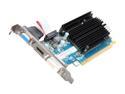
SAPPHIRE Radeon HD 6450 1GB 64-bit DDR3 PCI Express 2.1 x16 HDCP Ready Video Card ( 100322L)
Pros: Needed a card to connect a desktop computer to a TV via HDMI. I am using an Dell Optiplex 330 running vista with 2 gig of ram, connecting to internet via a USB G WIFI connecter to watch Prime movies from that other company. Works just as it should. Movies are clear on a Sony 32 inch TV. I don't play games, Vista windows experience Aero rating 4.7.
Cons: Sound didn't work at first but re-seating the card fixed the problem. The software didn't detect the resolution of the TV automatically, I needed to look up the specs for the TV and set it manually in the catalyst software. I am using an older version of Catalyst (11.7 I believe). Used this version with another computer without a problem and decided not to push my luck.
Overall Review: Haven't had the card long so don't know if heat will be a problem with the fanless design. Have to wonder if I could have gotten by with a 5450 card and saved $10. Oh well, maybe next time.
9/19/2012See more detail
Bad Drum
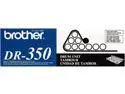
Brother DR350 Drum Unit Cartridge
Pros: None see below
Cons: I normally don't get excited about the occasional bad item. If the manufacturer treats me fairly I move on. That was not the case here. I got a bad drum (also destoyed the toner cartridge). I call Brother. After 1.5 hours on the phone with India (the accent so bad you could not understand her) and speaking to a supervisor I was told the 7820n entire unit needed to go in for service. I asked why when it was a bad drum. I was told that was their policy. At this point you can imagine my blood presure going through the roof. I told the I tried a different toner/drum in the machine and it worked fine. In actually do have a couple of these printers in our office. They said Ohhhhh, I guess in that case we can have our parts department call you tomorrow. This was 2.5 hours and two calls later. The next day I didn't get a call back and had to call them again. Of course they won't transfer me to the parts department. I finally got a call back the next day from a very nice gentlman.
Overall Review: Went through the story all over again. He said I would have to mail the parts to there verification center at my cost and then they would see if the toner and drum were bad. I said why can't you just send me out the parts after all I was spending a lot more money for the Brother product instead of a 3rd party drum. He said that was their policy. Had brother stood behind their product and just swapped them out they would have had a customer for life. As it is I will never purchase another Brother product (for myself or my office), I will tell people about my experience and I spend not the money for the oem products. I just purchased a 3rd party drum for 1/2 the price and it works like a charm. I suggest you do the same. Brother will never see more revenue from me, my company or my clients.
3/24/2011See more detail