

Your Browsing History


Rustan C.
Joined on 12/28/04
0
0
product reviews
- 7
Very pleased!
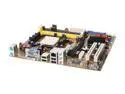
ASUS M2N-VM DVI AM2 NVIDIA GeForce 7050PV Micro ATX AMD Motherboard
Pros: Works great with Linux (Ubuntu 7.10). Runs the eye candy at max settings without any problems at all. I was a little nervous with it being such a new board, but the other reviewers who rand linux on it made me more confident, and I'm glad I bought it. I love the bios update mechanism that allows you to pull new FW straight from a USB or CD drive while in bios (no need to load an os first).
Cons: The asus support website seems to be terribly underpowered. I had a heck of a time getting in to get the latest bios, etc. Finally I found it when it wasn't overloaded.
Overall Review: Another review mentioned needing to use a PCI expansion card to run serial & parallel devices. While this board doesn't have external connectors for those, it does have them internally. Check the manual; all you should need is a cable/bracket to take it external. Matched this with an Athlon 64 X2 5200+ Windsor and Kingston KVR800D2N5K2/2G . Everything works great.
12/31/2007See more detail
Good housing but poor fan.
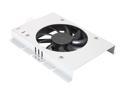
Thermaltake A2376 Aluminum HDD Cooling Fan
Pros: Low price. Unit was easy to mount on my hard drive. Seems to cool the drive some even with the fan disconnected.
Cons: Fan was loud out of the box; much louder than anything else in my system and noticeable from across the room. After slowing it down with a 4 pin fan controller I was able to make it quiet enough. Then after 3 months it started making an awful metal on metal grinding sound (like a dry bearing).
Overall Review: I wish they offered something with a better quality, quiet fan. I'm going to replace the failed fan with a Silenx 80 x 80 x 15mm fan (Item=N82E16835226001). From the reviews on that item I see I won't be the first to use that fan in this HD cooler. Using the fan controller I found it doesn't take much airflow (on my home PC set up at least) to keep my 500 GB SATA drive nice and cool. I know that the replacement fan itself is 3-5x the price of the whole unit, but I don't know of a better way to go so I don't regret my original purchase of this unit. However, I'd really have preferred the option to buy a good fan with the housing upfront and not have to pay shipping on each separately.
5/2/2008See more detail
My first aftermarket cooler, and I'm sold.
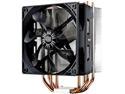
Cooler Master Hyper 212 Evo CPU Cooler, 4 CDC Heatpipes, 120mm PWM Fan, Aluminum Fins for AMD Ryzen/Intel LGA1200/1151
Pros: Good value and very effective. Quiet. Far better attachment engineering than the stock intel 1155 cooler. Whenever I do my next build I'm going to skip the stock cooler and go with one of these.
Cons: A bit of a challenge to get it initially connected without the unit moving around and smearing thermal grease where it shouldn't go. I couldn't put the fan down all the way because of my ram, but it doesn't seem to be a problem.
Overall Review: I used this to replace the stock cooler on my 1.5 year old build which was soaring up towards 90C under load. This solved the problem very nicely. It is a bit tricky to install for a noob like me but still far superior to the stock Intel attachment design. I did a novice mistake and put too much thermal grease on the first time and as the heat sink moved around it got grease everywhere. Fortunately all of it stayed where it wouldn't cause any real damage, and after carefully cleaning around the CPU I was able to get it attached without further problem.
6/23/2013See more detail
Just what I was looking for.
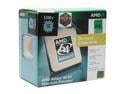
AMD Athlon 64 X2 5200+ - Athlon 64 X2 Dual-Core 2.6 GHz Socket AM2 65W Processor - ADO5200CZBOX
Pros: Nice upgrade from my slow & hot athlon XP 2700! The old chip made my system a space heater for my office. Now the system zips along and the room is cool and quiet without all of the fan noise.
Cons: None.
Overall Review: CPU and HSF installation were incredibly easy. This was my first time putting these components together, and it worked just like the instructions said it would. I had a harder time getting the RAM seated. One of the main reasons I chose this chip over a C2D is it sounded like this one was a bit easier to install the stock HSF. For a newbie like me this was important. I'm very happy with my choice!
12/31/2007See more detail
Works great for me.
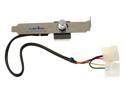
APEVIA FC-01 Multi Fan Speed Controller
Pros: This unit did exactly what I was looking for. The knob stays cool and it lets me adjust the speed of my fans. By taking the RPMs down a bit, the noise level has gone from jet engine to tolerable, and it doesn't seem that I'm loosing much in terms of actual airflow and cooling.
Cons: None.
Overall Review: I hesitated to buy this because of the negative reviews describing the unit getting excessively hot. I finally decided to take the chance because I couldn't find an alternative to try. I'm not sure if there is a QC issue and some units have problems, or if those with problems are running too many amps through the unit. I'm using this to control a slot fan and my 60 mm CPU fan. With both fans on the same controller I haven't had any issues with the knob getting hot. I bought this in August of 2006 and now in Dec 2007 I'm looking at buying another unit.
12/11/2007See more detail
Painless in Ubuntu Linux.
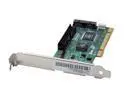
PROMISE SATA300 TX2plus PCI SATA II (3.0Gb/s) Cost-effective Controller Card
Pros: I bought this card to replace a flaky secondary ide controller on my motherboard. At the same time, I wanted to be able to buy a SATA drive the next time I need more space. After some research on the linux forums, this card came out on top. All I did was seat the card, attach the cable, and boot up. Ubuntu Fiesty Fawn picked up the controller and the drive showed up from Fdisk. All I had to do is mount the drive and I was good to go. Everything should be this painless!
Cons: None that I can see.
Overall Review: I haven't tried the card in a windows box, and also don't have a SATA drive yet to use with it, so I can't speak for those areas.
6/9/2007See more detail