

Your Browsing History


Steve W.
Joined on 06/18/04
1
0
product reviews
- 17
Fantastic Case - Well Built
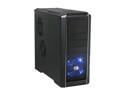
Cooler Master RC-690-KKN1-GP Black SECC/ ABS ATX Mid Tower Computer Case
Pros: I read about 100 reviews before I bought this case. Mostly complaints and I have found that all of them except the one mentioned in the Con were frankly incorrect. The video card isn't lose using the screwless attachment, screws do match standoffs for the motherboard, no problem plugging in SATA cables without using 90 degree connectors, I didn't have to remove the cable management system to install the motherboard. Good airflow and reasonably quiet fans although I think I am going to add some sound dampening material just to make it even quieter. I just left the stock fans in the current location but I did add fan silencers to the rear and side fans. All screwless installation works perfect if you take the time to figure out what to do and this includes for the video card and the hard drive. I didn't want a bottom mount powersupply, but it is already growing on me. Well built solid case (heavy) with no rattles or vibrations from the case similiar to buying a Dell.
Cons: I did have one SATA port on my motherboard (ASUS P6T Deluxe) blocked by the cable management attachment and I had to remove it. To remove any of those cable management holders just take the cables out of it and then unscrew them counterclockwise, you don't have to cut them out unless you just like destroying something you just paid money for.
Overall Review: **TIPS** 1) There are two different size screws one that matches the standoffs for motherboard installation and one that doesn't. Look for the screws that don't look like they have the little washer around them and test fit them before you try to install them. 2) Remove the rear fan before you install the motherboard, and place the back end of the board into the i/o shield first and then tilt it towards the front of the case. Also move the wires out of the cable management holders and turn the holders 90 degrees to give you more room to install the motherboard. 3) Remove the extra metal spacers in three slots before you install your video card (assuming you have a dual slot card like I do). Case - Cooler Master RC-690-KKN1-GP Black Windows XP Pro - 32bit Asus P6T Deluxe Intel I7 920 Power - Thermaltake W0116RU 750W Sapphire 4870 Toxic Edition Corsair XMS3 TR3X3G1333C9 - 3GB Samsung F1 Spinpoint 1TB Asus DVD R/RW Lightscribe DRW-2014L1T Sony DVD R
1/14/2009See more detail
Ok for a cheap monitor
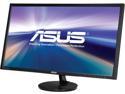
ASUS VN289H Black 28" HDMI Ultra-Widescreen LED Backlight LCD Monitor ,300 cd/m2 ,ASCR 80000000:1 (3000:1) Built-in Speakers, Tilt Adjustable
Pros: It was on sale. It was a 28" monitor at the price of a 27" monitor
Cons: Glossy screen, poor speaker, undesirable colors
Overall Review: Honestly I don't know why anyone makes a monitor that has a glossy screen. It seems like a cheap way to get the picture brighter to me. And no mention of it anywhere on the webpage, Newegg should change that to provide better customer service. I didn't expect the speakers to be good but to be honest the speakers on a monitor are a waste anyway. USB ports would be much more useful than cheap lousy speakers. And these are some seriously cheap ones. They sound extremely hollow. I wouldn't expect to use these for much more than when your computer makes a "ding" to notify you of something. A lot of people mention the stand as cheap. It does not shake while typing and if it did for anyone then they need to look into why they have such a cheap, weak, desk. That being said the stand could use a bit of bracing as this is a LARGE monitor but it does not shake while typing. The color on this monitor seems to be off. It's like bright whites with no yellow tones. I've even adjusted the settings to a warmer color scheme but it's still too white. Keep in mind colors are a preference so others may like it just fine. Overall it is an ok monitor but I wouldn't buy it again.
12/13/2014See more detail
Decent power supply
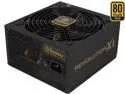
ENERMAX REVOLUTION X't ERX730AWT 730 W ATX12V 80 PLUS GOLD Certified Modular Active PFC Power Supply
Pros: It's modular.
Cons: Falt cables can only be turned 1 direction.
Overall Review: It is a decent power supply. The flat cables are not what I had hoped for. I thought they would be decent and I was willing to give it a shot. The problem becomes that you can only turn them one direction. Which normally would be fine, but since the cables are too long it makes it messy to do much with them. It might work well on a larger full size case but with a midtower, the cables were simply too long by probably 6 or more inches. For comparison I had a Thermaltake 750w toughpower before this that got hit by lighting and those cables were spot on perfect length. This is my 5th self build.
1/19/2015See more detail
3 Seats nice

Microsoft Office 2010 Home & Student 3-User
Pros: Works perfectly. I bought this mostly to use Excel and it works fine.
Cons: You can't get both a PC and Mac version on the same disc like you can with other software. I'd blame Apple, but it could Microsoft as well. I'm not taking off an egg for something that isn't Newegg's fault.
Overall Review: It's office, it's pretty much always worked flawlessly for me.
1/4/2011See more detail
It just works well.
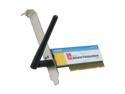
GIGABYTE GN-WP01GS Wireless Adapter IEEE 802.11b/g PCI Up to 54Mbps Wireless Data Rates
Pros: Easy to install. Plug it an and load the software.
Cons: None.
Overall Review: Connects well to my Belkin wireless router. They are only about 10 ft from each other but it has not failed in the past 30 days.
1/4/2011See more detail
Good fan
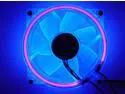
LOGISYS Computer CCF80UVBL 80mm Blue LED Case Cooling Fan
Pros: Looks good, fairly quiet,
Cons: none
Overall Review: It lasted for about 4 years before the light burnt out
4/9/2010See more detail