

Your Browsing History


Daniel R.
Joined on 07/03/11
0
0
product reviews
- 42
Great for the price

Acer Aspire Chromebook Intel Core i3-4005U 4GB Memory 32GB SSD 11.6" Non-Touch Screen Chrome OS C720-3605
Pros: There are some serious advantages to ChromeOS - especially if you've already sold your soul to Google. I think ChromeOS is perfect as long as your expectations are realistic. You can check out the Chrome Web Store before-hand to make sure it has applications to suit all of your needs. This thing is really fast and really reliable. While they are overkill most of the time, the i3, 4GB memory, and 32GB SSD are really nice if you need them. (I did, as explained in "other thoughts.") The battery life is really stellar. It's probably not the absolute best you can do on a chromebook (because of the processor), but I have no complaints at all. These pros are only really pros for the price range. If I had $550 or more to spend on a computer then I would get something else. For around $350, though, this little guy is extremely functional.
Cons: The external hardware is...really bad. There's no way to sugar coat it. The case is VERY plastic and it has a really...2009 netbook feel to it. The keyboard and trackpad are just awful. I don't mind being a little patient with lost keyboard input and a really flimsy trackpad, but if you value high-quality input hardware then this is not the machine for you. Note that this is just the reality for a chromebook in this price range. You get to pick between (1) higher internal specs (i3, 4GB memory, and a 32GB SSD) with a flimsy enclosure, (2) weaker internal specs (celeron or...eek...exynos, 2GB memory, and a 16GB SSD) with a nicer enclosure, or (3) lower-quality everything at a lower price point. At the time, this was the best I could do in box (1). The only ChromeOS con I have is that you can't install printer drivers. If you need to print then you'd better have access to Google Cloud Print or be prepared to get creative.
Overall Review: Bottom line: If you're coming from a traditional operating system (Windows/OSX) and you're looking for a cheap computer that does all the same stuff, then this isn't what you want. However, if you understand the advantages and disadvantages of ChromeOS then you will be happy with this purchase. I bought this computer for one reason: crouton. Crouton allows you to run Ubuntu (I use xfce but I think unity is possible) on top of ChromeOS (when you want it to do so). It's not a dual-boot situation where you need to shut down to switch; Ubuntu and ChromeOS run simultaneously and you switch between them with a hotkey. Few of my technological adventures work EXACTLY as advertised, but crouton is one of them. The installation isn't as hard as I expected (though, there are some mildly technical parts) and there has not been a single hiccup while using it for months. There's a bigger learning curve with Ubuntu than with ChromeOS, but once you get comfortable, Ubuntu can do anything that ChromeOS can't (light programming, LaTeX, printing, GIMP, FTP) and vice versa (Netflix and ESPN videos). The only things I can't do are Windows/Mac exclusive software like Office (though there is a free Web Store app for a light version of Office), photoshop, and games. Crouton uses local storage which is not a chromebook's strong suit, so I highly recommend getting a model with a 32GB SSD. Also, I think that 2GB of memory would be pushing it at times so I recommend 4GB. I was originally worried that the really low-end processors used by some chromebooks would be a problem, but I think any non-ARM processor would do fine.
10/28/2014See more detail
Decent product with one gigantic flaw.
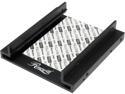
Rosewill RX-C200 2.5" SSD / HDD Aluminum Mounting Kit for 3.5" Drive Bay
Pros: It's made of sturdy metal and has a thermal pad for the hotter laptop drives. The two drives I have fit snugly but I didn't have to force them.
Cons: The whole point of this mounting kit is to fit two 2.5" drive in a 3.5" drive bay. The screws that mount the 2.5" drives into the adapter work fine. But then there are four screw holes used to mount the adapter into the case. The screws that come with the adapter work fine but the screws are threaded differently than the standard holes in 3.5" drives. If you're using the screws that come with the adapter this doesn't matter, but most cases have a special mounting procedure and if you need to use screws that are designed to fit in a standard 3.5" drive to mount this adapter then they're not going to fit. This is a huge and unacceptable flaw.
Overall Review: There are several mounting kits available that fit two 2.5" drives in a 3.5" bay. Considering the flaw in this one, you should just buy a different one.
11/19/2011See more detail
Great case for airflow with clean, understated aesthetics.
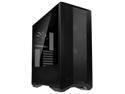
LIAN LI LANCOOL II MESH PERFORMANCE BLACK Tempered Glass ATX Case -Black Color -LANCOOL II MESH PERFORMANCE-X
Pros: - The mesh panel in the front gives excellent airflow. I moved the two front fans to the top of the case, put a 280mm AIO in the front, and put two fans in the bottom. (Total of four intake, including the AIO radiator fans, and three exhaust.) - The case opens up without any thumbscrews, which I think is fantastic. The tempered glass panels and the lower mesh panels are all held on with magnets. Also, the glass panels come off which is great for building. - It was easy to work in. Everything is well thought-out and there's plenty of room for cable management. - The HDD cage is really easy to remove for those of us who don't have any HDD's which is great because that area is a good place to store excess cable length. - I really like the included fan controller. You plug up to six fans into the controller and then plug the controller into one of your motherboard's case fan slots. There is then a switch on the front panel which let's you switch between four fan speeds: low, medium, high, and pwm mode where the speed is controlled by the motherboard. - There are two removable dust covers for fans and the front panel comes off easily to clean the front fans. - It feels like high-quality construction. Everything is either aluminum or tempered glass.
Cons: Note: This is mostly just minor stuff but I'm including it in case it helps someone. - There is a horizontal metal wall that separates the bottom HDD/PSU area from the main portion of the case. On that wall near the front of the case there is a panel which seems to be designed to be removed to facilitate a long AIO. It's nice if you can leave the panel in because with the panel removed you can see into the bottom area below which likely contains a bunch of excess cable length. My 280mm AIO was like 2mm too long to be able to install in the front of the case with the panel included; there just isn't quite enough space between the panel and the front connector. - It's a little bit lame that the front-panel USB-c connector isn't included. I don't really need a USB-c port on my front panel but it just looks a little silly without it. - The vertical mount GPU kit isn't included either but this is a more reasonable omission. - One of the tempered glass panels isn't quite perfect. When it swings closed it doesn't line up completely and needs to be lifted a bit to close completely. There is also a small scratch on the same panel. (This is almost certainly specific to my unit.) - The HDD cage was bent quite a bit near the metal bracket which holds it in place. It was still functional, though. - The headphone jack in the front panel is EXTREMELY tight. It takes quite a bit of force to get a plug in there and I have to use pliers to get it out.
Overall Review: This is an excellent case. It's good if you want a large, clean case with great airflow. Here are some build notes: - If you're installing an AIO in the front of the case (as opposed to the top) be sure to take the front cage out first and attach the radiator while it's outside of the case. Also, be aware that there are several different configurations for the cage and AIO so be sure to think about it a bit before picking one. - Don't assume that you can put nice RGB fans on the top of the case. I put two 140mm fans there and they had to be off-center so that they didn't interfere with the motherboard; they would have looked strange if they were RGB. (Lian Li has thought of this and there are already holes for mounting fans off-center.) - If you buy the add-on that puts a USB-c port in the front I/O panel make sure you install it BEFORE the rest of the components. It would be an enormous pain to install after the PC is built. - If you're using a 360mm AIO you're probably going to have to install it with the tubes at the top of the case. Some people think that's bad and some people don't mind; I'm just letting you know. - The HDD cage DOES come out. At first it might seem like it doesn't because once you undo the screws and it comes loose it's not clear exactly how to pull it out of the case. It does come out but it really only comes out one way. If you're forcing it then that's not right; if you're pulling it out at the proper angle then it comes out cleanly without any force.
7/22/2021See more detail
Does what it's supposed to do.
SAMSUNG 980 PRO SSD 2TB, PCIe 4.0 M.2 2280, Speeds Up-to 6,400MB/s Best for High End Computing, Gaming, and Heavy Duty Workstations (MZV8P2T0B/AM)
Pros: It's fast and stable for me. Benchmarks, boot times, and load times are bonkers. It's really easy to install and is invisible in the case.
Overall Review: This drive is great all-around but it's unique feature compared to the last generation is that it can use PCIe 4.0. (As far as I know, the only chipsets that can take advantage of Gen 4 PCIe are X570 and B550 for AMD and Z590 for Intel.) If you're not able to take advantage of that then you'll probably get the same performance out of the previous generation of drives. The cost savings is pretty negligible, though.
6/23/2021See more detail
No complaints so far.
CORSAIR RMx Series (2021) RM750x CP-9020199-NA 750 W ATX12V / EPS12V 80 PLUS GOLD Certified Full Modular Power Supply
Pros: It's quiet. It's modular. Plenty of connections.
Cons: None, really. There's no RGB if that's something you want.
Overall Review: I mean, I turned everything on and it powered my PC. Nothing eventful happened, which is exactly what you want from a power supply. I don't personally know enough about PSU's to compare what this one has to what others don't, but it works for my purposes. I'm powering an i7-11700k and 6700xt.
6/23/2021See more detail
No complaints. It does its job.
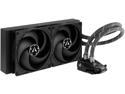
ARCTIC COOLING Liquid Freezer II - 280 ACFRE00066A Multi Compatible All-In-One CPU Water Cooler LGA 1700 Compatible
Pros: - I have great temperatures so far on an i7-11700k. (I used the thermal paste that came with it.) - Easy enough to install. No major issues. - It's very quiet. I had some slight gurgling when I first turned it on but that went away quickly and since then I haven't heard anything noticeable. (For what it's worth, I installed mine "tubes down.") - It seems really sturdy and well-made. The fans seem like they're high quality. - Personally, I really like the way it looks on the motherboard. That's going to be personal preference, though.
Cons: I don't really have any "cons" but maybe I'll list some things to be aware of. - Out of the box mine was set with the fans to work as exhaust. If you want the radiator in the front of your case working as intake then you'll need to switch them around. (It's really easy; just a few screws.) - It's very big. Like I said, this isn't a con but it surprised me a little bit. Make sure that the case you're using actually has space for as 280mm radiator because it takes more than just two 140mm fan slots.
Overall Review: This is my first AIO and I have no complaints. I would describe this as a no-nonsense product that does a really great job of what it's designed for: quietly cooling a CPU.
6/23/2021See more detail