

Your Browsing History


Adam G.
Joined on 10/19/04
0
0
product reviews
- 9
Super Wireless Power, ACTIVATE!
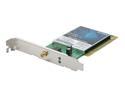
D-Link DWL-G550 High-Powered Wireless Desktop Adapter IEEE 802.11b/g PCI Up to 108Mbps Wireless Data Rates
Pros: This replaced an aging WDA-2320 in my tower. The included external antennae is a total beast, able to pull in the furthest of signals. With my previous adapter, I was able to see anywhere between 3-5 networks. Now, I am able to see between 14-16! Connected the first time without any trouble to my Verizon FiOS router. Great transfer speeds and lower ping times in online games than with my previous wireless adapter. Also, my previous adapter would perma-lose the connection requiring a reboot after about 10 minutes of inactivity...my tower has been turned on and logged in for the past 9 days straight, and this monster hasn't lost or slowed the connection a single time!
Cons: While it is long enough for my purposes, it would be nice if the included external antennae had a slightly longer cable...but in the grand scheme of things, this is like complaining about the colour of the low-gas light in a Ferrari.
Overall Review: If you are looking for a wireless adapter for your desktop, DEFINITELY buy this one. It's powerful, fast, and reliable.
5/15/2008See more detail
Really frustrated
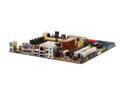
ASUS M3N78-EMH HDMI AM2+/AM2 NVIDIA GeForce 8200 HDMI Micro ATX AMD Motherboard
Pros: None. Board shipped with a BIOS whose sole purpose seems to be angering me.
Cons: Put together my system (X2 5400+, 4 gigs of Corsair XMS2 DDR2 800 RAM) went to go boot it up for the first time...and I get a corrupted BIOS message. No biggie, the built in CrashFree Bios starts looking for the backup...I put the DVD that came with the board in the drive, it finds it, reads the file, and rewrites the BIOS. "Please restart your computer." I would LOVE to actually do something with this board other than flash the BIOS, but apparently that is all it will let me do...It keeps going straight back to the same CrashFree BIOS screen. I've tried doing it with NOTHING attatched (no hard drive, optical drive, one mem stick...not even a keyboard or mouse connected to the system) and I've tried every BIOS available from Asus' website...nothing. Every single time it goes back to that screen.
Overall Review: Will RMA. Not Newegg's fault, of course...but insanely frustrating. Come on Asus, get your act together!
6/5/2008See more detail
Fantastic PMP!
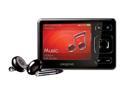
Creative ZEN 2.5" Black 8GB MP3 / MP4 Player
Pros: The Creative Zen is absolutely fantastic. With full sound, excellent battery life, a superbly colourful screen, a simple interface, and the ability to transfer music, video, and files using just Windows Explorer, the Zen is super easy to use. The control scheme works great, and I love having the "shortcut" button that you can assign to any function. The built-in microphone sounds fairly decent, and the FM receiver works well enough. It also has an SDHC compatible memory card slot for capacity expansion! Personally, I put my music on the internal 8 gig memory, and put a whole TON of movies and TV episodes on an 8 gig SDHC card. w00t!
Cons: The memory card slot is a bit limited...you can only browse everything in one long list, and the list is seperate from whatever you have stored on the internal memory. For this reason, I just use the Memory Card for stand up comedy sets and for videos. Also, if you use Windows Explorer to transfer files over to the player, you can't browse different folders while files are transferring...you can, of course, get around this using the (horrible) included iTunes-like software...or, you can just use Media Monkey (which is by far the best PMP management software out there, if you choose to use any). Most of the time, you need to convert videos to get them to work on the player, but this is a fairly easy and quick process. Video quality is excellent during playback, so this isn't that big of a deal.
Overall Review: Overall, the Creative Zen is an absolutely fantastic portable media player (PMP), one that is CERTAINLY worth the money. There are some minor negatives associated with it, but hey nothing is perfect; overall, this is definitely one of the best media players I've ever used. Be sure to pick up the Creative brand clear case, though...this beauty scratches kind of easily. The clear case has a little pop-out leg that is extremely useful while viewing videos. All the Pure Pwnage, Futurama, Family Guy, and South Park episodes as well as some stand up comedy video help pass the time at work, and the pop-out leg keeps the player in an easily viewable position:-)
5/28/2009See more detail
Fantastic Mouse...yes, even for gaming

Logitech Marble Gray 4 Buttons USB or PS/2 Trackball TrackBall Mouse
Pros: Super comfortable. Long enough to support your entire hand, so even long hours at the computer don't fatigue your hand and wrist. Big, centered trackball allows for fantastic precision and quick motion whether gaming or tooling around online. Main left and right buttons are long, which accommodates various sizes of hands.
Cons: I only have three complaints about this mouse. First, there is no scroll wheel. It's a shame, because they could easily just "puff out" the left (or right) part of the plastic that is next to the ball, shorten the button, and put a scroll wheel right there. Not that big of a deal though, the comfort and accuracy outweigh the loss. Two, the secondary button on the right is a bit tough to reach...the one on the left is simple, you just move your thumb up a bit. Because of the way our fingers are attached to our hands, hitting that other secondary button is a bit tough. My last complaint is that it is only available in a wired version. I don't NEED a wireless mouse, but it is nice to be able to just move my mouse out of the way if I put a plate of food or papers on my desk without having to worry about the cord...plus it just looks nicer.
Overall Review: Overall, a fantastic mouse that is darn near perfect. I use one both at home and at work. Provides super-accuracy and quick movement for gaming, while having a very comfortable design that enables me to work all day without any wrist pain (this despite the fact that I tore a ligament in my right wrist a couple years ago). If you are looking for a good trackball, you can't go wrong with this one. What are you waiting for?!?!?!
6/30/2008See more detail
Salvation in a tube
Arctic Silver 5 High-Density Polysynthetic Silver Thermal Compound AS5-3.5G
Pros: The absolute tops! Arctic Silver 5 is by far the best performing, easiest to apply, and easiest to remove thermal compound out there. Unlike the pads or wax-based stuff that many heatsinks come with, this is thermal GREASE. It never hardens, meaning you never have to worry about your heatsink and CPU getting stuck together.
Cons: The "break-in" period is, unfortunately, quite long. In my own use, I found that it took about 140 hours or so for everything to fully set and function properly. For the first month or so after you use this stuff, make sure you turn your computer off every 10 hours or so and allow everything to return to room temp. Multiple thermal cycles will help everything settle in properly.
Overall Review: The good news is that over the course of the long break-in period, you can watch your CPU temp drop. After about a month, my temps at full-load had decreased nearly 6 degrees Celsius from where they were when I first applied it (which were already nearly 4-5 degrees Celsius lower than if I used the junk most heatsinks come with). Given how cheap this stuff is and how easy it is to apply, there is absolutely NO reason to not use it. Just a dab will do ya!
6/17/2008See more detail
Awesome case...as long as you aren't building.
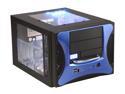
APEVIA X-QPACK2-BL/500 Black/ Blue Aluminum Body/ Front Mask Micro ATX Desktop Computer Case 500W Power Supply
Pros: Case looks FANTASTIC when it is all closed up. The front aluminum panel looks great...some people are complaining about how the blue looks more purple (or "blurple) but I love it...it matches the UV lights that I put in there PERFECTLY. A LOT of room, considering it is an mATX case. A solid 2-3 inches between the edge of the motherboard tray and the intake fan that sits in the front. You could likely fit one of the larger video cards in here...with some slight dremel work, you could likely put one of the big ones in here. Only one intake (80mm) and exhaust (120mm) fan, but the way they are positioned in the case makes any other fans unnecessary. The 80mm intake blows directly over where the RAM and CPU is (it's level with the mobo tray), and the exhaust fan sits directly above where the CPU would be (and is right in line with the intake fan, just higher up.) The power supply sits directly over the PCI ports...all together, this case has awesome cooling efficiency.
Cons: Build quality is complete trash. The front aluminum panel is made well, but the same cannot be said for the rest of the case. Everything FEELS cheap (luckily, it doesn't LOOK cheap...just feels like it.) The removable motherboard tray is really easy to slide in and out, but it is quite possibly the flimsiest piece of metal I have EVER seen used in a case. I assure you, there will be blood letting. Quality control on the case sucks as well. There were multiple holes I had to either make bigger, or "move" over by drilling new holes so that my stuff would line up properly. The worst one was the rectangle hole for the motherboard back plate...I had to dremel about half an inch to get it big enough so I could install the back port plate that my mobo came with in there!
Overall Review: Once it is assembled, this case looks awesome and does a great job. Even fully loaded, it is very light and very easy to move (I wouldn't trust the built in handle, though...make sure you use both hands to carry it.) It may feel cheap when putting your system in, but it only feels that way...once it's done, it looks PHENOMINAL. Also, if you plan on putting in lights, make sure you get either 4 or 6 inch cold cathode tubes...there is no way to get the full 12 inchers in there without them running across the windows. Plenty of places to hide the mini ones though. Cable management is also very easy in this case, despite its small stature. As with any mATX case though, a modular power supply makes a HUGE difference...I highly recommend getting one if you are going to buy this case. Overall, I would definitely recommend this case. It feels cheap and the quality control sucks, but if you have the patience to make the install you will have one slick looking system when done.
6/6/2008See more detail