

Your Browsing History


kurt p.
Joined on 03/28/05
0
0
product reviews
- 54
New technology
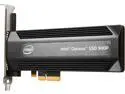
Intel Optane SSD 900P Series - 280GB, 1/2 Height PCIe x4, 20nm, 3D XPoint Solid State Drive (SSD) - SSDPED1D280GASX
Pros: Works well, no drivers required for I7-7700 and Z170X-Gamiming 7. Boots in just a few seconds (takes longer to get through BIOS than to load Windows 10).
Cons: Wrote a long review on this, Newegg didn't post it.
Overall Review: More write endurance than other SSD (MLC,"TLC" which is really 8-level cell) Edit 5-30-19: I see that there may be negative reviews on the M.2 version not supporting PC booting. I am using the AIC (Add-In-Card), PCIe version of this item. I have no experience trying to get a computer to boot from M.2, perhaps this is related. The following Wikipedia page (https://en.wikipedia.org/wiki/M.2) explains some of the Features of M.2, perhaps there's a configuration option in BIOS to force booting through PCIe on M.2 rather than defaulting to SATA? I have never seen a manual for a motherboard which clearly defined all the BIOS functions and features, and have spent HOURS fiddling and poking with settings, in order to get a system booting reliably. I even had a motherboard that advertised support for Kaby Lake, but you needed to boot Skylake in order to flash to a new BIOS before Kaby Lake would boot (thanks a lot, G***byte)! I feel sorry for folks who didn't know that, or didn't have an old processor kicking around the junk bin *end of rant*.
5/30/2019See more detail
Wrote too soon...

AVG Protection 2017 Unlimited Devices - 2 Year
Pros: still none
Cons: During Full Computer Scan, threw an error box: AVG Diagnostics. Following AVG processes failed: avguix.exe. Would you like to send the report to AVG for analysis? Note, the full computer scan continued to run. Edit 4-29-17: AVG wanted more money to get it working. Apparently it changes some network permission settings which prevent it from fully installing. After re-enabling access, finally got it to install. Now, daily advertisements pop up to ask you to purchase additional products from this company. AVG should focus more on providing good products, less on extorting money from customers.
Overall Review: Already have a couple hours invested in this product (including waiting for them to answer the phone). I am sticking to the free stuff from now on.
4/29/2017See more detail
BBBBurttonnn BBBBouunce

ASUS ROG Keris II WL Ace (54-gram ergonomic mouse, 42000-dpi, ROG Micro Switch, SpeedNova wireless technology, ROG Polling Rate Booster, 4000 Hz in wireless mode, up to 8000 Hz in wired mode) - Black
Pros: Functions
Cons: Paid an extremely high price for what I hoped was a premium mouse. After 6 months of moderate use, now getting multiple responses to single mouse clicks. Don't know how this is possible wince it's supposed to be optical, but it has become really annoying.
Overall Review: I guess I will use cheap mice (mouses?) from now on, and toss them in the landfill when they start acting up.
12/13/2024See more detail
Looks nice, compact size.
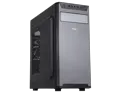
Sama Jazovo-BK Black USB3.0 Steel ATX Mid Tower Computer Case, 3 x120mm Black Fan (2 x front, 1x Rear Pre-Installed)
Pros: Doesn't look bad at all (2-tone finish complements DVD installation). Smoothtop design keeps innards clean, and makes wiping down easy. Using a Core i7-13700T (which is available on A****n from 3rd party, CPU temperature is < chipset temperature, 35 C using IR gun) as a networked HTPC client, with big-posterior Noctua cooler, fan speed <250 RPM. Front mounted I/O is highly convenient as a desk/cabinet positioned computer, as is accommodation for a DVD player. Very nice basic design. Had a height problem, and this case is particularly short.
Cons: Needs panels to close off other holes (in the sides) as desired, or offer a model with smooth sides. Has room for multiple hard drives, but no mounting cage, or I could have used an additional one as an HTPC server. Not very rugged, lower end case. Some motherboard standoffs were missing, and stripped easily due to cheap case material. Didn't use the fans since I don't know the noise/lifespan rating. Would rather have the cost of the fans put into the quality of the case materials. Since this is not a 'gamer' case, it suffers from associative identity disorder, but it is hard to find a case that doesn't.
Overall Review: If your expectations aren't high, this is a pretty good choice for a basic system, reasonably priced. Smooth top, DVD, front panel I/O, attractive. For very little work, could be a 5-star HTPC winner.
8/15/2024See more detail
Flakey installation requirements
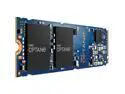
Intel Optane SSD P1600X SSDPEK1A118GA01 M.2 2280 118GB PCIe 3.0 x4, NVMe 3D XPoint Enterprise Solid State Disk
Pros: Got it working. Mounts directly to motherboard, so installation is easier than other memory types. Endurance is 1292 TBW vs. 200 TBW for a typical eight-level-cell (euphemistically labeled "TLC"). I believe this is one-bit-per-cell, which inherently makes it more stable regarding long-term data retention, and better endurance. Windows loads in about five seconds.
Cons: Doesn't come with necessary drivers (in BIOS). Need to download/install them prior to booting, meaning you need a separate working computer to install this device, and USB memory sticks. Also, need to guess/try multiple versions of driver before you find one that works. I don't know how to tell you what is needed, I got lucky on my third or fourth attempt (briefly thought it was bad hardware, but it turns out all roads lead back to bad software). I had the same problem with a conventional NVMe M.2 SSD, so it's not unique to this device. I really wish I could help more, but I tried lots of things, and it finally just started working.
Overall Review: Would recommend M.2 to masochists. You CAN boot from this if you get lucky with the right BIOS downloads. Great endurance, low power (cool to the touch). Great potential if you get lucky.
2/2/2023See more detail
Flakey
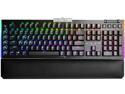
EVGA Z20 RGB Optical Mechanical (Clicky Switch) Gaming Keyboard 812-W1-20US-KR
Pros: Although the configuration procedure was VERY poorly documented (most features were not completely described), I managed to get it to do what I wanted (most key backlight groups ON continually, one group OFF).
Cons: Keyboard reverted to default backlighting without user command. This seemed to happen randomly. Key feel was not what I hoped for, but this is subjective.
Overall Review: I don't know if I got a defective unit, but it loses its configuration. The default is flashy, but not particularly usable.
6/25/2021See more detail
seller reviews
- 1
Decent quality, would pay more for superior quality.
Product can accept up to five 3.5 inch hard drives. It ships with only three mounting cages (others available separately). Newegg website showed product comes with five, they fixed it after I complained. A similar product, with silver trim, still shows it comes with five.
On-time
Delivery
Product
Accuracy
Customer Service
Satisfactory
9/25/2020See more detail