


Your Browsing History


Katherine E.
Joined on 03/08/04
0
0
product reviews
- 22
Simple to OC. Needs better documentation.
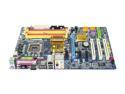
GIGABYTE GA-965P-DS3 LGA 775 Intel P965 Express ATX Intel Motherboard
Pros: Good overclocker. Clean layout. Solid state capacitors. The Hardware Installation Guidebook is a full-color step-by-step newbie-friendly illustrated guide of how to set up the board. First-time builders can follow this easily. Excellent overclocker. My E6420 has achieved a 3.2 OC at 1.375v and 407 GHz. I'm still stability testing, but I know it's stable at a 2.75. There are also a gazillion guides on overclocking this board. See hardforums, ocforums, forumz.tomshardware.com, etc. There is a CMOS reset jumper. If you hook up your computer restart connection to it, you can easily reset CMOS without much trouble. The BIOS allows you to save "portraits" so you can save different settings. Very nice!
Cons: The documentation could be better. Gigabyte doesn't document their utilities well and the website is filled with broken links--especially links to the more technical documentation. I still have no idea what Xpress Recovery 2 does, except that it is an imaging utility--but why image a drive on the same drive? Or is this a Gigabyte version of Ghost? Who can tell? Also, don't use the EasyTunes for overclocking. The bios is pretty easy enough. To tweak the bios, you need to press Ctrl F1 at the main Bios screen. This is in the manual, but not in screamingly large letters. In other words, while the board is easy enough to set up, and very tweakable once you do, but the Internet is better than Gigabyte as a technical resource.
Overall Review: I had trepidations after I bought this board, but I'm glad I did. This is the 2nd computer I've built and it was smoother than the first. I have a Centurion case, 2 x 1G SuperTalent DDR2 6400 RAM at 4-4-3-8, E6420, Tuniq 120, geForce 8600GTS. Using the guides I found on tech forums, I overclocked easily to 2.75, and am looking at stability testing over 3.2, though I have relaxed timings to 5-5-5-15. I am not running RAID. I had no problems with my IDE optical drive. It works fine. My SATA HD uses the native SATA ports, not the Gigabyte SATA ports. People have had issues with the Gigabyte ones. Intel has discontinued native IDE support with the 965 chipset, so issues with IDE are not Gigabyte's fault. You are stuck with jmicron. Sorry. The board default memory voltage is 1.8. Make sure your RAM will work at 1.8 else you'll need to have cheapo RAM just to boot up to get into the BIOS. If you plan anything other than a mild overclock, get extra cooling for the northbridge.
7/3/2007See more detail
Update: Artifacting still an issue after BIOS update
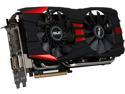
ASUS Radeon R9 280X 3GB GDDR5 PCI Express 3.0 CrossFireX Support Graphics Card R9280X-DC2T-3GD5
Pros: Stunning visuals, nice oc software
Cons: Random artifacting without any causes found by monitoring software
Overall Review: I updated to the new v BIOS. Initially, things were good, but here we are, 3 days after the update and once again, I have artifacting in Guild Wars 2. There is absolutely no rhyme or reason for the artifacting. I check temps. They're good. Other monitoring software suggests that the memory is good. I may need to research core voltage to see if the default voltage to this card is problematic.
2/2/2014See more detail
Corsair H50
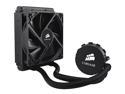
CORSAIR Hydro Series H50 120mm Quiet Edition Liquid CPU Cooler - Intel Only (CW-9060006-WW)
Pros: This is a quiet unit, and the looks are very good. Some people have good luck with it. I didn't. Read other thoughts.
Cons: The poor instructions make this very difficult to install, and the poor labeling and inherent design issues make things worse.
Overall Review: This is for the H50. Please note that all the reviews for Corsair closed-loop coolers are lumped together, so make sure you are reading the review for the product you wish to buy I wanted to like this a lot. I hated it, and will return the unit. I purchased an H100i to replace the H50, and I love the H100i. Here's why I hated the H50. 1. Poor instructions. The back bracket is a hard, yet flexible plastic. You need to put pins in the appropriate holes in order to mount the bracket correctly. The printed instructions do not show which holes to use (note that the older issue dates did have diagrams, which you can find on the Internet). The socket holes have labels stamped on them, but these are small and easily missed. If you have eyesight older than 35-years, you'll miss the labels. 2. Even once the back bracket is installed, cooler installation is tough. The cooler unit has phalanges on it that have to be twisted to fit under the phalanges of the mount. This means that the mounting bracket has to be very loosely twisted into the retaining bracket. In theory, this should be an easy push-down-and-twist installation. In practice, the phalanges don't line up well with the openings, there's not enough clearance, etc. I had to mount this twice. The first time, I didn't get the retaining bracket mounted correctly, which is when I did a google search to find more resources on how to mount it. The Corsair demo makes it look a lot easier than it is. On both occasions, it was hard to get the unit to screw in properly. Even after getting the retaining bracket correctly mounted, the unit couldn't be tightened down as much as it needed to be. Once installed, it was quiet, and the clean looks are impressive. The unit did cool well at idle--at about 23-25C. However, under gaming load, the temperatures went up to 70C. It failed one of the stress tests within a minute. I know that this unit works well for other people, but I was very disappointed and would strongly recommend against it. If you do wish to give it a shot, do significant research on the Internet in order to find out how builders in real life situations handle the idiosyncrasies. I eventually went with the H100i because of the easier mounting system. My system: Gigabyte GA-Z87-OC Intel i5-4670K HAF 922 8 G RAM ASUS R9 280x Corsair 650 PSU Kingston 120G SSD WD 1T Blue HD
12/11/2013See more detail
Keys too stiff
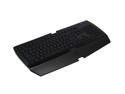
RAZER Lycosa Keyboard
Pros: Great backlighting. Attractive layout. Nice media features.
Cons: Keys are stiff. You will have to hit them very hard, and you have to hit them precisely in the center in order for them to register. If you're using the keyboard for wordprocessing, expect to be fatigued quickly. If you're using it for gaming, expect to miss keystrokes and find yourself getting killed or missing commands.
Overall Review: I bought this on sale, so I'm not complaining too much. I will definitely replace it with another backlit keyboard, though. I find this one to be very hard to type on. Backlighting has to be on in order to see the keys--which sometimes even this touch typist needs to do. I think there are other keyboards that are better. My ancient Saitek, which this replaced, had a better feel. My Logitech G15 (the original) was a dream to type on. I'll probably look for deals in Logitech as a replacement.
12/16/2012See more detail
Good way to extend an old mobo
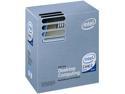
Intel Core 2 Duo E8400 - Core 2 Duo Wolfdale Dual-Core 3.0 GHz LGA 775 65W None Integrated Graphics Processor - BX80570E8400
Pros: Great way to extend life of an older motherboard. Nice overclocking capabilities.
Cons: As per most available older cpu technology, the price is higher than it would be to buy a better, more modern cpu architecture.
Overall Review: If you have an older motherboard, in my case a Gigabyte 965P-DS3, with an older Conroe chip, then this cpu represents a good upgrade for a lot less than buying components for a new system. Please be aware that if you do own the GA-965P-DS3, that only the Revision 3 boards have the BIOS upgrade that allows you to use the Wolfdale cores. Do your research ahead of time! Also, remember that this processor has a faster front side bus. That means that you MUST adjust your clock speed in order to bring the cpu up to spec, lest you run underclocked. I got this because I wanted to extend the life of my mobo, and I plan to hand this system down to my mother, whose computing needs are significantly more modest than my own. Getting this cpu was significantly cheaper than building or buying a whole new system, so even though the cpu costs more than it should for such old technology, it's a good upgrade for those still using the older technology.
1/4/2011See more detail
Good value in a lower-
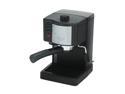
DeLonghi EC140B Pump Espresso/Cappuccino Maker Black
Pros: Overall, it's an affordable machine, well-built, and easy to clean. The instructions are clear and easy to follow. I had expected to spend several attempts trying to make a decent cup of espresso, but my first attempt was quite drinkable. I was impressed by just how easy it is to clean the machine. The steam wand works very well. Overall, I think this is a terrific value in an espresso machine.
Cons: The height under the nozzle is, as has been mentioned, quite small. You'll not be able to fit a coffee cup under there. My solution was to use the glass espresso pot from my old espresso machine.
Overall Review: The person who said that pods make poor coffee doesn't own this machine or hasn't read the instructions. This isn't a pod system, though perhaps it could use pods. Rather, you use your own espresso coffee. It is true that there are other, better, and much more expensive machines out there. However, this fit my budget well. My last machine, a refurbished Krups my husband gave to me, lasted for close to 10 years of daily use, but the coffee never had as smooth a taste as the first cup out of the DiLonghi. Also, newegg rocks, as always. My old machine broke a week ago. I placed the order, and I'm now drinking espresso once more. Great service!
1/23/2009See more detail