

Your Browsing History


Jeff Z.
Joined on 10/19/18
0
0
product reviews
- 7
The best gaming upgrade for existing AM4 owners. 5600X better value though
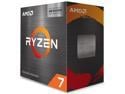
AMD Ryzen 7 5800X3D - Ryzen 7 5000 Series 8-Core 3.4 GHz Socket AM4 105W None Integrated Graphics Desktop CPU Processor - 100-100000651WOF
Pros: Good upgrade for gaming to extend the life of an AM4 motherboard Competitive with 13th gen Intel and Ryzen 7000 in gaming Especially good for MMOs
Cons: Runs hot, almost requires an AIO or large air cooler Production work slower than 5800X Expensive (sort of) No overclocking
Overall Review: I bought this chip as a last huzzah for my nearly 3 year old B550 motherboard thinking it would extend the life for another 3-4 years. And it has. Not wanting to invest in expensive DDR5 or a two chip platform I took the plunge. First off: This chip is a beast at gaming, beating every Ryzen 5000 and even trading blows with the 12th and 13th gen Intel flagships. Also beats/matches AM5 in gaming. If you mostly game and are on AM4 this is the CPU you need. You might not notice the average FPS as much but you will notice the improved 1% lows. And as a caveat there is no need to upgrade anything else so you can skip current gen CPUs. The cons? well it's hot. Even with an EK 360 AIO running 6 fans in push/pull I am still hitting temps in the upper 70s sometimes 80 C on games like Aped Legends and Microsoft Flight Simulator 2020. This of course leads to excess fan noise and an uncomfortably hot room during a gaming session. In winter this could be a pro. And yes I am running high airflow case with 6 intake fans and an exhaust with the AIO in top (Corsair 5000D) so it's definitely not the case. On the flipside high temps seem to be the norm with current gen CPUs these days So if you mostly game, have an AM4 motherboard, good cooling and airflow case this is the CPU for you. If you don't have the budget then the 5600X is the better choice at half the cost and 85-90% ability in gaming and will last you for a few years to come
11/16/2022See more detail
Good airflow and static pressure but loud motor whine
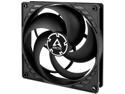
ARCTIC P14 PWM - Pressure-optimised 140 mm Fan with PWM
Pros: Neutral colorsGood static pressure and airflowaffordable
Cons: Very loud motor humming at 550 and 1000 rpmfeels cheap
Overall Review: Well these Arctic fans seem to be the darling of the tech review world lately so I decided to grab some for myself. I noted some reviews mentioned a very loud hum/whine at about 1000rpm but thought nothing of it since everyone else was gushing how great a fan it isI can confirm the bearing hum exists. First at around 550 rpm and then around 1000-1100. very annoying very high pitched humming whine that was driving me mad. Adjusting the fan curve made these rev up faster and higher than normally which just increased noise making these fans pointless. Replaced it with a Noctua NF-A14 and haven't looked back
3/27/2021See more detail
Am almost perfect case fan
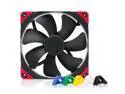
Noctua NF-A14 PWM chromax.black.swap, Premium Quiet Fan, 4-Pin (140mm, Black)
Pros: The perfect balance between noise and airflowNoctua qualityNo obnoxious motor noisesChromax
Cons: More expensive but you get what you pay forColor scheme if you don't get Chromax
Overall Review: Bought this to replace some Arctic fans that were driving me crazy with the constant motor humming. It's like heaven on the ears now, no grinding, ticking or humming coming from these motors and they move a lot of air and good decent static pressure. No they're not totally silent when they ramp up past 1000 rpm but what is? I've accepted the fact that if fans spin fast and move air there's gonna be some noise if you want good air flow. Noctua has minimized this and seemed to find that perfect harmony between the two.
3/27/2021See more detail
Works great if you use the included brace
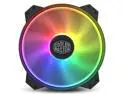
Cooler Master MasterFan MF200R ARGB 200 mm Addressable RGB Fan. R4-200R-08FA-R1
Pros: QuietTons of airflowDirect replacement for Coolermaster H500 seriesARGB looks great
Cons: Slight fan wobble
Overall Review: One of the 200mm ARGB fans in my H500M was only lighting on the top half so I decided get this as a replacement. It works the same as long as you use the included brace to lock the ARGB ends together. Without the brace it just lights up a white LED with a faint RGB glow in the center. Why am I mentioning this? Because the stock fans are the same fan yet don't require this step for the ARGB to work. Also the included brace comes in a bag with the screws so if you're buying this as a replacement it's an easy detail to overlook if you're reusing the old screws. Other than that it's the same 200mm ARGB fan from the H500 series so you know what to expect
3/27/2021See more detail
Good airflow poor quality control
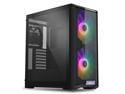
LIAN LI LANCOOL 215 X Black Steel / Tempered Glass ATX Mid Tower Computer Case
Pros: Just the right size Great airflow Good cable management Cheap price
Cons: Poor quality control Motherboard standoffs preinstalled poorly threaded and not aligned Back panel screw wouldn't come out
Overall Review: Bought this case to replace a Fractal Focus G which was giving me pretty bad temps. Gamers Nexus recommended this based on temps, noise, airflow and price. Another tech channel noted it was cheap and I have to agree with them. Despite all the pros there was concerning quality control issues. Mainly with the screw threading on the standoffs and back panel. I had to pull on the back screw with pliers and loosen the bottom screw to get the rear panel. Top one came out just fine but this one spun in place and getting in back was just as much of a pain. Then there's the motherboard standoffs. Two weren't even tightened in all the way, one was bent and nearly all of them had trouble threading screws in. I even popped the head off one of the supplied screws leaving the rest in one of the standoffs. To top it off they weren't even properly aligned, the middle right screw was a millimeter off. I get Lian Li was trying to make a great case that was also affordable but please don't skimp on quality control to make it affordable. I mean how does a cheaper Fractal Focus G have better quality than this case?
2/25/2021See more detail
Works great, looks great
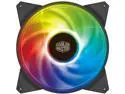
Cooler Master MasterFan MF140R ARGB 140 mm Addressable ARGB Fan. R4-140R-15PC-R1
Pros: Lots of airflow and bright flashy colors. Not as loud as the specs suggest
Cons: Shorter ARGB cable could be a problem for some but I had a splitter ready to go so no problems for me. Did not work on the H500M included ARGB hub despite some on the question section saying it does. I had to buy a splitter to tie into the front 200mm fans. That's not a knock against CM as they made no claim, just putting that out there for those getting false info from other consumers
Overall Review: Great airflow. Looks awesome. Finally my H500M has a matching rear fan to go with the 2x200mm front fans. Replaced a Corsair ML140mm with this. While on paper this fan "looks" loud it really ins't compared to the Corsair. This is more of a whoosh at higher RPMs instead of a buzzing whir sound my ML140 had so to me it is much quieter. Fans that spin at high RPMS make noise though. Who knew? Most of the time it isn't even audible. Case is all lit up like the 4th of July now
6/29/2020See more detail