




 here!
here!
I’m your shopping assistant for PC builds, upgrades, and everything tech.
Got questions? Ask away!
Start a conversation
here!
I’m your shopping assistant for PC builds, upgrades, and everything tech.
Got questions? Ask away!
Start a conversation

Joined on 08/19/06
Only way to go for PS3!!
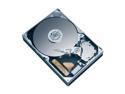
Pros: Bought the 20Gb PS3 and installed this HDD in 3 minutes!!The 60gb PS3 costs more than the total of a 20gb PS3 and this 120gb HD combined. Hmmmmmm....TWICE the storage for less money than the best PS3 set up availabe....No brainer!! and I just sold the 20gb that came in my PS3 originally for $30....further improving the financial benefit of going this route.
Cons: NONE!!! The swap is so easy a monkey could do it!! Just google PS3 HDD Upgrade and follow the simple instructions (with pictures) and BAM 120gb PS3!!!
Overall Review: DO NOT be afraid to attempt this modification unless electronics tend to explode when you touch them...LOL
Works perfectly on Win 7 64bit and SSD drives- 4k alignment enabled
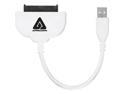
Pros: Very simple and effective tool for upgrading from a 5400 rpm laptop HDD to a SSD or faster HDD. You have to enable the 4k alignment option in advanced settings to copy to a SSD properly, so that it doesn't bog down the SSD speed(and increase wear) due to Mis-aligned reading and writing of data on the drive(VERY IMPORTANT). Also you need to hook up the drive with the cable and plug it in to a USB port FIRST for the software to launch correctly in Windows 7. The price is great, considering what it would cost to have the drive copied by a computer shop tech.
Cons: The cable adapter is a bit short, but not a deal breaker...
Great seller with Awesome products!
This seller has went above and beyond to make me a happy customer. I ordered the wrong size(my fault) and he allowed me to exchange with no hassles and only charged me $5 S/H! The quality of his product is outstanding, and he takes care of his customers! I will buy again!


