

Your Browsing History


DON J.
Joined on 04/13/04
0
0
product reviews
- 8
I Love This Monitor
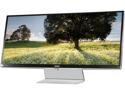
LG 34UM95-P Black 34" Class QHD UltraWide LED Backlight LCD Monitor IPS Panel 320 cd/m2 DFC 5,000,000:1(1000:1), Dual HDMI / Dual ThunderBolt ports
Pros: This is a great all-round monitor for work and gaming. It has plenty of screen area to spread my windows out when working (software development). The panoramic (21:9 aspect ratio) form factor and size fills my field of vision while playing games--without any bezels getting in the way to spoil the experience. It has almost a million pixels more than the 2560 x 1600, 30" monitors with a similar pixel density. I haven’t had any compatibility problems with the games I play (Battlefield 4, Metro Last Light, STALKER series, and Left 4 Dead 2).
Cons: The factory-supplied stand is exceedingly lame. Buy a 30 lb. rated VESA mounting arm to go with this monitor. You'll be happy you did! Powering down the monitor is a little quirky: According to the on-screen help, the monitor should power down with a long press to the joystick control on the base. That doesn’t seem to work, although power-on does function that way. Maybe I'm doing it wrong. Anyway, I have to bring up the root menu (what you get with the click while the monitor is on) and then click the joystick forward to select the power-off command. This can be annoying if the computer shuts off the video feed before you can turn off the monitor because you then have to wait for the monitor to show the video signal missing message, which re-activates the screen, to bring up the menu.
Overall Review: I had both the LG 34UM95 and the Samsung UD590 monitors side-by-side on my desk. Even though the Samsung is a 4K (3840 x 2169 native resolution) monitor and the LG 34UM95 isn’t (3440 x 1440 native resolution), the 34UM95 was the hands-down winner for me. I’ll admit that maybe it’s an apples-to-oranges comparison because of the different panel technologies used in these monitors. But because of the IPS panel, the LG appeared a lot sharper and the colors more vibrant. The Samsung just seemed like more pixels crammed into a smaller space. I’m not knocking the Samsung UD590 because it’s still a great buy, but the LG 34UM95 suited my purposes better. IMO, the only monitors out now that beat the 34UM95 are the 32-inch 4K monitors from Dell and Asus, but those cost almost two-and-a-half times more than this one. If you can’t spring for a high-end 4K monitor, then I would seriously consider one of these.
5/19/2014See more detail
Not like the old SpotCool
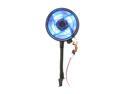
Antec SpotCool Blue LED System Cooler
Pros: Similar design to the old SpotCool.
Cons: Antec started using a cheaper goose neck that doesn't work nearly as well as the old one.
Overall Review: I have used several of the old Antec SpotCools in past builds. A fan bearing went bad on a SpotCool in one of my old systems, so I ordered a new one from Newegg. Apparently, Antec has started using a cheaper goose neck assembly that doesn't stay where it is bent. So what's the point of that? Don't mess with a good thing. I'd rather pay a few bucks more for a SpotCool that does what it's supposed to do.
7/29/2013See more detail
Update to my review from 9/26/2013. Worked great for 3 years and 9 months, then it died.
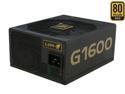
LEPA G Series G1600-MA 1600 W ATX12V / EPS12V SLI Ready CrossFire Ready 80 PLUS GOLD Certified Full Modular Power Supply
Pros: Inexpensive. It worked great powering my water-cooled, overclocked, quad-GPU monster system.
Cons: It died after 3 years and 9 months. The standby power is working, but it just decided to stop powering on the other day. An electrical burning smell comes out of the box when I hook it up to a PSU tester and try to activate it.
Overall Review: I suppose one gets what they pay for. This PSU had an impressive review from Jonny Guru and I was impressed when I installed it in my rig. All the PSUs I have used in my overclocked systems for the past 15 years are still working, except this one; the first PSU I have owned that died on me. I would normally chalk it up to just bad luck, but seeing so many other reviews posted here with the same longevity problem, I thought I'd chime in with an update. My advice: 1600 watts is a lot of power, so spend the extra $200 on a better-built power supply from another manufacturer.
5/22/2017See more detail
Great Upgrade From My C2Q
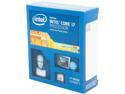
Intel Core i7-4930K - Core i7 4th Gen Ivy Bridge-E 6-Core 3.4 GHz LGA 2011 130W Desktop Processor - BX80633i74930K
Pros: Built-in Support for PCI-E 3.0 which greatly improved the performance on my two Radeon HD 7990 video cards. One heck of an improvement over my old over-clocked Intel QX9650 (Core 2 Quad) processor...One would hope, right? ;)
Cons: No cons as far as I'm concerned.
Overall Review: I just built a new system using this CPU, the Asus Rampage IV Extreme motherboard, and 32GB (8GB x 4 DIMMS) of Corsair Dominiator RAM @ 1866MHz. I easily over-clocked this chip to 4.6GHz @ 1.42v vcore by bumping up the multiplier only. Stable over-clock tested with ADIA64 and OCCT Linpack torture tests using 2GB memory blocks for each of the 12 threads. The core temps averaged from 58C to 62C under water cooling during testing. It looks like I'm going to need a lot more voltage to get beyond 4.6GHz with the stability I prefer. A very satisfying purchase.
9/27/2013See more detail
Excellent Power Supply
LEPA G Series G1600-MA 1600 W ATX12V / EPS12V SLI Ready CrossFire Ready 80 PLUS GOLD Certified Full Modular Power Supply
Pros: The review and technical analysis at Johnny Guru says it all regarding this power supply. Insanely clean and stable power delivery. I am very happy with this unit.
Cons: Two caveats that aren't really cons, but you need to be aware: First, the small form factor can cause the fan to be rather loud when this PSU is under a heavy load. Second, I would not use this PSU if your intention is to incorporate two, dual-GPU graphics cards (e.g. AMD Radeon 7990 or Nvidia GTX 690) into your rig that you want to over-clock. The PCI-E rails are rated at 30 amps each. Which, will deliver 360 watts on a rail. According to reviews I have seen, a single Radeon HD 7990 can pull 350 watts at full load without being overclocked. That doesn't leave any room for overclocking. I know this since my rig has two 7990s in CorssFireX. If your running single GPU cards (even Nvidia Titans), then you'll have no issues hooking up all four of them to this beast of a PSU (one on each 30 amp rail.)
9/26/2013See more detail
Still chugging away after all this time.
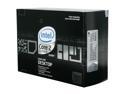
Intel Core 2 Extreme QX9650 - Core 2 Extreme Yorkfield Quad-Core 3.0 GHz LGA 775 130W Processor - BX80569QX9650
Pros: I've been running this CPU in my DFI Lan Party X48 T3-RS motherboard at 3.83GHz (water cooled) for nearly five years now. It won't die. It's faster than the "new" Xeon workstation I have at work. The most satisfying purchase I've made in a CPU.
Cons: I'll admit, it's getting a bit long in tooth. Time to upgrade! :)
Overall Review: Bought mine in November of 2008 just before the next generation of Intel CPUs were to be released. I walked into a local bog-box store retailer one day and saw a hand-written sign advertising the QX9650 for 50% off retail price. I couldn't pass it up!
8/30/2013See more detail