

Your Browsing History


Brian J.
Joined on 09/05/15
0
0
product reviews
- 10
Good Cooler
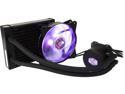
Cooler Master MasterLiquid ML120L RGB Close-Loop CPU Liquid Cooler, 120mm Radiator, Dual Chamber RGB Pump, Dual MF120R RGB Fans, RGB Lighting for AMD Ryzen/Intel LGA1200/1151 LGA 1700 Compatible
Pros: Very Quiet. The RGB on the fan and block look very cool and are easy to control with the included controller. It's keeping my CPU very cool.
Cons: The biggest issue I had was with with how the mounting hardware is packaged. There are a lot of similar looking, but significantly different screws all in the same bag. It took me a good bit of time to figure out which screws were needed to mount the radiator. The instruction book was almost completely picture based. This is probably good for a someone who has a good idea as to what they are doing, but not very helpful for first timers.
Overall Review: This was my first time installing a water cooler, and for the most part, it was a good experience. What I would change: If Cooler Master sees this, my recommendation would be to separate the mounting hardware into separate, smaller bags labeled with their corresponding part letter from the instructions. I would be willing to pay a few bucks more for that simplicity. I would also suggest putting some reference to the Cooler Master YouTube channel in the installation manual to look up an installation tutorial. I understand the desire to keep the instructions concise but having other outlets would be helpful. What I like: Now that I have the cooler installed, I am very happy with it. It is so much quieter than the old heat sink/fan combo that was in it and is running a few degrees cooler. I am enjoying being able to change the colors on the fan and water block. I have a USB 3.0 expansion card that uses a molex power connector, which provided a good opportunity to plug in the controller (with the provided power/pass through cable) near the expansion slots, so I have the RGB controller sitting outside of the case. It is very easy for me to change colors on a whim. This cooler came with all of the hardware pieces needed to make it work with almost any current processor/socket. Cooler Master seemed to try very hard to make this cooler a one size fits all product, which I appreciate. I suspect I will continue using this cooler when I upgrade my motherboard/CPU in the next year or two.
4/5/2019See more detail
They're Case Fan Screws
APEVIA FS-30BK Case Fan Screws (Black)
Pros: They do a good job of holding fans to cases. The dark color works well with dark cases .
Overall Review: They get the job done and they don't stick out like a sore thumb like unpainted ones do.
5/23/2020See more detail
So Far, So Good
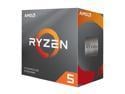
AMD Ryzen 5 3rd Gen - RYZEN 5 3600 Matisse (Zen 2) 6-Core 3.6 GHz (4.2 GHz Max Boost) Socket AM4 65W 100-100000031BOX Desktop Processor
Pros: It's fast!
Overall Review: I upgraded from an i5-2320 to this processor. Wow, it is so fast in comparison! I like the Wraith Stealth cooler that came with it. I am probably going to put in my AIO once I can get an AMD mounting kit for it, but I wouldn't complain too much if I got stuck with using the Wraith Stealth.
4/28/2020See more detail
I Like This Motherboard
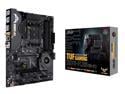
ASUS AM4 TUF Gaming X570-Plus (Wi-Fi) ATX Motherboard with PCIe 4.0, Dual M.2, 12+2 with Dr. MOS Power Stage, HDMI, DP, SATA 6Gb/s, USB 3.2 Gen 2 and Aura Sync RGB Lighting
Pros: It has built in bluetooth and Wi-Fi. It's very easy to install if you remember to mount the CPU and CPU fan before mounting in the case. It works with the CPU I wanted to install. The included user guide is actually helpful. There is an abundance of SATA connection points. I really like the lock/unlock mechanism on the PCIe x16 slots.
Cons: The standoffs on the CPU cooler backing plate do not fit snug into the holes on the motherboard.
Overall Review: I decided to upgrade my CPU and was in need of a new motherboard to go with it. There were a lot of options out there, but I went with this board because it was in my acceptable price range, it could accommodate the CPU I had decided on and it had built in bluetooth. I quickly installed the board and CPU, but ran into a small problem when trying to mount the cooler that came with the CPU. The backing plate was loose and the backing plate standoffs don't fit snugly into the holes on the motherboard, so it fell back into the case, too far for the screws on the cooler to reach. I had to remove the board and mount the cooler while holding the backing plate in place. From there, re-installing the board was quick. The user guide (an actual book, not a stapled stack of paper) that came with this board is well laid out. I went step by step to find all of the connection (audio, led, fan, etc) points I needed and had everything setup in short order. All told, I really like this board. The only complaint I have is about the backing plate, but that can easily be mitigated by planning ahead a little. If I were to build another machine, I would absolutely consider this board. My experience building a machine is fairly limited, but I found this board easy to work with.
4/28/2020See more detail
It's a Perfectly Functional DS4 Controller

DualShock 4 Wireless Controller for PlayStation 4 - Jet Black (CUH-ZCT2)
Pros: It's easy to pair and use. The rumble on this feels just like the Dual Shock controllers for PS2. Good battery life.
Cons: The plastic seems to have a bit more give than what I was used to with the PS2 Dual Shock controllers. Every now and then it feels like the two sides of the controller are "clicking" back together. I'm not a fan of the shape of the analog sticks. The concave thumb pads feel weird and I'm never completely convinced I am moving the stick in the direction I want to.
Overall Review: I bought this to play old PS1/PS2 games on my PC with emulators as well as to use with my Steam library. This controller is easy to pair with my PC and works seamlessly with Steam. For emulators and games from non-Steam shops, some extra fiddling (and a program) is needed to trick your PC into thinking that an Xbox 360 is being used and to process the inputs accordingly. This is completely a Windows issue, so it shouldn't be taken as a con of the DS4 controller. I have been getting 10-12 hours of gameplay before I recharge, but have not had the batteries run dead yet. I'm sure this controller works very well with an actual PS4, but I have never owned one so I can't speak to how well it works with a PS4. For use with a PC, it works very well.
12/26/2019See more detail
Good Upgrade From 2.4GHz Only Router If More Than 100Mbps Aren't Needed
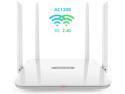
Wavlink AC1200 High Power Dual Band 2.4G/5GHz Wireless Router, Gigabit Ethernet Wi-Fi Router, IEEE 802.11ac/a/b/g/n, 4 x 5Dbi High Gain External Antennas, Smart LED Indicator, Support WPS, WPA/WPA2
Pros: Relatively simple setup. Very strong WiFi signal. Simple settings interface (once you can get into it) that is good for those who are less tech savvy.
Cons: WAN/LAN ports are only 10/100 Interface is very limiting for advanced users. The URL for the interface is useless if the assigned IP address is changed.
Overall Review: After dealing with congestion in the 2.4GHz band, I decided to give this router a try to see if I could get better performance in the 5GHz band. The package included the router, a power adapter, and a quick setup guide. Within 5 minutes, I had this router plugged into my modem and my 5GHz capable devices were connected to the network. Speed tests run on my 5GHz capable devices now have speeds 2 to 2.5 faster than they ever did on my old 2.4GHZ modem/router. I am also getting an extra 15-20 feet in range compared to my old router. This router works very well, but I would be a bit cranky if I had it connected to my PC with ethernet as my internet connection tops out at 200Mbps, but this router only supports up to 100Mbps on both the in and out ports. Fortunately, I can still use my old modem/router for this purpose. I won't complain too much about this as it is very clearly noted in the product specs and overall does not negatively affect my setup. The one place that warrants dropping an egg is the web interface to update settings. If the router's IP address gets changed from the default (which will happen on the default dynamic setting or if you need to set a static address to prevent conflicts on other devices on your network), the URL in the quick start guide no longer works. At that point, you have to figure out what the IP address was changed to and then enter that as the address in your browser in order to review and change any settings. Overall, this device is great if you are trying to add the 5GHz band to your network but are not needing to have speeds over 100Mbps. If you have a higher speed internet connection, you will want to look for something else.
11/4/2019See more detail