

Your Browsing History


Ross A.
Joined on 02/28/05
0
0
product reviews
- 9
All good, nice card.
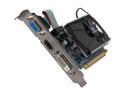
SAPPHIRE Radeon HD 6570 1GB DDR3 PCI Express 2.1 x16 Graphics Card 100323-2L
Pros: This was a plug and play experience as the last card I had was a Radeon Saffire, as well. It picked up the old driver and things were up and running at boot up pretty much. (Win7 is pretty good this way). I went to the AMD site and downloaded the newest drivers, 64 bit ones, after the initial install. Clearly the quality of the images on screen were much improved compared to my old video card (HD3650) and the Performance Test score improved 1.1 points which was nice.
Cons: None.
Overall Review: I run two monitors, BTW, and I read here where people were talking about the spacing between the HDMI and DVI outputs - so I nixed the idea of an adaptor and instead purchased a hybrid cable (DVI to HDMI) that ran from the card to my second monitor. This worked out perfectly so thank you all for that info!!
2/27/2013See more detail
Dell 2719H and the Rabbit Dell Rabbit Hole

DELL P2719H 27" Full HD 1920 x 1080, 60 Hz, 8 ms, 16:9, LED LCD IPS Monitor
Pros: Good looking monitor, good picture and fairly priced. I liked it so much I bought two for my double monitor setup. But....
Cons: Dell makes nice monitors IMO. And this is no exception on so many levels. However, you cannot DAISY CHAIN this monitor. It has an HDMI input, a DP input, a USB input.... BUT NO DP OUTPUT. Since I wanted to daisy chain my monitors I was looking at the HDMI and DP jack - never thinking that they are BOTH INPUTS. As to the Dell Rabbit Hole comment, there is absolutely NO WAY you are going to talk to a DELL TECHNITION ABOUT A MONITOR UNLESS YOU OWN A DELL PC. NO PC ID TAG, NO SUPPORT. And this is maddening because in the SPECS column regarding this monitor it simply says 'HDMI and DP PORT'. It does not say that either are inputs or outputs. And of course you need an OUTPUT PORT to daisy chain two monitors. OK, so, to those of you buying this for a single monitor or something to add onto a laptop with a monitor output, you are all set, carry on, please ignore my disappointment. To those of you looking to daisy chain two of these 2719H monitors together, forget it.
Overall Review: On one level, for a particular market, I would say buy this monitor. To the ppl buying this thinking you can daisy chain them together, look elsewere or buy a video card with two separate outputs. 2 eggs because Dell should be more specific describing the port connections - or at least open their Technical Support to ppl shopping their monitors.
6/12/2019See more detail
Super Fine Memory!
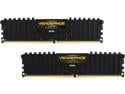
CORSAIR Vengeance LPX 32GB (2 x 16GB) DDR4 3200 (PC4 25600) Desktop Memory Model CMK32GX4M2B3200C16
Pros: Easy install, good fit for my Designare Z390 MB
Cons: None. I do see where some ppl are complaining about getting it to it's rated capacity but this is a MB Bios issue, not a problem with the product. I hope they sort their problems because this memory performs at it's rated speed without a problem. Thank you , Corsair!
Overall Review: Highly recommended. I actually came back today, 9 months after initial purchase, to check the price. I'm ready for two more.
3/9/2020See more detail
A clever and QUIET i7 cooler
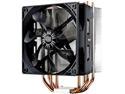
Cooler Master Hyper 212 Evo CPU Cooler, 4 CDC Heatpipes, 120mm PWM Fan, Aluminum Fins for AMD Ryzen/Intel LGA1200/1151
Pros: The install was quick but I admit you must be somewhat handy. The FAN can and MUST be removed to install this cooler, and then there's an 'X' mounting bracket that must be attached to the MB first that will accept the cooler base. It's clever how it attaches and depending on you MB you can reverse the fan's position. I left mine blowing across the aluminum fins towards the back of the case and into the case fan that was set up to exhaust the case air. (My dual space AMD graphics card fit just below it, with it's two fans blowing upward, no problem.) It is SUPER quiet. My case, BTW is rather large, a Fractal Design case, and my MB is a full on ATX size, a Gigabyte Designare Z300. I've added two top of case fans that are exhausting air as well. The whole package is quieter than my older Intel Core 2 Quad PC build with the stock Intel fan.
Cons: It might take a minute or two to figure the install out, and it is rather large.
Overall Review: I love this cooler, it's prefect for my needs and is SUPER QUIET.
6/24/2019See more detail
Great install, very quiet, plenty of powerfor my DAW.
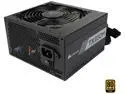
CORSAIR TX-M Series TX650M CP-9020132-NA 650 W ATX12V v2.4 / EPS 2.92 80 PLUS GOLD Certified Semi-Modular Active PFC Power Supply
Pros: A simple install into a Fractal Design Case, plenty of modular hookup harnessing, and delivers the power I need.
Cons: None
Overall Review: Buy it, Corsair has made a solid product here, IMO.
6/18/2019See more detail
Simple to setup, many features.
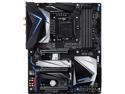
GIGABYTE Z390 DESIGNARE LGA 1151 (300 Series) Intel Z390 HDMI USB 3.1 ATX Intel Motherboard
Pros: Gigabyte always makes a solid product, IMO. I've currently have another Gigabyte MB that still serves me well after 6 years without fail or hiccup. This new board has Thunderbolt and USB 3.1 inputs, plenty of DDR4 slots (4), things I need for my audio recording needs.
Cons: There do seem to be some quirks, but honestly, this may all be related to the Win10 recent update (Win10 1903) as of June 14, 2019. It's hard for me to tell if this is going on, or if it's the MB getting sorted after sitting on a shelf for a few months. Case in point, the USB peripherals seem like something to keep an eye on. For example after a few restarts, my USB iLok key was unreadable to the OS and then later my mouse. A quick unplug and reinsert seems to have resolved things. (Here I should point out that although I had set my USB hubs to stay on without the energy saving turnoff that WIN10 installs by default, the new 1903 OS update set them back to the default setting.) Was it Win10 or is it a bad USB hub or a faulty connection? So, like I said before, I'm keeping an eye on the USB hubs. Also I needed a CD burner and picked up an internal LiteOn unit, model iHas324 with SATA connection, for my work. I thought the player was bad at first because Win10 could not find the device. I even called MS about this yesterday (June 15) and gave them full access to my PC. No Joy, and in fact they are scheduled to call me back this Tuesday...BUT, after the call...I unplugged the SATA cable at the MB SATA input and reinserted it into a new SATA input.... and the OS found the device and it works perfectly. I have yet to reinsert it into the original SATA port but I will circle back and do this. I actually suspect it will work. Also, another issue that two other ppl have discovered in their reviews of this MB: the HDMI and DP ports on the MB are probably NOT what you think they are. The HDMI is an output so it will light up your monitor with an HDMI input. However, the DP port is an input that is associated with the Thunderbolt out (I can't /won't take the time to explain it!) - DO NOT expect it to send signal to your DP input monitor. Hm, a disappointing discovery for me because I am running a two monitor setup and I thought the connection would be a simple process. Note: It COULD be simple if you bought a monitor with an HDMI and DP input AND A DP OUTPUT that you could then plug into the next monitor with a DP input. Haha, reading the fine print did not help either. So I'm out another $150 for a dual HDMI video card....
Overall Review: Alright, you can see I'm a little thick-skinned about problems with the physical parts as they begin doing their digital work. In part this is because I have had a good experience with Gigabyte in the past, but also because setting up a DAW is always a thoughtful process. Call me foolish but I have seen that there always seems to be a slight learning curve of the various parts as they interface and begin the process. I will circle back in a month or two and let you know how this works out. My 4 egg rating is based on the fact that the monitor connections are not detailed clearly (or otherwise!) in the product description.
6/16/2019See more detail