

Your Browsing History


Larry W.
Joined on 04/18/07
0
0
product reviews
- 8
Fractal Design Focus Installation Tips
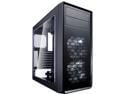
Fractal Design Focus G Black ATX Mid Tower Computer Case
Pros: Nicely constructed. Compact. Light weight. Two CD Rom drive trays..
Cons: A little tight in places for cables. Sparse on installation instructions. Need additional cables for old motherboards (fan and USB 3.0 header)
Overall Review: I bought this because my 8-year old Antec case was rusting, it was too large and heavy, and I was upgrading my hard drive to SSD. I like the case but here are some installation tips: 1. The installation instruction sheet suggests an option of routing the motherboard power cable back through the slot next to the cable channel before installing the motherboard. If you do this and have a fat power cable, you won't be able to get additional cables in that channel and be able to close the right panel. Recommend checking that out before you do that. There is plenty of room in the opening to route your cables, so don't think you have to use the channel or slots to tie down all your cables. 2. Consider installing the motherboard power cable onto your power supply before installing your power supply in the case if you have a modular power supply. The room between the power supply and the hard disk drive cage is a bit tight. 3. Don't install a rear outlet fan or CD Rom drives before installing the motherboard. There's not enough room and you will be taking out the fan and CD Rom drives to allow you to put in the motherboard. I thought I could get ahead of the process by doing this and it caused me to repeat some of my installation. 4. Don't push your CD Rom drives too far back before reinstalling the front case panel. You won't get them back through the openings if you do this. I learned the hard way. 5. The hard disk drives go in backwards. You put the connection tabs toward the back (right side of the case) and insert them into the cage that way. This was different from what I was used to and took me a while to figure out. 6. If you only have one input fan header on your old motherboard, you will need to buy a splitter cable to run both of the provided front fans. 7. If your motherboard doesn't have a USB 3.0 header, you will have to buy a 3.0 to 2.0 converter cable to use both USB slots on the top of the case. 8. The hard drive cage and the SSD mount are too far apart to use one power cable. I am using one more cable than I had with my old case (but I didn't have the addition of the SSD in the old case). If I had known the above, my installation would have been a lot smoother and quicker. Other than that, it's a nice compact mid-tower ATX case and seems well-designed and built.
2/10/2020See more detail
So far, so good
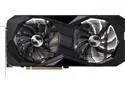
ASRock Challenger D Radeon RX 6650 XT 8GB GDDR6 PCI Express 4.0 Graphics Card RX6650XT CLD 8GO
Pros: The installation of this card went very well ... except for one thing. My previous graphics card didn't require the extra power cord and I forgot to connect one to the new card. Imagine my disappointment when the computer failed to boot! Solution: Install the extra power cord and, wham, watch it boot up. A side benefit of the new card for me was that my Asus motherboard was having problems restarting. It would restart fine after a Microsoft Windows update or something similar, but it would freeze on the initial screen when doing a manual restart. It would, however, always work if I did a shutdown and then started the computer. I was surprised and delighted to find out that the problem went away when I installed the new graphics card, and now it seems to always restart properly. I am getting just under 60 fps running Microsoft FLight Simulator, Avengers, and other games. It turns out that these games are set to limit the refresh rate to my monitor's maximum refresh rate of 60 fps. I am now interested in purchasing a new monitor with a higher refresh rate to see if there is any improvement. The prices for gaming monitors have really come down and seem to be very reasonable. So far I am very happy the new card. I think it's a good improvement over my Nividia 1060 TI. \
Cons: My Nero Score program wasn't that impressed with the GPU. It gave me a System AVC GPU score of 1168 (below average) and a Metaverse GPU score of 3805 (below average). My CPU is an I7-Core 10700
Overall Review: I would recommend this card given the price point versus other graphics cards if you have an older, less powerful card. Looks like a pretty good upgrade.
5/16/2023See more detail
Runs great. No problems
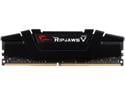
G.SKILL Ripjaws V Series 16GB 288-Pin PC RAM DDR4 3200 (PC4 25600) Desktop Memory Model F4-3200C16S-16GVK
Pros: Price was very reasonable.
Cons: None
Overall Review: I have purchased many G.Skill memory modules in the past and this is the reason I went with them again. All of them have functioned perfectly.
9/16/2020See more detail
Works great, runs cool
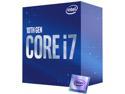
Intel Core i7-10700 - Core i7 10th Gen 8-Core 2.9 GHz LGA 1200 65W Intel UHD Graphics 630 Desktop CPU Processor - BX8070110700
Pros: Came with stock CPU cooler that went right in. Already coated with thermal paste. My CPU temperature is currently 89 degrees F., barely more than room temperature. Using Fractal Design case with loads of fans.
Cons: Could be cheaper. This was the most expensive part of my upgrade.
Overall Review: Still hanging in with Intel.
9/16/2020See more detail
ASUS TUF Gaming Z490-Plus with WI-FI
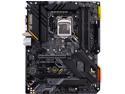
ASUS TUF GAMING Z490-PLUS (WI-FI) LGA 1200 (Intel 10th Gen) Intel Z490 (WiFi 6) SATA 6Gb/s ATX Intel Motherboard (Dual M.2, 12+2 Power Stages, USB 3.2 Front Panel Type-C, Intel WiFi 6 & 1Gb LAN, Aura Sync)
Pros: Works very well.
Cons: Some connections are a little hard to reach such as the fan connectors and the front panel connections. My fingers had a hard time pushing them down. Scared me the first time I booted as it couldn't find a boot drive.
Overall Review: I am very please with this motherboard. I replaced an almost ten-year old Intel motherboard and didn't have any major problems (except missed connecting my CD/DVD rom drives to the power supply). When I turned it on it scared me as it couldn't find a boot drive. Turns out you have to set the default boot method to legacy bios rather than UEFI in the bios setting to get it to recognize the boot drive. This is required if you are using an existing drive that is configured using legacy bios. I don't think this would be a problem if you are building a new computer and are using a brand new drive. The instructions could have provided more information on this. They are pretty much all pictures and don't go into a lot of detail on the difference. Once I had figured this out, the computer booted right up. Also, there is a bios update on the ASUS website but when I try to install it, it says that it's not applicable to my motherboard. I haven't figured out what's going on with that.
9/16/2020See more detail
Worked like a charm as a laptop hard drive replacement
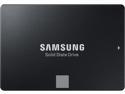
SAMSUNG 860 EVO Series 2.5" 500GB SATA III V-NAND 3-bit MLC Internal Solid State Drive (SSD) MZ-76E500B/AM
Pros: Comes ready to work. All it needs is operating system installed. Fast
Cons: None
Overall Review: This is second HP Pavilion Laptop that I have replaced the hard drive on. The laptops were so slow that they were almost unusable because of their slow hard drives. Now they are very serviceable and we can continue to use them for the foreseeable future.
7/8/2020See more detail
seller reviews
- 1
Initial shipment sent to wrong address
Initial shipment sent to wrong address. Seller shipped a replacement item which was received. Item works as expected when it was received but the initial error caused about two weeks' delay in getting product. Newegg intervened and followed up well.
On-time
Delivery
Product
Accuracy
Customer Service
Satisfactory
5/5/2020See more detail