




 here!
here!
I’m your shopping assistant for PC builds, upgrades, and everything tech.
Got questions? Ask away!
Start a conversation
here!
I’m your shopping assistant for PC builds, upgrades, and everything tech.
Got questions? Ask away!
Start a conversation

Joined on 12/20/02
Z690 UD + 12900k
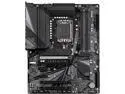
Pros: Price 19 phase VRM Runs the 12900k DDR4 support Quiet Good amount of heatsink for the VRM feels heavy and well built. Nice amount of features for cpu overclocking Memory runs 3600 c14 14 14 (should do more, see cons) Gives me great frames in BF 2042 on my 6900xt @ 1440p You can disable the E cores Lots of boost options for P cores i have yet to play with (cpu is very fast out of the box) Plays nice with my 4400mhz c19 19 19 patriot viper 16gb kit x2 for 32GB. (i did have to use 1.45volts on it for 3600mhz a bit more than with other builds)
Cons: I had to disable RST VDM for the bios to see any of my NVME drives outside of the raid manager did still show the drives so i knew they were working. At this time i am unable to find io voltage for the cpu limiting my ddr4 to just 3600mhz.(should do 4000mhz c14 14 14 according to others) Limited support / very few people own z690 gigabyte boards at this time. Gigabyte bios update revisions might be lacking some function or quality of life aspects as gigabyte often only really spends good amount of time on the release bios (dumb i know) Gigabyte forums seem to be pretty dead and from what i have seen do not offer any gigabyte support there.
Overall Review: Over all it seems to be a solid platform for just 200usd, and while that's not exactly cheap i do think its a pretty good value compared to what else is available at this time. I like the fact it has a pretty beefy VRM with out all the extras i don't want/need. like "highend audio" or any other items that bloat the price to oblivion just to run my cpu with good clean power. I knew gigabyte has bios issues from past builds years ago. But not having IO voltage control seem like an oversight, however it is possible they just linked it with something else or its not used any longer, i really cant say at this time. At any rate going from 3200mhz c14 to 3600 c14 had very minimal effects on game performance. So the bottleneck might be some place else in the system. Z690 is suppose to support bclk oc and maybe that could help, i know it did on my x299 platform.
APEX the pinnacle of overclocking board!
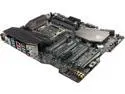
Pros: It works (sort of) overclocking is easy bios has a lot of options and has good fan control even if it is a bit clunky. Have my i9 7980XE @ 4.8ghz on all 18cores. With no delid and only h100i for cooling. 32GB 4000mhz 16,16,16, feels really really good.
Cons: USB ports are flaky. they all seem to work well with keyboards and mice, but not so good with my capture cards. infact only one port will work with them. The type A port next to the usb c port is the only port that has proper signal. Allowing my capture cards to work proper! The other ports seem to work OK for the most part but i have had some USB flash drives get corrupted when using other ports! I have tested with no overclock and the board seems to be have the same.
Overall Review: I have had issues with other recent intel boards as well with usb ports. how ever so far the 2 amd systems i have seem to work great on all usb ports. I do not know how many others are having issues but i know of at least 2 others that have capture card issues on there intel based systems. \o/ My old x79 intel system works great as well all usb ports work with capture cards. sooo for what its worth there you go i shared my experience.
32" 6k 165hz / 3k 330hz
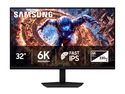
Pros: Its reasonably low power - light weight monitor - looks good. 6k native 165hz looks good lots of room to work with. 3k native 330hz motion is very clear and crisp. tbh i thought only oled was able to achieve this type of fast motion clarity. Pixel response is impressive to me. Was "on sale" at $1350 (1450 after tax)
Cons: 6k is a bit much for the 7900xtx in demanding new games. (old games run great and look amazing) 5090's are $4,500 so i will be waiting for next gen gpu's. Display has issues with handshaking with the gpu. After some research it looks mostly due to having a secondary monitor plugged into the gpu. apparently both amd and nvidia have to bridge the bandwidth of 2 ports into 1 and while doing this it reduces the total bandwidth of the gpu, meaning having a secondary display plugged in limits the 6k display down to 120hz. Problem is the monitor just says no signal and wont try any lower hz. same for dual mode 3k. So swapping dual mode often will require a system restart to pick up the display again. Work around is use either 2 unlike branded (amd intel nvidia) gpu's in your machine or use the igpu from the cpu. for most desktops this is less than ideal. (even if you have two capable gpus in the system apparently they software lock you from running 2 of these displays one on each gpu) Very short display port cable 3ft. Some screen flickering can happen on occasion. (probably due to the major bandwidth required to run) this could be from the gpu i'm using. but both displays did it very occasionally maybe only a couple of times a day. Would have much rather gotten a 32" 5k monitor (they dont offer 5k other than 27") as it would be a bit easier to run for my current gpu and i would have been able to read things with out any desktop scaling. 6k is just too tiny to read efficiently unless you are very close. And even then text that is 1 pixel is just a bit idk what you would call it "cloudy" ish? the pixels are so tiny they tend to bleed a bit i guess. 125% scaling does the trick for me at about 2.5ft away from the display. *update* After doing DDU / installing drivers text now looks as it should at native 6k without using scaling. I still use 125%. Windows was acting weird with some scaling for awhile so i'm guessing that was causing some weirdness. Wish this would have came with a gloss option vs the mat finish. on the second display i actually left the protective plastic over the display and it looks much better... If you watch any reviews on this monitor you will see the viewing angles are not perfect, light bleed is very respectable for an ips panel. Color seems fine and the contrast looks very nice much like what an oled would look like i'm sure. (dont currently have oled to compare) Trouble shooting was less than ideal when the display does not get a signal.
Overall Review: Samsung does not have a good track record for me. But they are the only one that offered anything close to what i was looking for and this managed to get close enough (with my current asus monitor half dead) to pull the trigger. Value of this monitor feels like it should be a sub $1000 monitor but ok its new tech so i guess sure 1350 is somewhat acceptable? Any more i would have not bought it. We will see if Samsung does me right with this display and lasts over 2 years... mind you it only has a 1 year warranty (not that i would count on samsung regardless.) Newegg ships in factory box no outer protection. mine had a thumb sized hole in the box directly center of where the front of the monitor was. Luckly this did not hurt the display. Monitor came defective with a cluster of bad pixels around 60 pixels (mid right of display) in total like someone at factory nicked it with a wrench and shipped it out anyhow. (newegg did refund my first defective display with out hassle)
"it just works"
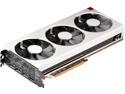
Pros: 3840x1600 killer card. Even in games that are not well optimized at all, this card still delivers acceptable performance. Mainly got this card to review it and for cities skylines with heavy mods. My vega 64 LQ was able to play 3840x1600 + 150% Super Sampling, Granted it was lower fps around 26 it looked good and was 100% playable. (26fps was at its worse zoom level) Gpuz reported 13GB vram usage and it did have some slight hiccups while moving at times not too bad tho. With this card i can run +200% SS and get 40fps (at the same worse scaling zoom) and have zero hiccup or stutters its just silky smooth now. This is with a city of 170k people and all tiles unlocked 500+ assets with extra shaders and lighting effects mods. Atlas is now playable on ultra settings at 3840x1600. Atlas is basically ark with new skin, and the fps is not good at that resolution, 1440p would be much better, but i can play it with resolution scale back a little bit and all is well mid 30's and feels very nice. Pretty certain that game is a worst case scenario.(by a landslide lol) All in all i would say this card is about 30% faster than my vega64LQ running at 1750-1800mhz core and 1050hbm. So not huge but 16gb is nice for mods and 1TB/s aint too bad either :)
Cons: This card should have been a liquid cooler at 750$ usd, they should have made a slightly slower card at 700$ with the same cooler. That way you would have more overclocking headroom and it would have been received by the media better. And really only would have been about 3% slower. And the liquid would have make it a down right 2080 killer on average.
Overall Review: Putting a cheap water block on this card should get temps down by a good 35c on a custom loop, should easy do 2000mhz possibly 2050-2100. Do wish they would have optimized it more for games sure. But it is what is. and its good enough for AMD until they can get out of debt. No clue how loud it gets as my pc is a nuclear reactor with a 7980xe @5.0ghz. And i can safely say my other fans are much louder lol. I am happy with the card as i wanted the extra vram and it works well for my resolution.
Easy to buy knowing WD reliability on there consumer drives!
Pros: s/n is marked on back of drive so you can locate bad drive off storage manager! They look really nice on your desk as a paper weight.
Cons: 1 of 6 DOA second one never worked proper (no errors) and died 2 weeks later, 3rd disk would not show fault but could not be used in array without missing files (unable to copy) files were usable just not copyable. Finally 3 years later it showed errors and can now find the bad drive. All drives worked fine on there own so was hard to tell what drive was bad.
Overall Review: I should have just sent them all back right away i paid 400$ each and really have not been able to make proper use of them. Shame this drive is the first out of many (32) or so drives that never had a issue other than being old and small :) I guess stick to the normal black drives, even the green drives have been ok to me.
Dont buy if you liked your RAT7

Pros: Look cool, Has a ton of promise over the RAT7 I own.
Cons: Zero quality. First two I got had major scroll wheel drag, Third one drag was tolerable and now only a few months of casual use less than 4 hrs/day. The scroll wheel will now scroll up at random on its own or even when your scrolling down... Combine with the left and right click buttons going out for everyone (as did my rat7) in less than a year. Its just not worth owning.
Overall Review: Hard to believe i still have my old ps/2 mouse i used to play StarCraft Broodwar on and it still works fine.... used that mouse every day all day for 3 years all the clicks still work..... Simply put madcats is selling a mouse that is about 15$ in actual value and charging you over 100$ Shame on you madcats good luck to you tho i'm sure your company will continue to grow and prosper lol.


