

Your Browsing History


James M.
Joined on 09/21/02
0
0
product reviews
- 29
Fast, silent, flawless hard drive
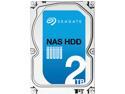
Seagate NAS HDD ST2000VN000 2TB 64MB Cache SATA 6.0Gb/s Internal Hard Drive
Pros: I tested this drive in the three applications that would be most useful to me, and possibly to most customers: as an internal PC hard drive, as an external USB 3 drive, and as a NAS drive (its primary target market). It so impressed me in every application that there will be no Cons in this review; if I overflow the Pros section, I will use Cons (and maybe even Other thoughts) for the overflow, with a clear note there to that effect. I started out just mounting the drive in the last remaining internal bay in my Antec P183 V3 case (it's obvious from my choice of case that silence is important to me; I also have a fanless Seasonic power supply, a fanless video card (I'm not a gamer), and a gigantic CPU heatsink so that I can use essentially silent fans - the noisiest thing in my PC is a 7200 rpm WD HDD), alongside a different model Seagate HDD, two Western Digital HDDs and two SSDs. One of those WD drives is the 1TB Caviar Black WD1002FAEX I mentioned earlier, 7200 rpm, 6.0Gb/s, with 64MB Cache, which for a couple of years has been my standard reliable, high-performance but affordable hard drive. All of my testing of this new Seagate drive compared it to that WD drive, as a possible successor. I have two of that same WD drive set up as RAID1 in the Synology DS212j NAS box which is the primary, central backup for all my computers. Seagate has done a LOT recently to eat into WD's reputation as the only manufacturer of reliable, high-performance, affordable hard drives, but I still feel a little radical even considering a Seagate to replace the WD Blacks (the existing Seagate in my PC is used only for local backup, so its performance isn't critical, and redundant backups on my Synology NAS mean its reliability isn't even critical - although it has done its job well for more than two years). The most obvious immediate difference is that the new Seagate doesn't make a sound, not that I can hear anyway. It might as well be an SSD for all the noise it makes. It's not as fast as they are, so I wouldn't use it (and didn't even test it) as my Windows drive, but it's just as quiet as they are for my purposes. As I've said in other reviews, I'm not a benchmark numbers geek. I care about whether a product does well what I need it to do, not how it scores compared to other products in performing a bunch of abstract exercises. But since I have limited time to spend on this review, and since I'm looking at this drive as a possible replacement for another specific drive, it made sense to do some limited benchmarking. In testing the internal PC and USB applications, I used ATTO's Windows Disk Benchmark, because it's simple, it's free, and it gives me as much information as I need. In the NAS, I just verified compatibility between the drive and the NAS and timed how long it took to fully repair the almost-full RAID using the new Seagate compared to one of the WDs that's been in the NAS from the beginning. Continued under Cons...
Cons: (This drive HAS NO CONS! This is a continuation of the review started under Pros.) Although this new Seagate drive doesn't have its rotation speed specified (others have said it's 5400 rpm, but I don't know), it's about 25% faster than the 7200 rpm WD, and it's a LOT quieter. In the ATTO Disk Benchmarks, with the two drives mounted internally side-by-side, the read and write speeds were around 140 MB/sec for the WD and around 175 MB/sec for the new Seagate. Impressive. (Read and write speeds are close enough together that it's not worth reporting them separately.) To evaluate USB 3 performance I bought a little Anker Uspeed USB 3.0 to SATA 3ft Converter Adapter Cable from another vendor (Newegg doesn't carry it) because it gets fantastic (and well-deserved) reviews and costs under twenty dollars. Again, the new Seagate was notably faster than the WD Black, especially when reading: around 140 MB/sec for the WD and around 175 MB/sec for the Seagate, the same 25% increase as when they were mounted internally. When writing in the USB configuration, there was no significant difference: both drives write at between 110 and 120 MB/sec, although the Seagate is in the higher end and the WD in the lower end of that range. I don't know enough about USB 3 to explain any of this; I'm just reporting what I got. Testing in the Synology NAS involved removing one of its WD Black drives and replacing it first with the new Seagate drive, and then with the original WD drive but reformatted in Windows to NTFS - so that the NAS would have to reformat it to the ext4 file system it uses internally, just as it had to do with the Seagate. Since the NAS got essentially a new drive in both cases, it had to repair the almost-full RAID 1 (785.59 GB used out of 912.45 GB total) both times. The RAID repair succeeded both times without a hitch, taking 3 hours with the WD and 3 hours 5 minutes with the Seagate, an insignificant difference. I couldn't think of any other testing to do in the NAS - just to make sure the new Seagate drive would work in it and that repairing the RAID didn't take an ungodly amount of time. That's enough to convince me that the new Seagate is a very attractive replacement for the WD Black in that application as well.
Overall Review: I haven't decided yet which of these three applications to use the new drive in - probably in the NAS to increase its capacity above 1TB (I'll have to buy another drive, though, to maintain the RAID 1 configuration). It's good to know that it's a great candidate for any of those applications if I need it. Of its three primarily selling points - that it's quiet, fast, and super-reliable, I can corroborate the first two. I'm as willing to take Seagate's word for its reliability as I am the word of any drive manufacturer, including WD. WDs are no longer the only drives I'll consider buying when performance matters; now Seagate has taken the lead for both speed and noise, and their credibility for reliability is as good as anybody's (the three-year warranty vs WD's five doesn't particularly bother me).
6/25/2013See more detail
Poor, non-adjustable white balance
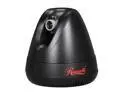
Rosewill RXS-3323 1280 x 1024 MAX Resolution RJ45 Pan/Tilt Day/Night Wired Network Camera w/ 2-Way Audio, Indoor
Pros: Resolution is good. It really is 1280 x 1024; the reviewer who said it's just 640 x 512 doubled is either mistaken or didn't set up the camera for high-resolution (or got a defective one). Ditto the large incremental moves when panning/tilting: that's all adjustable (down to a barely perceptible 1°) in the software if you take the time to find it. The use of white rather than IR LEDs is an advantage to me, because I'd much rather have true colors than invisible illumination. But... (see Cons)
Cons: White balance is WAY off - as bad as a cheap IR camera - and it is not adjustable; the only SW options are Auto and Hold. It snowed last night, regular, white snow, but the camera shows it looking like pink cotton candy. The only way I can make it white is by killing the color completely. I thought the lack of IR would mean true colors, but that's wrong; so you get the worst of both worlds: visible illumination and pink snow.
Overall Review: This camera is going back to Newegg.
1/30/2012See more detail
Can't handle daylight; intrusive, crippling Samsung "cloud" interface
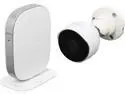
SAMSUNG SmartCam SNH-E6440BN Full HD 1080P Day & Night WDR 2 Way Audio Outdoor Wireless IP Camera
Pros: Great image after dark, even with IRs turned off, if there's any ambient light at all (street lights, normal floodlights, etc). With IRs, typical spooky B&W image; w/o IRs, good color even at night.
Cons: Image is completely washed out after the sun rises - totally white by 8:30 am in January - so it's completely useless outside during the day, even on an overcast day. Two cameras in a row did exactly the same thing, so it's not just a sample defect. If you insist on buying this camera, get a Newegg Premier membership first, because you'll need the free return shipping. I HATE Samsung's insistence that you control the camera through their cloud server. It's even worse than Razer's Synapse. There's very little you can do with just the camera's internal web page; you have to log in to Samsung's smartcam.com site to control the camera in your own house. Even through smartcam.com, control is very minimal. You're pretty much stuck with whatever setup Samsung wants you to have.
Overall Review: For just a little over half the cost, Hikvision makes FAR better cameras, the best home security cameras by far for the price. The 3-megapixel Hikvision DS-2CD2332-1 gives an amazing range of control directly in the camera, things like adjustable backlight compensation that I've never seen in a sub-$150 camera before, and spectacular images 24/7 with the IR turned off. It sees better at night than I do. And (unlike this Samsung) the Hikvision is ONVIF compliant, so setup in Blue Iris is nearly effortless.
1/23/2015See more detail
Useless - doesn't recognize NiMH batteries
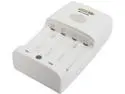
Maha Powerex MH-C204W 1-Hour Worldwide Travel Conditioning Charger for AA / AAA NiMH Batteries
Pros: none Well, they're cheap, but that just means they're not worth returning, so even that is a Con after all.
Cons: I tried several different brands of AA NiMH batteries, and it just flashed red for all of them, meaning (according to the instruction manual) that it doesn't recognize them as NiMH batteries or that they're internally shorted. All of the batteries measure a little over 1.2 V on a Fluke digital multimeter, so there's nothing wrong with them. It's the stupid, useless charger. Maybe it only works with their own brand, or only with new NiMH batteries, but that's NOT what the description says. It specifically recommends using it with old batteries, which mine are. I bought two of these chargers, and both do exactly the same, so it's not just a lemon.
7/9/2014See more detail
Amazing camera, worth three times the price
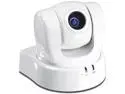
TRENDnet TV-IP612P ProView Pan/Tilt/10x Optical Zoom Auto Focus Zoom Lens CCD Sensor w/ IR Cut Filter PoE IP Camera
Pros: I don't know where to start. It's like having a high-quality video camera that you can control over the internet just as well as if you had it in your hands. Everything about this camera is amazing, including: * Fast, flawless auto-focus, from less than four inches to infinity, in daylight, near darkness or IR illumination; I can't find any situation in which the auto-focus fails except total darkness, when there's no image to focus on anyway. I can zoom in on a spot surrounded by much closer obstacles, and it focuses perfectly on the more distant spot every time * Fast, precise manual focus, if you prefer it, through its built-in web page * Smooth, precise pan and tilt * Power over Ethernet, so only one, easy to route cable no matter where I need to mount the camera * Rich, true colors by daylight; IR cut filter that kicks in and out at exactly the right light levels; crisp, clear black-and-white image under relatively wimpy 850nm IR illuminators * 10x optical zoom. If nothing else, this would make the camera worth every cent. I can zoom in and read a license plate 500 feet away, with the auto-focus responding almost as fast as the zoom throughout its range. This is astonishing in a ~$200 IP camera
Cons: None, unless 704x480 isn't enough resolution for you - but remember the 10x optical zoom lens, and the license plate at 500 feet. I'll take that optical zoom over a multi-megapixel sensor with digital zoom any day.
Overall Review: I've bought more than a dozen IP cameras in the past five years, and I've never been this excited about one before. It's worth far more than it costs, and I can't say that about any of the others. Haven't used the SD card slot or the included software and probably won't. I use Blue Iris, the best low-cost security camera software in the world.
7/8/2014See more detail
Also works in non-OTG microUSB port (continued)
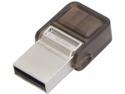
Kingston DataTraveler microDuo 16GB Micro USB OTG Flash Drive DTDUO/16GB
Pros: I'm writing this in response to the comment by Jewel of Kingston Tech Support on my original review, since Newegg doesn't provide any other way to do it. See "Other thoughts" below.
Cons: none
Overall Review: The Kingston compatibility list at the link Jewel provided is incomplete. My tablet is an Asus VivoTab Smart ME400, which is not in their compatibility list, and this device works perfectly in that tablet's single microUSB port. Her statement that "those microUSB ports [on Windows 8 tablets] are typically designed for charging only" is outdated, if it was ever true. I don't believe it ever was true. On Android tablets, maybe, but not Windows. When a Windows 8 tablet has only one USB port, it is going to be for communication with a USB device as well as for charging. Windows 8 has a radically new UI, but inside it's still Windows, and Windows PCs ALWAYS have USB ports. It would be unbelievably stupid for any manufacturer not to provide a functional USB port on a tablet designed for Windows 8. I obviously can't guarantee that this device will work in every Windows 8 tablet, but I definitely CAN guarantee that Kingston's current compatibility list is incomplete.
6/12/2014See more detail
seller reviews
- 2
always late
I've ordered from this seller several times. Always they wait a few days to ship and then choose the cheapest, slowest way, so the order gets to me usually on the day AFTER the last "expect by" date, and sometimes even later. Usually the product is good enough to make the sluggish shipping tolerable, but the last item was junk, so I'll try to avoid this seller in the future.
On-time
Delivery
Product
Accuracy
Customer Service
Satisfactory
10/12/2013See more detail
slow delivery, missing battery
I'm giving a two-egg rating because that's supposed to mean "below average", which this experience was - for two reasons: First, I received the product 11 days after placing the order, when I was told it would take 5-7 days. Even if that means 5-7 business days, I got it on the 8th business day after ordering. That's well below average in my experience; deliveries almost always arrive well before the end of the expected period, and practically never even one day after the end. That's just from Miami to New York; I pity customers in Seattle. Second, the scale requires two CR2032 batteries, but only one was included. A sheet packed inside the outer box but not in the inner box with the scale (where there was a different user manual) said it only requires one battery, which is wrong. That may be the manufacturer's, not the vendor's fault, but they should have checked.
On-time
Delivery
Product
Accuracy
Customer Service
Satisfactory
4/14/2013See more detail