




 here!
here!
I’m your shopping assistant for PC builds, upgrades, and everything tech.
Got questions? Ask away!
Start a conversation
here!
I’m your shopping assistant for PC builds, upgrades, and everything tech.
Got questions? Ask away!
Start a conversation

Joined on 08/17/05
amazing screen, 144Hz rock!
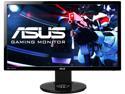
Pros: *great price at BHPhotoVideo.com ($264.99) where I bought it *excellent stand allowing for all direction adjustment *easy 144Hz refresh rate *easy to navigate menu allowing for multitude of adjustments *built-in speaker (never used them personally) *3D Ready (haven't used it personally)
Cons: *stock ICC color profile is bad for eyes (brightness & contrast) and looks washed out of saturation NOTE: there is custom ICC profile available for this monitor and NVIDIA orAMD cards on PCmonitor.info - get that, it's much better than stock one!
Overall Review: Knocking one egg off for bad stock color (ICC) profile. Install the driver to enable 144Hz in Windows, then go to PCmonitor.info (google it with keyword VG248QE) and download the specific AMD or NVIDIA color profile for this monitor which you can load to win7 or win8 and lastly set the monitor (firmware menu) to: Standard profile Brightness 25-35 Contrast 70 Red 100 Green 90 Blue 89 Alternatively (or additionally) google Zero Motion Blur and use the LightBoost feature in 2D mode to literally eliminate motion blur (like on CRT). In Summary this is the best gaming screen I have ever had, looks amazingly well after color profile correction!
NOT impressed at all
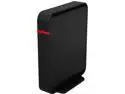
Pros: +open-source firmware out of box giving a good start for going into right direction +processor clocked @ 580MHz and lots of RAM for intensive networking use (64MBis impressive) +nice looking and lightweight case allowing for space-saving vertical setup on integrated stand +real life speeds over wifi on some wifi devices seem improved (at least over IPv4) over my much older N-band Linksys E2000 Other PART1/3: Some of you might be curious why I do not brawl about DD-WRT features here, well, they are just that - features provided by DD-WT firmware and they have nothing to do with Buffalo router itself nor the Buffalo company. Personally I've been running DD-WRT since around build 9000 (whatever the exact number was, most current is 24000) and kep upgrading it over years. DD-WRT gave me a great boost in funtionality of my various routers (both home and small business use) however I personally find this firmware a bit lacking in N-speed support (mixed results depending on build you try), VLAN support (some router models are crashing on generic VLAN configuration GUI, so use of text console commands is only way to get this to work) and lastly ... the main reason why I dropped DD-WRT all together is because it does NOT provide out of the box support for native IPv6! That last is something that you get natively from other open-source flavors like Tomato 1.28 (e.g. the 7505 build by Toastman which I use here now). See for yourself, IPv6 seems to be boosting over-wifi speed connectivity in my cases, while giving pretty much same speeds over wired connection. I did some speedtests over the Wifi and Wired connections utilizing my Comcast 100/10 Internet connection on Sunday afternoon in a very congested apartment block here in New Jersey (over 30 APs in wifi range, crowded channels on 2.4GHz WiFi which I use as not all my devices support 5GHz wifi). As mentioned, wifi channels are crowded here, in my apartment alone I can see/scan nearly 40 APs across various channels, there is always at least a few other active ap's on any 2.4Ghz channel. My test environment at moment includes 2 wifi (android) tablets, a wifi enabled smartphone, 2 laptops and a wired desktop and networked printer.
Cons: -price on higher side a for device utilizing only a 100Mbit switch and opensource (free!) firmware -range is pretty POOR out of box, actually about 20% shorter than on my old Linksys E2000 at standard settings -no out-of-the-box IPv6 support on DD-WRT firmware -real life speeds are lacking in wired department (100mbit switch!) when copying large data between 2 wired computers connected through this router it can get really painful -real life speeds over wifi on some of my wifi devices seem about the same as with much older router I bought for $20 years ago -DD-WRT GUI reported router's CPU (Ralink MT7620A ver:2 eco:3) speed as 580MHz, Buffalo advertises it as 600MHz, I don't personally like such rounding up in advertising -case has intergrated stand and so the wall mounting is not possible without modding -getting up to 120Mbps downstream via wired connection on my old Linksys E2000 flashed with tomato 1.28.7505.2 while I get only up to 95Mbps on brand new Buffalo AirStation N300 (over same wired connection) ... not impressed, but it's what it is! OTHER PART2/3: 1. old Linksys E2000 354MHz @ 453MHz running Tomato 1.28.7505 (MIPSR2-Toastman-RT K26 VLAN-VPN flavor) a) recent i7-3770K @ 3.5/4.7GHz performance desktop running Windows 8.1 x64 Pro and a wired Intel 82579V Gigabit NIC IPv4: downstream peak 101.89Mbps, avg 100.33Mbps / upstream peak 12.48Mbps, avg 11.43Mbps IPv6: downstream peak 96.32Mbps, avg 92.00Mbps / upstream peak 11.84Mbps, avg 11.39Mbps b) new HP Envy laptop (Intel i7-4800MQ @ 2.7/3.7GHz) running Windows 8.1 x64 Home and a wifi Realtek 8188EE b/g/n NIC IPv4: downstream avg 8.67Mbps / upstream avg 11.42Mbps IPv6: downstream avg 52.53Mbps / upstream avg 10.26Mbps c) ancient Dell Inspiron 1501 laptop (AMD Turion 64 X2 TL-62 2.1GHz) running Windows 7 32-bit Pro and a wifi Dell 1505 N-draft NIC IPv4: downstream peak 17.26Mbps, avg 15.89Mbps / upstream peak 11.39Mbps, avg 10.55Mbps IPv6: downstream peak 63.70Mbps, avg 55.23Mbps / upstream peak 11.74Mbps, avg 11.35Mbps
Overall Review: OTHER PART3/3: 2. Buffalo AirStation N300 running factory DD-WRT flavor, mine was flashed with Standard build 22750 a) recent i7-3770K @ 3.5/4.7GHz performance desktop running Windows 8.1 x64 Pro and a wired Intel 82579V Gigabit NIC IPv4: downstream peak 95.00Mbps, avg 94.50Mbps / upstream peak 12.98Mbps, avg 11.68Mbps IPv6: no support b) new HP Envy laptop (Intel i7-4800MQ @ 2.7/3.7GHz) running Windows 8.1 x64 Home and a wifi Realtek 8188EE b/g/n NIC IPv4: downstream peak 8.70Mbps, avg 6.93Mbps / upstream peak 11.88Mbps, avg 11.44Mbps IPv6: no support c) ancient Dell Inspiron 1501 laptop (AMD Turion 64 X2 TL-62 2.1GHz) running Windows 7 32-bit Pro and a wifi Dell 1505 N-draft NIC IPv4: downstream peak 36.92Mbps, avg 28.03Mbps / upstream peak 11.89Mbps, avg 11.47Mbps IPv6: no support 3. Reconnected my old E2000 and what you know, Xfinity speedtest reported up to 120Mbps on IPv4 downstream and 111Mbps on IPv6 :) NOTE: *Comcast Xfinity Speedtest is powered by Ookla, it reports both IPv4 and IPv6 protocol speeds, as an average and peak results as opposed to Speedtest.net tester which reports only peak speeds and only for classic IPv4. The linked xfinity speedtest stage results however do not include peak speeds (only averages), but they do include IPv6 results. ** wifi card in my wife's Envy laptop might need attention (drivers?) or replacement with another brand, during this test I noticed how bad the results on it were consistently over IPv4.
I love how it clicks
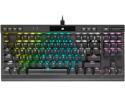
Pros: -I love the portable K70 form factor where you still get media and light control keys -power cord is a detachable USB Type-C -RGB effects easy to manage in iCUE software -excellent quality of key caps on top of superb Cherry MX switches -comes with silver gaming caps and tool to easily remove them -fast input gaming keyboard geared for tournaments (there is a tournament switch on it)
Cons: None!
Overall Review: Probably the cutest & best performing portable keyboard I have ever used
Beautiful looking durable light-weight power beast :)
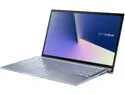
Pros: -Processor Intel Whiskey Lake quad core i7-8565U 1.80 GHz (up to 4.60GHz Turbo frequency) with integrated Intel UHD Graphics 620 -mine came with 8GB RAM and 512GB NVMe SSD, great start options! -stunning quality Nanoedge display -great quality audio sound from built-in Harman Kardon speakers! -Military-grade case -gigabit fast wireless 802.11ac over 5GHz band -backlit keyboard -HD webcam and microphone -weighs only 3.2 lbs! -fingerprint reader is nicely integrated with touchpad, worked OK for me -battery life up to 10 hours -includes carrying sleeve
Cons: -It should come with Windows 10 Professional edition -it could have more USB 3.1 ports ... who needs USB 2.0 nowadays? -included optical mouse is wired, I think most people would have preferred a bluetooth mouse -8GB RAM might be too little for more demanding business apps, I will upgrade mine to 16GB
Overall Review: This laptop is marketed as Usage for "Business", not really "business" until it is sold with at least Professional Windows edition, Home edition is NOT "business"
Amazing cooling options for such little (but wide) case
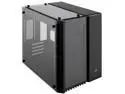
Pros: +Beautiful looks, mine is black theme intended for CPU & GPU AIO cooling later down the road +With some LED lighting options this case can be a nice show off +Tempered glass panels are amazing and nicely show what’s behind them +Separate compartment for drives and PSU with wiring +Great cable management features +Dust filters +Choice of mounting space for 2 sets of 280mm radiators (top and bottom) and 240mm in front
Cons: -With my mATX board I can really use only 1 out of 3 cable management cutouts as the other 2 are nearly completely covered by the board -You will have to worry about fingerprints on glass panels :D -There could be more space under the bottom-most PCIe slot -No HDD activity LED, but it doesn’t seem to be greatly missed nowadays -Be careful not to drop the glass door when removing mounting screws, it drops dead down right after you remove the last one – maybe the door should have a handle? -after installing 240 radiator in front (part of Corsair H100i Pro) I noticed the magnetic filter will not fit anymore (dropped an egg)
Overall Review: I like this case a lot, really impressed with looks and flexibility of cooling solutions available for use in this little (although fat) case I guess the front and top glass panels can stay at all times since they do block the air flow, but I think they might be limiting it a bit? I don't think any of Cons I found are actually big enough top drop an egg from rating, it's still an awesome product and also backed by superb Corsair support!
Awesome enthusiast board for the price!
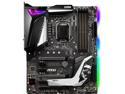
Pros: +looks beautiful +RGB lights allow for color matching to lighting theme in the case +works flawlessly +good software apps for light control (Mystic Lights) and driver updates and monitoring (Dragon Center) +2 connectors for M2 SSD +great sound quality +XMP profiles from my mem sticks work great! +eazy overclocking
Cons: -wish there were 1-2 connectors for thermal sensors on board -it could have 2 more USB ports in the back ... -there could be more lighting in CPU socket area -Nahimic app for sound management is kind of weird, no equalizer control afaics
Overall Review: I purchased the MSI MPG Z390 GAMING PRO CARBON AC board and paired it with 2x16GB of DDR4 RAM (G.Skill Ripjaws V) and i5-9600K, on top of that 2x 1080Ti SLI with custom water cooling, works beautifully!


