




 here!
here!
I’m your shopping assistant for PC builds, upgrades, and everything tech.
Got questions? Ask away!
Start a conversation
here!
I’m your shopping assistant for PC builds, upgrades, and everything tech.
Got questions? Ask away!
Start a conversation

Joined on 08/07/05


Fast, Light and Inexpensive
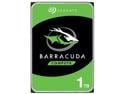
Pros: This drive is light, quiet and thin. The price is really good considering the size and speed of the drive. It has a large 64MB Cache which greatly speeds up sequential read and write operations. It supports the SATA 6.0Gb/s interface. This drive will not overheat your case! The hottest it ever got during benchmarking and formatting was just under 95F (that would be a cool day where I live in Phoenix!). The drive, in my testing, was whisper quiet. There is nothing worse than a loud hard drive, clunking and rattling when you are trying to work.
Cons: None so far.
Overall Review: The drive was recognized right away, and took less than 1 hour for a full format. I always do a full format (as opposed to a quick format) on every drive before putting it into production. This is a good way to weed out weak drives before they can cause problems. The drive was very quick in benchmark tests (Crystal Disk Mark): Sequential read speed was 212.9 MB/s Sequential write speed was between 203 and 210 MB/s As fast as this drive is, random read/write speeds were, of course, predictably slow: Random read speed was between .670 and .733 MB/s Random write speed was between 1.341 and 1.453 MB/s With all the advancements we have seen in hard drive density, it’s amazing how little random read and write speeds have improved. Of course, SSDs don’t have the same physical limitations. This is just my personal opinion, but I really doubt that so-called “performance” drives are worth the money in most cases. With the lightning fast speeds this drive is getting (at this price point), I think it is really in the sweet spot of price and performance. With 64 MB cache and rotation speed of 7200 RPM, you get good value for the money.
Useless
Pros: None
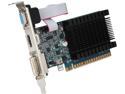
Cons: Unlike what is pictured, this card only has one output connector, a DVI. It has no HDMI or VGA connectors as shown.
Overall Review: I bought these for basic dual monitor support, therefore having a single output renders them completely useless. Now I am on the hook for the cost of return shipping.
Fast and Light
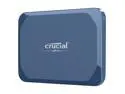
Pros: (Tested with CrystalDisk Mark 9.0.1) Super fast and super small. As you can see from the attached picture, sequential read speeds averaged between about 430 to 464 MB/s. That is similar to m.2 onboard hard drives. As expected, random reads and writes were a lot slower but still very good.
Cons: It does seem to run a teensy bit hot at times. After heavy testing it was pretty hot to the touch, not really a problem as I highly doubt this would create any performance or reliability problems. Maybe my adapter wasnt the right type, but I had no luck converting it to USB A. I suppose you wouldnt want to do that anyway because it would be a lot slower and defeat the purpose. This will be less of a problem over time as USB C is becoming widely adopted.
Overall Review: Awesome performance from a micro-sized hard drive that fits in the palm of your hand. Its obviously better than traditional external disk drives and gives you good value for the money. It works with Mac computers (Mac mini, Macbook air and Macbook pro), so I think its safe to say it works well with apple products. I didnt have the ability to test it with any gaming consoles. If you do anything like graphic design, 3D modeling, PC based video games, backups or restores where you are working with large files, this would make your life so much easier. I would be interesting to set this up as a boot drive (assuming the BIOS would support it). This could be good if you want to take your operating system with you when you are not using your computer.
Reliability and stability but average speed.
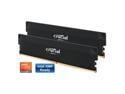
Pros: DDR6 likely wont be available until 2026, so this is as good as it gets for now. Of course, fast memory increases the overall speed of your computer, assuming there are no bottlenecks with slow components. I installed this memory in a new build and it has been very stable and fast with benchmarked (AIDA64) speeds for reading and writing were between 57,000 and 70,000 MBPS. That is plenty fast, and these sticks use just a little over 1 volt, decreasing not just power usage, but heat creation. These memory sticks come with a lifetime warranty, which is a nice bonus. I have rarely had bad memory sticks, but I have had a few over the years. Crucial has priced these modules very competitively and they are therefore a good value for the money.
Cons: There are no flashy LEDs on these memory sticks. I must admit the pretty colors can be somewhat cool and mesmerizing, but honestly the computer usually resides under your desk and is barely visible. I build a lot of systems for people who use their computers extensively for photoshop in a professional setting and dont want their computer to look like a Christmas tree, so for those people, these are perfect.
Overall Review: With computers I build for other people, I never overclock any computer components; not CPU, not GPU and not RAM. Why do something that will create more heat and possible instability and even increase the chance of damaging these components? I just dont think it is worth it. I did overclock these sticks to get the speeds I posted above which are impressive, but for me stability will always take precedence over raw speed, and I have confidence in Crucial to make stable and reliable memory. The thing is, if memory is designed to be overclocked, then it should be very stable at stock speeds.
Gen 4 NVMe Optimized for Speed
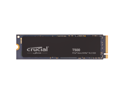
Pros: Its a 4th generation NVMe with tons of storage space and lightning fast speeds. It has a large high speed DRAM cache which helps boost the speed. Ive had good luck overall with the Crucial brand so I expect this to last. 2 TB!! You can never be too rich or too thin, and you can never have too much storage! This SSD is compatible with PS5. Gen 4 is a huge speed upgrade over Gen 3, almost doubling the speed. I tested this SSD on a motherboard that only supports Gen 3, and it worked fine.
Cons: It does seem to run a teensy bit hot at times, but that is pretty normal for this type of super-fast SSD. I always have a ton of airflow in any computer I build, so I dont need a heatsink on the SSD. Not really a con per se, but if you put this in a Gen 3 motherboard, its pretty much a waste of money because you wont get the higher speeds its capable of.
Overall Review: In benchmark testing, I obtained sequential read/write speeds of just over 6,000 MBs per second (thats 6 GB of data in one single second!). I believe that the slower speed was just a result of limitations with the motherboard. You will likely top 7,000 MB/s if you have a good quality newer motherboard. Benchmarking with a Gen 3 motherboard produced read/write speeds of around 3,500 MB/s, which is still lightning fast. If you go to the crucial website, you will be able to download a stripped-down version of Acronis that will only work with crucial drives, but is good enough to clone your existing drive if you are upgrading. Honestly, I do find Acronis to be more fault tolerant that other cloning software which is important if your old hard drive has some bad clusters/sectors.
Don't Let the Name Fool You.
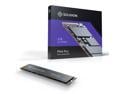
Pros: PCI Express 4.0 NVMe technology -Super fast read speed about 7200 MBps, write speeds just over 6500 MBps. -5 Year warranty -Reasonable price Solidigms origins stem from an October 2020 agreement by SK hynix to acquire Intel's NAND and SSD business for $9B. This is not a startup company, its tried and true technology and they have deep pockets for R&D.
Cons: Heat wasnt a problem, at least for me. I could not find cloning software anywhere on the Solidigm website. Most other brands give you free cloning software that works with their brand. This is actually a pretty big deal for me, because most of the time, I am replacing an existing disk that is either slow or failing, and I therefore need to clone the old drive. A minor issue is that it doesnt come with a screw to hold it on place. I always seem to be short of those tiny screws. Older hard drive almost always came with mounting screws. The other thing is your computer will boot so fast that you wont have time to grab a coffee and a donut while you wait.
Overall Review: Hard drives have come a long way since the old days. I remember thinking that 50 Mps was pretty good, now that seems like dinosaur technology. They just keep getting faster and faster, while getting smaller and smaller! I avoided SSDs when they first came out due to reliability problems, but these new drives are more reliable than magnetic platter disks and more than 100 times faster. Not only that but they are much more fault tolerant. Upgrading to an SSD is just as important as faster processors, if not more. Nothing worse than hearing an old drive crunch away while you wait and the CPU sits idle.
Good Seller
Items arrived quickly and in good condition. Thank you?
Good Product - Slow Shipping
The price was good, and the product arrived in pristine condition, but I wonder if they ship by mule train? It took 8 days to go from California to Arizona (5 hours by car). I guess I should have paid a few bucks more to upgrade the shipping.


