

Your Browsing History


Jeffrey B.
Joined on 08/07/09
0
0
product reviews
- 15
Not for lazy people
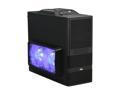
XCLIO Godspeed Two Advanced Fully Black Finish 0.5 mm SECC / ABS Plastic ATX Mid Tower Computer Case
Pros: Solid case, Room for everything, Great airflow, filters in front panel of case to help fight dust. Twin fans push a ton of air and the fan control allows you to turn on/off the LED lights. Top fans work great too and blow the air out of the back channel of the top panel. HD Audio connection for the front top panel works great. USB was easy to connect and so were all of the other connections. The square area around the power/reset buttons is the HDD activity light and it looks really cool in the dark! The tool free design works great as long as you make sure everything is lined up before you crank the knob on the clamper mechanism. Thumb screws on all of the rear pci expansion slots are great and easy to use!
Cons: Fans aren't the highest quality (see other thoughts) Having to remove the top fans to insert my power supply was a pain, but I don't mind having to do it as the top panel came off rather easily and I was able to do the whole operation without too much trouble. 150mm fans might scrape against the inside of the fan cages. ( I fixed this by putting cardboard risers under the screws to keep the fan blades a few centimeters away from where they were making contact)
Overall Review: As soon as I started working on the case I took some hair clipper machine oil and dropped it into both of the fans. Once I was done putting together my build I started it up and noticed one of the fans was slightly wobbly but it still worked fine so I paid it no heed. A few days later I came home from work and noticed the wobbly fan had stopped working entirely and was only spinning about 10RPM. I took the case door off and pushed downward on the fan blade and the entire fan blade mechanism fell apart. So I took the fan out and put it back together piece by piece. It consists of the fan blade assembly with a small metal post coming out that goes through the motor assembly. The post has a small indentation on the end where a tiny plastic O clamp goes around it to hold it in place. I put it together with the rubber seal ring separating the blade from the motor and the clamp holding it together tight through the rear hole. After re-oiling it I fired it back up and now it runs pe
2/15/2010See more detail
Bleh
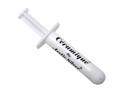
Arctic Silver Ceramique Thermal Compound
Pros: Transfers heat decently
Cons: Sticky disgusting mess! Hard to rub into the heatsink surface to pre-treat the heatsink. Hard to manipulate this stuff at all or squeeze out how much you need. Very sticky and messy and it stretches like pizza cheese!
Overall Review: Save yourself the mess and buy some ASilver5 (the silver stuff) I thought id save 5 dollars and get this stuff and ended up costing myself a whole lot of frustration.
2/15/2010See more detail
5750 Review Update
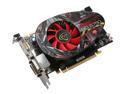
XFX Radeon HD 5750 1GB DDR5 PCI Express 2.0 x16 CrossFireX Support Graphics Card HD-575X-ZNFC
Pros: Read below for my updated guide into getting this awesome card to work wonderfully!
Cons: Not free
Overall Review: This is an update to my previous review. Since catalyst 10.2 came out I did a complete driver reinstall and reinstalled ATi Tray Tools. In ATi Tray Tools I made 2 profiles. One for 3D and one for 2D and set the 2D one to 400/900mhz and saved it as 2D, then set it as the profile to load at windows start up. I set the 3D one to 700/1150mhz and changed the voltage (theres a voltage selector) to 1.100, and then saved the profile as 3D. I then right clicked the ATi Tray Tools icon and selected HOT KEYS, and then set them to Enable (On). Then I set ctrl+F11 to the 2D profile and ctrl+F12 to the 3D profile, by clicking Hot Keys -> Customize -> New -> Profiles -> Overclocking Profiles -> To the right you'll see a selector for each profile you have made (2D, 3D). This voltage being 1.100 for 3D fixed any and all stability problems in all games I own. And setting the profiles to hot keys gives me control of when the card changes its clocks. (Instead of it changing mid-game and cr
2/25/2010See more detail
Good Mouse
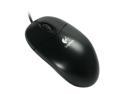
Logitech SBF-96 Black 3 Buttons 1 x Wheel USB Wired Optical Mouse
Pros: Good mouse, tracks well. My sister is using it for normal usage and its great for the price.
Cons: None
Overall Review: Great mouse, great price. BUY THIS
2/15/2010See more detail
awesome DVDRW
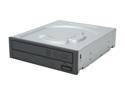
Sony Optiarc DVD/CD Rewritable Drive 24X DVD+R 8X DVD+RW 12X DVD+R DL 24X DVD-R 6X DVD-RW 16X DVD-ROM 48X CD-R 32X CD-RW 48X CD-ROM Black SATA Model AD-7240S-0B
Pros: Burns CDs at 48x on top of being a DVD-RW. Operates smoothly without much noise. Sleek looking and great even without a 3rd party face plate. SMALL! This thing is incredibly small, about 1 1/2 - 2 inches shorter than my old DVD-RW! Great for small cases!
Cons: None
Overall Review: This thing rules, burns anything I throw at it. No coasters so far. Couldn't ask for more, looks like SONY is finally getting their act together!
2/15/2010See more detail
Best Win OS Ever
Microsoft Windows 7 Home Premium 32-bit 1-Pack for System Builders
Pros: Easy to install, Easy to reinstall. Doesn't need to delete an entire drives contents to reinstall, only the partition you're installing to. Insane UI, try out the Dreamscene animated desktop wallpapers! My favorite is the Asteroids one as it feels like you're navigating through a cloudy dense asteroid field! So many great features I can't list them all. 32 bit for increased compatibility!
Cons: None
Overall Review: This OS is great, I went with the 32 bit version for now as I heard about compatibility problems with the 64 bit one. It only reads 3.25gb of my 4gb of RAM but I have no problems with that as games don't really need anything more at the resolutions I game at. (1280x1024) In a few years I'll switch it out for the 64 bit version and throw in 4 more gigs of RAM into my PC for a nice fairly cheap upgrade! Thanks newegg for the OEM OS at a great price!
2/15/2010See more detail