

Your Browsing History


Jordan R.
Joined on 11/05/04
0
0
product reviews
- 12
Still going...
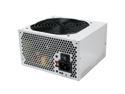
FSP Group SAGA+ 400R 400W ATX12V Power Supply
Pros: Bought this 1/6/2008 and its still going in the computer I built for someone...despite never being cleaned and being in a very dusty/dirty environment and nearly 24x7 use.
Cons: A little light on the wattage, but works fine for the system its in.
10/23/2010See more detail
I made it into a roll up keyboard
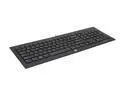
HP 639841-003 Black 104 Normal Keys USB Wired Keyboard w/ Tilt Stands
Pros: None
Cons: I got so fedup with keys not working and having to punch the keyboard to get it to work that I just folded it into a roll up keyboard and chucked it across the room. Shipping it back would have cost more than buying it did. I liked how thin it was, I hated having to press keys 10 times to get a character or modifier keys not working or some numbers not working. Trying to type a capital T was an affair as the shift key would not work when T was pressed but would work when Y or R was pressed. Either shift key! Same story for the control keys, sometimes one worked sometimes neither worked. 5 and 6 were dead. Delete was dead.
Overall Review: Selling overwhelmingly defective products sucks, I think when a product gets glaringly negative reviews Newegg should just offer a credit for the item price to everyone unhappy with it and pass it on to the supplier of that item.
8/14/2012See more detail
Missing Norton Ghost key
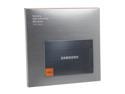
SAMSUNG 830 Series 2.5" 128GB SATA III MLC Internal Solid State Drive (SSD) MZ-7PC128B/WW
Pros: It looks very pretty, been sitting on my desk till I have time to install. The time is now, come to find I don't think I have a Norton Ghost key!
Cons: SSD Technical support is open during exactly when I'm working as a Mechanic and unable to be in-front of my computer at home. Calling them, writing down a key, then calling back the next day to talk to someone else to explain a situation sounds like a waste of my time.
Overall Review: I hope someone at SSD Technical support is contactable through email to help resolve this, the contact section on the Samsung website doesn't list SSD as a product. Live chat workers can only tell me to call the 1-800 number.
11/4/2012See more detail
Update
HP 639841-003 Black 104 Normal Keys USB Wired Keyboard w/ Tilt Stands
Pros: It looks nice
Cons: Now the five, six, and one keys have stopped working as well as the left shift key. No matter how hard I press them or how many times they're not coming back around.
Overall Review: Pass on this. If shipping it back wasn't more than it cost to buy I'd send it back. Too bad because I LOVE how the keys feel, the shorter stroke and slim profile are much easier on my hands and wrists than my old keyboard.
7/29/2012See more detail
E key did not work at first
HP 639841-003 Black 104 Normal Keys USB Wired Keyboard w/ Tilt Stands
Pros: It feels solid, nice to type on, quieter than my old mechanical keyboard, solid keys with little wiggle, very thin, fairly comfortable, very inexpensive on daily deal sale. Had to get a USB keyboard because PS/2 ports are fading out and I had no USB keyboards at all.
Cons: At first the E key did not work. Then it suddenly began working. We'll see how long this keyboard lasts,
Overall Review: The box it came in was HUGE with gratuitous packing. Seemed a little wasteful for just a little keyboard.
7/22/2012See more detail
Drivers for 64bit?
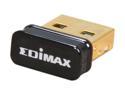
EDIMAX EW-7811Un 150 Mbps Wireless IEEE 802.11b/g/n Nano USB Adapter
Pros: Can't tell you yet, cannot get to work.
Cons: Is there ANY support for 64bit OS? I've been trying with win7 64bit here for about an hour with driver files on the disk, from their website, from realtek directly, all to no avail. it will NOT work at all. Glad I got these on the $10 shellshocker deal and didn't pay full price. Not worth the return shipping to send back...maybe they'll work with the girlfriends mac?
Overall Review: I've jumped through every driver hoop I can think of here with these and tried both dongles. Both can be seen by device manager and windows, both are recognized as USB Wifi devices, so its not faulty hardware I don't think. Windows can't automatically find the driver, which is fine since its a newer chip. I've even tried to specify where the driver is and Windows tells me there's nothing there for this device. I'm really annoyed, I wanted to use these to revive a couple old notebook PC's, so I figured I'd just try on an OLD one with XP 32bit...also a no-go in the driver realm, but I didn't try too long with that.
12/8/2010See more detail