




 here!
here!
I’m your shopping assistant for PC builds, upgrades, and everything tech.
Got questions? Ask away!
Start a conversation
here!
I’m your shopping assistant for PC builds, upgrades, and everything tech.
Got questions? Ask away!
Start a conversation

Joined on 04/13/04
Good so far!
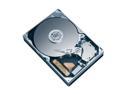
Pros: Mostly quiet. Runs fast (see other thoughts). I'll never use all the space. Slightly faster than the 1TB model (to the tune of about .0001% ;) ).
Cons: Now that I've got some quiet fans, I can hear it seeking, a muted grinding noise. Until I get some more absorption (I have it mounted to the bottom of my case), it and the PSU fan are the loudest things (but nowhere near my old Seagate 7200.7).
Overall Review: I spent about two months debating on whether or not I wanted to spend the premium $$$'s on the Raptor's RPM or on space. I was convinced on the Raptor, but was wincing at all the reviews of the noise. Finally found a comparison on this and the Raptor, and found that this beat the Raptor in all but seek times (beat it in loading applications, too). It's the density of the disk that does it, and I'm lovin' it. Until WD updates their Raptor line to compete with the current 7200RPM drives, there's no need to go for speed (and noise). Highly recommended.
Powerful, but "virtually silent" a misnomer.
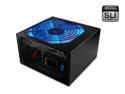
Pros: There is plenty of power from the unit. It's 80%+ Certified, which is good for the pocket book, and it's definitely at a decent price.
Cons: The fan is NOT "virtually silent". I've a system built with the three 80mm Enermax Enlobals, and two 120mm Scythe fans (the 60CFM flavor). The PSU fan is far louder than anything in my case, save the HDD when it's seeking. It also occasionally emits a high-pitched whine. Not -really- high frequency (like some TV's, CRT monitors, etc.), but it cuts through some headphones.
Overall Review: I wonder if mine is just a defective unit, though I think it does fall into the rated dBA levels (I believe the specs listed max at 34, when "virtually silent" is anything under 21). Anyways, good, clean, efficient power. Just, if you're building a quiet/silent system that needs more than an average amount of juice, I might think elsewhere if you have the budget. Right now I'm looking at some sound dampening material to try and get that high pitched whine down a bit, or at worst, find another silent PSU. Basically, if the rest of your case isn't built for silence, you won't hear the thing mixed in with all the other fans. But if it is, you will.
Pretty good case.
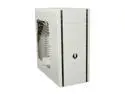
Pros: Good quality, very spacious, well-known layout, soft-touch plastic panels are surprisingly "soft", the top panel is actually decent, supports water cooling, and plenty of room for air cooling. It comes with a half-decent 2.5"/3.5" to 5" adapter, and the cable management is workable. The biggest "Pro" for me is that this case is one of the few "enthusiast" level cases that's not shaped like an ostentatious piece of spaceship that houses a hyper-drive. I was purposefully looking for something understated, and it was difficult. It fits the bill well; simple, soft white color, with subtle styling. If it wasn't for the front emblem you might mistake it for HAL 9000's sister - which I love.
Cons: The two cons I can think of immediately is that the bottom panel can support either a 1x 120mm fan or 2x 120mm fans. However, if you leave the HDD cages in then you can only fit one fan as the cage sits directly where the second fan would go. The second is that the included manual sucks hard. It's all vague pictures with fewer words than a Dr. Seuss story. Oh, and one minor Con: The plastic panels are surprisingly difficult to pull off. They do just lift off, but I needed some good leverage and felt like I was going to break them at first. Once I successfully yanked one off and knew how much force was required it wasn't that bad, but I was sure there were catches or a latch I needed to unlock first. Nope!
Overall Review: Luckily the case layout and accessories are familiar enough that the bad manual isn't much of a detriment. The sole exception is the tool-free system for holding things in the 5" bays. Here's how you do it: You slide it in, push the buttons on either side "in", then while pushing the buttons in you slide them in opposite directions. It can be done one at a time, but you push in and slide one forward, then push in and slide one backward. As the other review said, there is a single screw missing for mATX boards (not a standoff, but a screw to hold it down). I didn't feel it compromised anything. The cable management system can be tight. My PSU's meshed cables fit through, but I dragged some of the rubber grommets out with them at first. With that said, a little bit of forethought and it should be OK. There's also plenty of cable-tie areas on the back of the plate so you can get everything as flat as possible. Overall I'm quite happy with the case.
Great piece of hardware.

Pros: No dead pixels. Beautiful clarity compared to my 17" CRT and the LCDs at work. Contrast is there, brightness is there, and can't see any ghosting in games or apps at all. Wonderful color recreation (though not perfect, no fast matrix LCD is). Good looks. Not too drab (piano finish and all), and I can still find the buttons. All right out of the box, and it all comes with the Samsung warranty!
Cons: Stand is a little wobbly, but does the job.
Overall Review: You don't buy a monitor for the speakers. They're always junk, always. You buy a monitor for the picture, and this one won't disappoint unless you're looking for perfect color recreation or don't want even the hair's-breadth of a chance at ghosting (in which case the 2ms Samsungs would work for ya). So just throw away the audio input cord and have a ball. Highly recommended.
Doesn't deserve the bad rap.
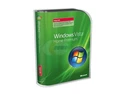
Pros: Stable, looks BEAUTIFUL with the eyecandy on (make sure your system can run it well, and don't listen to the Vista rankings on MS's website). Runs fairly clean after working out the kinks. I don't know if anyone else has mentioned this, but I'm rather fond of the Widget Bar on the right. CPU load, Memory load, HDD free space, and Shutdown/Hibernate/Restart buttons right in front of me. Yeah, I know similar stuff has been out for a while, but I like it still.
Cons: MS needs to optimize it for performance, that's for sure. Also barrages you with Permissions for the first little while, which is fine for most things... But not when I'm trying to run programs. Lighten up on the security lockdown, up the performance, and I'd give it 5 stars.
Overall Review: Plan ahead. Make sure your stuff is not only Vista compatible, but 64-bit compatible as well. Everything is running fine on my rig, and I'm actually enjoying Vista. It does need to be optimized, and even though I'm an Administrator I still can't do a few things (until I find out how from Google), but overall installation went great. (Yes, you can clean-install Vista from the Upgrade disk, Google it!) The 64bit software has to be mail-ordered from MS's website, and costs about $20 with Expedited Shipping (about 3-5 days, including processing time). I wouldn't recommend 64-Bit right off the bat unless you know what you're doing, but out of all the whining that's been done about Vista, I think a lot of it is undue. Q6600 OC'd to 3Ghz, 4GB DDR2-800 RAM, 512mb 8800GT.
New to heatsinks, but good enough for me.
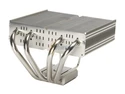
Pros: Top-down design, so the fan hits the chipset too. It's also lightweight compared to the ginormous tower heatsinks. Fit my P6N Sli Platinum board like a dream.
Cons: Base could've been better lapped. A bit difficult to put on, but be sure to read through the instructions first, look at the materials, then attempt it. NOT FOR PASSIVE COOLING. Towers are best for that.
Overall Review: OC'd 3Ghz Q6600 and the 67CFM Scythe 120mm fan with the Sony Bearing (very quiet). Put some Ceramique (following the instructions carefully, as it was my first try at thermal grease) on it. A few days later, the CPU idles at 35*C (when idling, the mobo lowers the multiplier on the CPU, so it's cooler than it would be otherwise), and hasn't risen above 62*C after running Prime95 for about 4hrs. I also put some rubber washers where the backplate meets the Mobo just in case. Like others have said, it does move if you put enough pressure on it (child-proof cap type pressure), but doesn't seem to affect it. If you don't touch it, it stays in place.


