

Your Browsing History


Matthew D.
Joined on 05/27/04
0
0
product reviews
- 40
The kalashnikov of CPU coolers
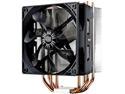
Cooler Master Hyper 212 Evo CPU Cooler, 4 CDC Heatpipes, 120mm PWM Fan, Aluminum Fins for AMD Ryzen/Intel LGA1200/1151
Pros: The Cooler Master 212 series of CPU coolers are legendary for their price to performance ratio and this one is no exception. I have two, one in my I7-5930k build and one in my Ryzen 5 1600x build and this cooler keeps them around 28c-32c idle and 55c-65c load.
Cons: None really, now that it seems to support AM4 out of the box, not 100% on this but the one I just bought said it did, but I had already ordered the kit from the cooler master store so I used it instead of the backplate and standoffs provided. The thermal paste they include is good but not exceptional, but that is just nit picking.
Overall Review: Some people complaint about installation difficulties. DON'T use the manual, go to youtube and watch the short installation videos provided my cooler master if you can. You will see how easy it really is and you will have your cooler installed in no time.
12/1/2017See more detail
Died in 15 minutes
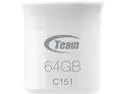
Team C151 64GB USB Flash Drive TC15164GS01
Pros: Small, seemed well built
Cons: I bought this specifically for the USB port in my car. It was large enough to fit entire Mp3 collection and it was small enough where I didn't have to worry about accidentally breaking off the drive in my cars USB port. I started the transfer of 41gb worth of music and it gave me a read only error 15 minutes in and then just died.
Overall Review: I probably just got a lemon, I've used Team products before and never had a problem, they're a good company. But there are drives that are similarly priced that are USB 3.0 so I am going to try a different brand.
8/15/2015See more detail
Amazing keyboard, bad software

be quiet! Light Mount Mechanical Keyboard | Linear | Hot-Swappable Lubricated Silent Switches | 3D Media Wheel | ARGB Keyboard | Quality PBT Double-Shot Keycaps | Programmable | BT003US
Pros: Nearly silent Good Feel Heavy and sturdy build quality
Cons: Software at the time of this writing is pretty bad.
Overall Review: Ive avoided mechanical keyboards for years because I cant stand the loud clicking sound they usually make. When I heard about this keyboard a few months back, I went back and forth on buying it, it was a bit pricey at the time. Fast forward to a recent sale, and I finally pulled the trigger, and Im so glad I did. The keys are almost supernaturally quiet for a mechanical keyboard, and the travel and overall feel are exactly what I wanted. The only downside so far is the software. Its pretty rough. My customized lighting settings wont save to the onboard memory, and the custom lighting effects dont work unless the software is running in the background. One of the main reasons I bought this keyboard was because it advertised onboard profile storage. As of now, macros save correctly, but custom lighting doesnt. Hopefully, this can be fixed with a future firmware or software update.
12/8/2025See more detail
Excellent Stand Alone WAP
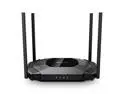
TP-Link TL-WA3001 WiFi 6 AX3000 Wireless Gigabit Access Point | Desktop Wi-Fi Bridge | HE160 & Beamforming | Supports Multi-SSID/Client/Range Extender Mode | 4 Fixed Antennas | Passive PoE Powered
Pros: This WAP has long range, strong signal and has nifty features like multiple SSID's. Plus I like the fact that it can sit on a desk and doesn't have to be mounted on the wall like some of those round wireless access points.
Cons: The POE feature is passive not active so that means you can't just connect it to a POE+ switch to provide power, you have use their injector or the power brick that it comes with. This was a very stupid design choice by TPLink. They should of made it active so that you can just plug it right into a POE network switch and be done.
Overall Review: This unit is PERFECT for folks who don't want an all in one unit, but prefer to use something like PFSense for their firewall/router, a network switch for wired devices, but still need WIFI.
11/28/2023See more detail
Almost perfect little NAS case.
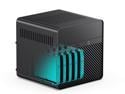
JONSBO N2 BLACK Mini NAS Case ITX, 5+1 Disk Bays Mini Aluminum with Steel Plate Case, Built-in 12cm Fan, SFX Power Bite (L150mm Max.), Support 65mm CPU Cooler , Integrated Upper Cover Removable,Black
Pros: Almost perfect NAS case that is easy to work with. Nothing to really complain about except for a few minor details I will outline below.
Cons: - 15mm fan is loud and too small to adequately cool all five hard drives IMO - Hex screws for top cover is dumb. They should of used standard Phillips. - The dual molex power for the backplate is awkwardly placed and the fact they require two is dumb considering a single molex could easily power 5 drives. The silverstone nas case has 8 hot swap bays and is powered by a single molex.
Overall Review: The biggest gripe is the 15mm exhaust fan. Jonsbo should of made the case a few millimeters longer then the case could of properly supported a 25mm thick man. However there are two mods that you can do to support a 25mm fan. The first mentioned above is the CAB219 molex adapter from moddiy.com. I ordered that adapter and while it technically does work, I found that the plugs are wider than the connectors on the backplate so you have to awkwardly bend the adapter to make it fit the plugs on the backplate. A better solution IMO is a 3d printed bracket that supports a 25mm fan. Just google "3D printed extended fan mount for the Jonsbo N2" and you will find it. If you don't have a 3d printer just google around your area and you will probably find someone who can print you one. My local library had one and they printed the bracket for me for five dollars.
8/9/2023See more detail
Perfect for Jonsbo N2
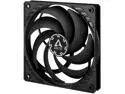
ARCTIC P12 SLIM PWM PST 120mm Case Fan with PWM Sharing Technology (PST)
Pros: The Jonsbo N2 case comes with space only for a 120x15mm fan. There are some mods and adapters that will allow a thicker fan which I have on order. For now I am using this fan at max speed and its moving so much air that I may not need a bigger fan. It is sitting about 6 feet away from me and I can't even hear it on max.
Overall Review: Great replacement for the stock fan in the Jonsbo N2.
7/29/2023See more detail
seller reviews
- 1
No problems, great transaction
Ordered product, received product in 2 days, product works. A+
On-time
Delivery
Product
Accuracy
Customer Service
Satisfactory
10/1/2020See more detail