

Your Browsing History


Richard C.
Joined on 12/07/01
0
0
product reviews
- 15
Really nice!
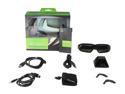
NVIDIA 3D Vision 2 Wireless Glasses Kit (For Use With Any 3D Vision Ready Display) Model 942-11431-0007-001
Pros: - Really adds life to PC games. 3D Vision Ready games look absolutely fantastic. - Excellent integration into nVidia's standard display drivers, so setup was somewhat painless (see con below) - Actually more comfortable with my headphones on (JVC HA-RX900) than without.
Cons: - The included documentation is some of the worst I've ever seen. You know how sometimes instructions will just be simple pictures with no text? Well, this was that same approach, except with text and very few pictures. Seriously, it was like a booklet of subtitles in several languages. As such, it's only useful, when it gets to the part where it says, "Ug...run 3D Vision Setup in display driver...ug". The setup wizard in the nVidia Control Panel does most of the work for you. - They're not as comfortable as you might expect, but they're not bad. You might want to smooth out the edges on the legs where the rest on your ears, as it feels a little sharp.
Overall Review: I was really excited to jump into 3D PC gaming, and I would say it's lived up to my expectations. Like I said, games listed as 3D Vision Ready in the game compatibility list look fantastic, as well as the few I've played that were listed as Excellent. Some require a little tweaking to look great. For example, the MMORPG, Rift (which is actually listed as Not Recommended), looked really bad at first, but there is an easy but strange fix: Google "Rift 3D Vision" and follow the directions to modify the application configuration and name of the executable, then switch to the low quality renderer in the game's display options and restart the game. Now it looks absolutely stunning. One more thing, I've been known to get a little nauseous just watching hi-def television at ultra high refresh rates in a department store display, so I was a little concerned how this would work out for me. I've played for a couple hours at a time, now, and I've noticed no negative side effects. It really has added another dimension to my gaming experience. ;)
2/3/2013See more detail
Not bad for the money
HP 32GB Flash Drive (USB2.0 Portable) P-FD32GHP125-GE
Pros: Inexpensive.
Cons: Transfer speeds are a bit slow compared to other similar-sized drives I own.
Overall Review: It does the job. That's about it. Had I known what the performance was going to be like, I probably would have just gone with a faster, more expensive option.
2/7/2013See more detail
Solid PSU
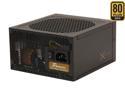
SeaSonic X Series X-850 (SS-850KM3 Active PFC F3) 850W ATX12V v2.3 / EPS 12V v2.91 SLI Ready CrossFire Ready 80 PLUS GOLD Certified Full Modular Active PFC Power Supply New 4th Gen CPU Certified Haswell Ready
Pros: Rock solid and stable. Modular. Quiet fan. Reasonably small size for the power.
Cons: Cable sleeving is kind of cheap - still better than a lot of the stuff out there, though.
Overall Review: Though I haven't come close to taxing this PSU, I've toyed with overclocking my CPU and GPU at different times, and it never missed a beat.
12/1/2014See more detail
Cheap
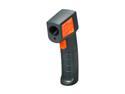
Rosewill REGD-TN439L0 Infrared Thermometer
Pros: Price. Simple to use
Cons: Laser very poorly aligned.
Overall Review: I had always wanted an infrared thermometer, so when this one went on sale, I bought one. It appears to work fine up to 10-12 inches. Beyond that, the reading fluctuates around 5% every additional foot. Also, the laser is *way* off. At 10" distance, the laser points a good 1.5" low and .5" to the left. If I had it to do over again, I wouldn't buy this one.
1/14/2014See more detail
Built to last
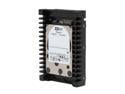
Western Digital WD VelociRaptor WD1000DHTZ 1TB 10000 RPM 64MB Cache SATA 6.0Gb/s 3.5" Internal Hard Drive Bare Drive
Pros: I don't own this particular drive (yet), but I felt compelled to throw my two cents' worth in regarding the 'Raptor series drives. I purchased the 74GB Raptor (SATA 1) in February 2004. Up until about a year and a half ago, it served as my OS drive in every machine I built. Now, due solely to the fact that it can't compete with SSD's of similar capacity, I use it for infrequent data transfers. The thing is, it is still going strong. That's 9-years, folks - most of which was under heavy usage. I haven't bought a mechanical HDD in a while, now, but for desktop use where greater-than-SSD capacities are needed, I highly recommend the Raptor line if at all possible, if your budget allows. You won't regret it.
Cons: Price.
Overall Review: I'm planning to order this drive. Just watching for it to go on sale.
5/13/2013See more detail
Really nice unit
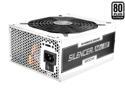
PC Power & Cooling Silencer MKIII Series 1200 Watt 80+ Platinum Semi-Modular Active PFC Industrial Grade ATX PC Power Supply (PPCMK3S1200)
Pros: The packaging was excellent and the bag for the cables was a nice touch. I love the mic jack style cable connectors. Much powah! (way more than I need TBH :p )
Cons: One too many cables were hard-wired for my rig. It would have been nice if they just hard-wired the 24-pin, one 8-pin CPU and perhaps one 6/8-pin VGA cable. Also, the power connectors on the SATA cable are a bit too far apart for my liking. It's a little on the pricey side, but not much compared to other PSU's in it's class. It was worth it to me for the stylish (and secure) modular cable connectors. All of this may be worth half an egg ding, if that.
Overall Review: If, like me, you prefer something nicer than the included rubber caps for unused connection ports, do a quick web search for SO239 rain cap - very nice chrome screw-on caps.
3/2/2013See more detail