


Your Browsing History


Steve L.
Joined on 04/18/06
0
0
product reviews
- 25
works fine now after some firmware issues
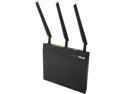
ASUS RT-AC66R Dual-Band Wireless-AC1750 Gigabit Router –Asus Certified.
Pros: Router came in a generic white box as expected since it is refurbished. Not DOA. Unit looks brand new as I couldn't find any blemishes. All the lights work and powered on as soon as I plugged it in. Exact same unit as RT-AC66U except the label on the bottom says AC66R. However, on the same label on another spot, it says AC66U. Quick internet search clearly states that AC66U and AC66R are the same unit but one is sold thru retail outlets (R) and the (U) version is sold through internet vendors. Although at this point, the distinction is moot. With a promo code Newegg had a couple of weeks ago, got it for significantly less than a Benjamin.
Cons: Shipping firmware was an older version numbered 3.0.0.4.374.5517. I immediately upgraded to the latest firmware 3.0.0.4.376.3754. (What's with the crazy version numbers??) That's when the "fun" started. See other thoughts below for what I mean by "fun".
Overall Review: After the firmware was upgraded to the latest version, I set the unit into Access Point mode since all I needed out of this unit was the highly rated radios, as tested by the good folks at SmallNetBuilder. With the latest firmware, the highest link rate I can get was 130mb/s with a throughput of about 40mb/s. This was in both the 2.4Ghz band and the 5Ghz band using my new MacBook Air that has 802.11AC capabilities and standing 2 feet away from it. I reset the router pushing the reset button on the back, changed wireless channels, change wireless mode, enable and disable WPA2 security and still no love. It's stuck at 130mb/s link rate. At this point, I'm thinking that 2 of the 3 data streams are dead and I'm getting single stream connection. Perhaps that's why this unit is refurbished. Two of the 3 radios are dead! So I thought. Then as a last ditch effort before I pack it up and ship it back for an exchange, I thought to try an older version of the firmware. I read on some forum that firmware version 3.0.0.4.376.3602 breaks the 5Ghz band so went even older with version 3.0.0.4.376.2524 dated 9/9/14. Then magically, all is well. My MacBook Air links up at 867mb/s (limit of my MacBook Air since it can only receive 2 streams of AC signal at 433mb/s per stream) and on N protocol on the 2.4Ghz band links up at 300mb/s (again only 2 streams of N at 150mb/s per stream). Throughput is somewhere north of 200mb/s on AC and 80-90mb/s on 2.4Ghz N protocol, which the best you can really hope for on wireless N. Range is also excellent but more importantly, at a significant signal attenuation, speeds are still around 60mb/s, plenty fast streaming the most demanding content like blu-ray. So, in all, I'm keeping it and not messing with the firmware again. I can't really comment on the other functions of the router since I am only using it as an access point. For my main router at the other end of the house, I'm using a Netgear R6250, which has an upgraded Broadcom BCM4708X cpu vs this Asus' Broadcom BCM4706 cpu. Also, the Netgear has a much more robust parental control feature that uses OpenDNS, something this ASUS lacks. With 2 school age kids in the house, having a robust parental control is very important to me.
2/9/2015See more detail
died quickly
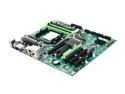
XFX MDA72P7509 AM2+/AM2 NVIDIA nForce 750a SLI HDMI ATX AMD Motherboard
Pros: Powered on for 2 minutes.
Cons: Died after 2 minutes. Then refused to reboot. Tried different power supply, switched out RAM, video card, reset CMOS and still wouldn't reboot. Recertified so I was expecting everything was checked out by XFX to work. Well, it did for 2 minutes. Moved all the components to an old board and everything works so definitely a dead board.
Overall Review: RMA for a replacement. Newegg has hassle free RMA and replacement service. Kudos to Newegg. Seems like a great board and looking forward to the replacement. Will update review when I get the replacement up and running.
3/9/2010See more detail
Top notch router for the money
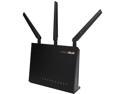
ASUS RT-AC68P Wireless-AC1900 Dual Band Gigabit Router IEEE 802.11ac, IEEE 802.11a/b/g/n AiProtection with Trend Micro for Complete Network Security-Certified Refurbished
Pros: Came out of the box looking new! Not a scratch, really! 1GHz dual core processor that's really speedy. Wifi range is better than my old Netgear R6250 and faster too. It came loaded with an older firmware but was able to quickly upgrade the firmware to the latest with ease. For my needs, don't need DD-WRT or other third party firmware and this fits the bill as is. AiProtection works as advertised.
Cons: Although AiProtection works as advertised, it slows down my it throughput speeds. My download speeds from Xfinity using a wired client on the lan port went from 230mbs to 160mbs. If I turn off AiPortection, the speeds return back to normal. 160mbs is still pretty good but not what I am paying for. Doesn't hurt the ping so games play as usual. Upon investigating this further, AiProtection maxes out one of the processor cores to 100% while the second core is idle. Interestingly, this only happens when speedtesting IPV6 and not IPV4. Perhaps this is a firmware issue, I really don't know. Since the usefulness of AiProtection outweigh the slowdown in download speeds, I will keep it turned on.
Overall Review: After about 3 weeks of use so far, zero issues other than what I mentioned in "con". Never needed to be rebooted, never dropped wifi connection. Only time will tell it's longevity.
4/2/2017See more detail
7 years and counting
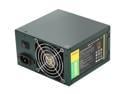
Antec EarthWatts Green EA-380D Green 380W Continuous power ATX12V v2.3 / EPS12V 80 PLUS BRONZE Certified Active PFC Power Supply - Intel Haswell Fully Compatible
Pros: Bought this PS back in Jan 2010 and it's still going strong! Not one misstep. It has outlasted several systems. It didn't kill the systems, the systems got old and obsolete so they got upgraded. Currently, it's powering an "old" system made of quad core Phenom II with AMD 7770HD video card, 6 gig DDR2 RAM, SSD and a 1TB 7200RPM HD on a ASUS MB. I don't know the combined power draw of all of these components but this power supply doesn't break a sweat. Get's slightly warm after hours of heavy computer use and gaming. Dust has collected on the air intake grill and on the fan but what do you expect? It's 7 years old!!
Cons: Didn't come with the 120V wall outlet power cord but if you are like me and have been tinkering with electronics for decades, I'm sure you have multiple power cords laying around in a box in the closet. Not taking an egg off for that. Just glad it didn't add to my "junk" pile. After 7 years of use, dust had collected on the intake grill and fan. Too bad it's not self cleaning, if there is such a thing.
Overall Review: I wish all the computer parts and electronics I have bought over the years were as dependable and reliable as this power supply.
1/5/2017See more detail
Works well with APU for budget builds
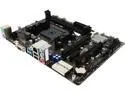
BIOSTAR Hi-Fi A70U3P FM2+ / FM2 AMD A70M USB 3.0 HDMI Micro ATX AMD Motherboard
Pros: Got it paired with A8 7600. Works wells. Bios is nice and user friendly. It's got enough SATA ports and other connectivity for a budget build. Not planning to overclock (A8 7600 wasn't meant for it anyways) so can't comment on that. Recognized my G.Skill Sniper 1866 ram and is running it at full speed after changing the memory setting in the bios by enabling XMP profile. It's suppose to have good audio circuit but can't comment on that since I am using the HDMI port for both video and audio. The on chip graphics on the A8 is plenty fast for it's intended purpose, which is general office stuff, internet surfing and light gaming like Minecraft that my kids like to play. Feels very responsive running Windows 7 off a 240GB SSD, boots to desktop in 20 seconds. Hard to get a better FM2+ board for this price.
Cons: Would be nice if it had a DVI port instead of the analog VGA port. Again, I'm using the HDMI port so it really wasn't a con for me but may be for some.
Overall Review: System setup: This board $40 AMD APU A8 7600 $80 8GB (2x4GB) G.Skill Sniper 1866 $35 240GB SSD by Silicon Powers $65 Corsair 430W power supply $20 Repurposed old HP computer case $0 Repurposed old HP wireless keyboard and mouse (came with said case) $0 25" 1080P TV with HDMI port bought on Craigslist $80 6ft HDMI cable, $5 on Amazon Not a bad system for a total cost $325.
3/15/2016See more detail
Update to my 2/19/14 review
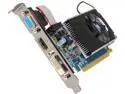
SAPPHIRE Radeon HD 6570 1GB DDR3 PCI Express 2.0 Graphics Card 11191-00-CPO
Pros: Initially worked
Cons: After less than 1 week of use, it is experiencing random crashes and video driver crashes. After removing all video card driver and installing a fresh copy of the lastes driver from AMD, the random crashing remains. When I put my old Radeon HD 5450 card back, the crashes stop. Obviously, it's this video card that is causing the crashes.
3/2/2014See more detail