




 here!
here!
I’m your shopping assistant for PC builds, upgrades, and everything tech.
Got questions? Ask away!
Start a conversation
here!
I’m your shopping assistant for PC builds, upgrades, and everything tech.
Got questions? Ask away!
Start a conversation

Joined on 09/10/10
Gamer board
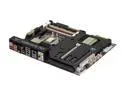
Pros: Many of you may be considering the ASUS Rampage IV, the roughly $350 dollar board. If you have eight USB 3.0 compatible devices, then by all means, get that one. If you need to Triple-Crossfire rather than just get a better card (no card tri-fires well), then get that one. Otherwise, get this one. For 83% (heh) of gamers and high-end users, this board will be more than sufficient. It has two 4-pin fan headers, two 3-pins on the edges, and one under the little removable plate for the tiny fan. The BIOS and ASUS interface are SUPERB. They are really the main reason you should have for getting this board. Simple, effective, and really nice to look at. Also, a USB 3.0 header on the board means that with a Lian Li adapter, cases that have USB 3.0 ports on the front but do not have a motherboard header connector can STILL avoid the whole cables-out-the-back thing (which is so ugly).
Cons: The tiny fan (I want to say 80mm, not sure) blocks the top PCI slot. Sure, you don't technically need it, but if you place, say, a sound card in the one remaining PCI slot in a Crossfire configuration, then it will definitely affect the airflow of your top video card. Frankly, as long as you have good air flow in your case, you won't need the fan. Keep in mind, also, that good air flow is NOT the same as just having a bunch of fans flowing everywhere. Just make sure you have air moving in one general direction (intake-->exhaust), and you'll be fine. The thermal shield will just need some intake air either from the front or bottom of your case. If your case has a big side fan, just remove the little plate. This has been mentioned before, but why they cover the RAM slots with that annoying sticker is beyond me. It leaves behind some residue that can be maddening to completely remove. I've already bought the board, why are they still advertising to me??
Overall Review: Yes, the thermal shield is not a HUGE benefit. It really doesn't do that much for you. That's not the main reason you should be getting this board, although it does make the interior look much more clean. I'm not big on the look of capacitors everywhere. The board is simply clean and effective. There really isn't much here that doesn't need to be here. The other ASUS board may be for the "Republic of Gamers", but I suspect they refer to a small group of elites, because most people will not need room for three graphics cards since they aren't trying to squeeze an extra 20% out of their system or something. Seriously, tri-fire scales terribly. This board may also only have two USB 3.0 ports, but it DOES have an internal header, meaning that you can get a 5.25 or 3.5 bay with two or more ports. You can also get a Lian Li mobo-header to two-USB-3.0 converter to connect to any USB 3.0 ports on the front of your case.
Hard to tell if it even works
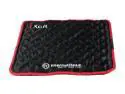
Pros: -Very, very portable, can be folded and whatnot unlike other cooling pads with fans
Cons: -Unfortunately, this is a very limited cooling method. Laptops are designed to cool themselves by drawing in cool air from the bottom of the laptop and push it through the hot components, ejecting the hot air out the side of the laptop. What does this do? It basically covers up the bottom vents, and instead relies on the cooling crystals to absorb heat. In my experience, what this means is that at first there's some cooling, but the crystals quickly absorb the heat and melt, and then your laptop's heat can begin to skyrocket. Do yourself a favor and get yourself a fan cooling pad!
Overall Review: If you use laptops that don't produce a lot of heat, this may be the pad for you---scratch that, if your laptop doesn't produce a lot of heat, then you don't need a cooling pad.
It works a treat!
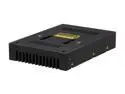
Pros: -Does EXACTLY what it's advertised to do. I have it connected to a 120GB Crucial C300 SSD, and it shows up in the BIOS as 230GBish, basically double of the 110ish it would normally show (sorry, I don't have the exact numbers on hand). -Comes with a nice short SATA cable. Nice!
Cons: -Was a little panicked at first when I saw that My Computer only showed my boot drive (SSD). Then, I went to Disk Management and realized that the remaining 1.15TB of my 1.5TB drive was simply unallocated. I right-clicked, set up a new drive, and bam, 10 seconds later I had both drives set up and running. -Sadly, it's restricted to SATA II 3Gb/s, but cmon, let's be honest: it really doesn't make that much of a difference unless you really do care about a few seconds of difference in your SSD times. I used to run a SATA III ssd, and I still can't tell the difference.
Overall Review: DO NOT GET EGG SAVER SHIPPING. It's a bit of a risk, since there are plenty of horror stories out there about the shipment taking up to 2 weeks. I lucked out and got mine in 4 business days, but you may not be as lucky. DHL's tracking is pretty terrible. This is a great alternative to a Z68 board. I will revise my review here if I run into any problems down the line, but so far it works like a dream.
Superb Projector
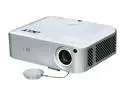
Pros: Absolutely incredible. What I say can't really do it justice--go look at professional reviews online, and user reviews with video. Vibrant color, easy interface, incredible clarity and brightness even on the Eco setting...awesome.
Cons: NEWEGG, WHY WOULD YOU DISCONTINUE THIS :( I was planning on saving up for two more to set up an Eyefinity display across my wall, but now its deactivated?? Bring them back! These are easily the best 1080p projectors on the market at this price range!
Overall Review: Bring. Them. Back. If they aren't selling well then try reducing the price a little.
FAR superior to the H50
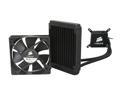
Pros: One of the main issues of the H50 was the fact that the block that went on the CPU was HUGE. In certain cases, it would actually prevent you from putting in a Push/Pull configuration. I'm not sure why this block isn't bigger news, because I consider it superior to both the H50 and the H70. It shocked me that the H70 was actually the successor to the H50, since it would make more sense for a second iteration to be more efficient. The key here is that while the radiator for the H50 and H60 may be small, they are extremely fin-dense. The fins on the H70 are much wider. In any case, this thing is superb. The radiator is not entirely square, which you should be aware of, but luckily it'll fit in almost any case, even my Raven RV02-E, which has a restricted area for the 120mm exhaust fans. I was still able to push/pull on this with two Scythe Gentle Typhoons.
Cons: Four extra screws. This would cost Corsair an extra 50 cents to put into this box. I would be willing to tack an extra dollar or two onto the H60 for them to include them. So why the heck do they not include them?? You'll need to buy your own 6-32 x 1-1/4in screws to do push/pull. Oh, and the mounting for Intel boards (Mine was a Sabertooth P67) is a little fickle--there are four little holes that you have to line up, but since different boards have different hole locations, the Corsair mount has little plastic pieces that slide around. Kinda difficult, but not that big of a problem.
Overall Review: There's a LOT of debate online about which is better, the H50 or the H70. I would suggest that the H60 is actually the best. The big block is gone, the mounting is very easy, and they thankfully realized that the huge radiator of the H70 does not give the kind of performance boost it should. In many tests, it actually gave INFERIOR results to the H50 without extremely high CFM/static pressure fans. Also, please know that you will need a 3-pin connector on your motherboard for the pump of this cooler. I'm not sure if you can connect it to the PSU directly via a 3pin-molex converter, but I wouldn't suggest it.
Cheaper elsewhere
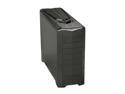
Pros: This case is everything it's purported to be. Keep in mind that this is the newer version of the Raven 2, which has better fans and hard drive spaces. I gave this 5 stars because this is a review of the item itself. However, Newegg charges way more than a few other sites. Try Googling this item and seeing what prices you get. Again, make sure that you're looking at the EW version!
Cons: None of as yet. Silverstone has addressed all the main issues of the original Raven 2. The fans are quiet and powerful, the hard drives no longer face awkwardly toward the back, and the case top FINALLY fits even with video card adapters.
Overall Review: It is my hope that this style of case will become more and more standard as time goes on. The principle of cooling from bottom up is excellent. There is NO competing airflow besides the GPU fans, all of it goes straight from bottom to up. Amazing stuff, and it allows for the case to provide the same level of cooling that a MUCH louder computer would provide. Also, keep in mind that this is not meant to be a water-cooling case, although it's apparently possible to mount small radiators (the case comes with these mounts for adding a radiator to the fans--I'm no expert so I'm not sure how these would be used).


