




 here!
here!
I’m your shopping assistant for PC builds, upgrades, and everything tech.
Got questions? Ask away!
Start a conversation
here!
I’m your shopping assistant for PC builds, upgrades, and everything tech.
Got questions? Ask away!
Start a conversation

Joined on 09/07/05
Great performance! Very happy with flexibility - check out under-volting, too!!!
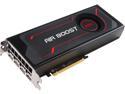
Pros: - Expels hot air out of case - Software/driver more than adequately matured - price:performance is justified - plenty of video out - relatively decreased power requirements compared to previous generation AMD cards - see Other below
Cons: I don't know. Maybe there's no DVI port?
Overall Review: Have had this MSI Vega 56 for close to 6 months now. It's been mostly used to drive a single Samsung 21:9 34" CF791 Curved Ultra-Widescreen Monitor at 3440x1440 @ 100Hz using AMD's FreeSync. IT'S GREAT! WOW - what a beautiful picture and what great quality! I'm very pleased with it's performance and have ZERO doubt this was a great purchase. I can confidently recommend this card (the closer to 400'ish, the better - I got mine for under that with a rebate). A week ago, Just to experiment, I added x2 smaller 19" 1440x900 @ 60Hz monitors vertically on the sides. I had to adjust the refresh of the 3440x1440 monitor to 60Hz. Wow - still holds up! Subjectively, it performs smoothly with what I think are reasonable frame rates (30'ish or much higher even!) in demanding sim games like DCS, Star Citizen and X-plane 11. I think that price:performance is an important characteristic with things like PC hardware. Go ahead and read/watch "professional" reviews/youtube - I have found that the positive reviews have held true for me thus far. Another valuable - but not required - step I took was to undervolt. Youtube it and watch two or three of them and try it. GamersNexus has a REALLY long but more deeply-INFORMATIVE video on it. Check them out.
Mixed experience

Overall Review: Received the refurb'd vac pretty promptly. However: 1) the washable filter that attaches at the end of the unit (having been used previously) is dirty and smells bad. It MIGHT have been "cleaned" at some point during the refub process, but if it was, it was not done well at all; 2) the power cord/charging cord is significantly damaged. It has sharp-looking cuts in several spots along the length of the cord, showing exposed wire. Looks like knife or razor type cuts. Clearly overlooked and UNSAFE for use! So I couldn't use the vac right away. I called Dyson customer service and explained the situation. They agreed to send me a replacement filter and cord. Their shipping is not fast however. About a week or so later a package arrived, but it was only the replacement filter - no charging cord! Ugh - so I called them again and eventually the person I spoke with understood the situation and sent a replacement cord. It also took over a week. In all, from having received the vac initially, it's taken approximately three weeks to get it operational. Sigh... Now that all of the parts are here the vac does work well. The paperwork Dyson sends along with the product emphasizes how much care they take and yadda-yadda with their refurbished products. Wasn't the case this time around. Bummer. We have a full upright vac from Dyson and a V8 cordless as well. Those have both been generally good experiences. This most recent purchase was not positive though.
TOSHIBA X300 HDWE140XZSTA 4TB 7200 RPM 128MB Cache SATA 6.0Gb/s 3.5" Desktop Internal Hard Drive Retail Kit
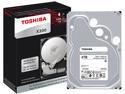
Pros: - Price:performance! WOW! - Appropriate USB3 speeds in a Rosewill USB3.0 external HDD enclosure on a Z97 mobo.
Cons: None
Overall Review: These were priced very well - great price point for storage size and performance capability! Had them for around 5 months at time of review. ***UPDATED 02/2019: I've had (still do) two of these since 11/2015 - one in an external enclosure, used in a typical/average desktop-user setting and the other has been used in a Synology 2-bay NAS running 24/7 (the second drive in the NAS is a Seagate NAS HDD). The one in the external enclosure is running well; the one in the NAS began experiencing bad sectors last month (01/2019). It's still working, but it's making audible noise during seeking and the Synology NAS has been warning me that a number of bad sectors have been found and that the drive should be replaced. So, the Toshiba X300(s) have been lasting well overall. It's less of a good choice for a NAS - obviously, based on how it's marketed :) . And even when being used in a NAS environment, which is not how it's intended to be used, it's performed well, long beyond it's advertised warranty period. Nice job Toshiba. I suspect I'll continue to get reliable use out of the other Toshiba drive in the external enclosure I'm still using.
Gigabyte Z97X-UD5H-BK *Update
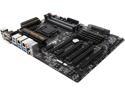
Pros: Listed feature set; prolonged testing; expandable/availability of slots and ports; number of fan headers (with somewhat of good placement). Flexible platform with loads of upgrade/future-proofing potential!
Cons: None
Overall Review: My build includes this mobo and a new Intel 4790K.
Reluctant 4 out of 5, was considering a 3.
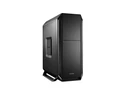
Pros: - Really like the external fit and finish - Top x2 exhaust fans are flexible in there size possiblity and positioning - Bottom and front dust filter - Room for x6 case fans (some 120mm some 140mm) - Rubber mounting supplied for all internal 3.5" HDD slots - USB 3.0 on top front of case - x3 supplied case fans with (albeit very basic) rubber dampeners - Bottom "feet" support are removable pretty easily - Some effort to allow for cable management - not amazing, but not bad
Cons: - Some aspects of the case are somewhat challenging/difficult to confidently disassemble - Supplied case fans are 3-pin...ugh - Less plastic would be nicer for the cost - Less detailed instruction manual than I would have liked - Plastic tab on side panel fan cover broke/was broken upon initial removal :( - Internal 3.5" HDD trays are a bit tricky to slide out; metal to metal is a VERY tight fit when removing/reinstalling - In order to access inside the top most or bottom most portion of the case, you must remove the front panel first - Removal of/access to the bottom and top most panels of the case are...inconvenient :\ - The screws that hold/secure the plastic bottom panel to the bottom portion of the (metal) case will, in time, strip out the threading of the bottom panel - come on ]:( - As others have mentioned, the removal of the bottom dust filter must be drawn straight back, which again, is inconvenient...
Overall Review: - Although the picture displays what looks like x4 5.25" optical drive bays, there are actually only x3; just know that going in. They DO clearly state this in the Specifications, but at the time I took it at face value that there were x4 :\ Oh well, that's on me... -There were only x2 mobo stand-offs provided (in total) and only x6 motherboard screws supplied (perhaps in error?) to affix to the mobo tray - The center (non-removable) post is a nice idea I think; I'm glad it's there, I like it - but am still missing having adequate screws supplied to hold down all the spots... I really like many aspects of this case, but annoyingly, am slightly bothered by some others. I'm offering 4 eggs as I have not yet completed the build and haven't heard (or not) just how quiet it all might just be. I'm using their generously supplied x3 be quiet! fans (as intake), along with x3 Noctua 120mm fans (for exhaust). I will also be using a Noctua NH-D14. Once the build is complete and everything is buttoned up for good I will update as necessary. If cable management is ultimately tidy and practical, and the noise is pretty much absent, then I'll be able to overlook some of the previous gripes.
Intel Core i7-4790K Devil's Canyon Quad-Core 4.0 GHz LGA 1150 BX80646I74790K

Pros: - Great performance
Cons: - It's more costly, but what are you gonna do...?
Overall Review: I multi-task often; audio/video editing; media creation/disc burning; running audio monitoring software; web browsing; etc and things run well. Also, I game, and of course this 4790K is certainly not a bottleneck.
Not a good refurbished purchase experience
Received the refurb'd V10 vac pretty promptly. However: 1) the washable filter that attaches at the end of the unit (having been used previously) is dirty and smells bad. It MIGHT have been "cleaned" at some point during the refub process, but if it was, it was not done well at all; 2) the power cord/charging cord is significantly damaged. It has several sharp-looking cuts in several spots along the length of the cord. Looks like knife or razor type cuts. So I couldn't use the vac right away. I did call Dyson customer service and explained the situation. They agreed to send me a replacement filter and cord. Their shipping is not fast however. About a week or so later a package arrived but it was only the replacement filter - no charging cord! Ugh - so I called them again and eventually the person I spoke with understood the situation and sent a replacement cord. It also took over a week. Sigh... Now that all of the parts are here the vac does work well. But it was a somewhat difficult process getting the refurbed vac in working order. The paperwork Dyson sends along with the product emphasizes how much care they take and yadda-yadda with their products. Wasn't the case this time around. We have a full upright vac from Dyson and a V8 cordless as well. Those have both been generally good experiences.


