




 here!
here!
I’m your shopping assistant for PC builds, upgrades, and everything tech.
Got questions? Ask away!
Start a conversation
here!
I’m your shopping assistant for PC builds, upgrades, and everything tech.
Got questions? Ask away!
Start a conversation

Joined on 12/18/06
Better than ASUS M4A89GTD PRO/USB3
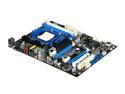
Pros: Has EVERYTHING the ASUS M4A89GTD PRO/USB3 has. But for $60 cheaper (when I bought it was). Can overclock each core individually - very handy for an unlocked core that doesn't want to OC very much. Same quality as ASUS (do some research on who started ASRock). It DOES have 8 channel sound. I connected to my home theatre AVR and it showed 7.1 channel. SATA connections are nice and snug. 4 SATA cables (some of the cheaper boards come with 3).
Cons: The only thing this board doesn't have that the ASUS M4A89GTD PRO/USB3 does, is: a) IDE drive connection b) one less SATA port for a total of 5 instead of 6 If you don't need either of those, BUY THIS board and save yourself some dough.
Overall Review: I own both boards. I like the ASRock better.
Don't buy if you actually care about your GPU
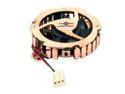
Pros: Fan spins Comes with decent accessories
Cons: Does not fit any recent GPU from like 2005-present without mods! If you have a 6-series to present Nvidia or 3000-series to present ATI card and this thing actually fits - consider yourself VERY lucky. For my friend's 7300GT the mounting holes were a tad too short so I had to angle the pushpins out to go thru the holes in the card. Also does a terrible job of cooling. Kept the card cool enough to surf internet and play simple games like mahjongg, but anything beyond that would toast the card.
Overall Review: reviewer nerp you are brilliant! from his comment: "Saw some posts from people who had issues with the 3-pin connector. The video cards have a small two pin connector and the fan comes with the standard 3-pin fan connector. On the three video cards that I replaced fans on, all I had to do to make the 3-pin connector on the fan work was to pull the plastic 2-pin receptacle off of the pins on the VGA card leaving the bare pins. The receptacle is friction fit onto the pins and can be gently worked off with pair of pliers. Then all you have to do is slide the 3-pin connector onto the two pins taking care to get the polarity correct." took his advice and it worked perfect. just wiggle it a bit with pliers while you pull firmly and it'll come off.
NOT REAL GREAT WITH RYZEN 2700X
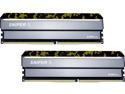
Pros: Post at 2133mhz
Cons: I spent hours trying various combinations of timings and voltages based on Ryzen DRAM Calculator, other reviewers suggestions, pro-reviews...absolutely nothing worked. They simply will not run at anything other than 2133mhz
Overall Review: I would definitely not recommend these Hynix CJR sticks, and definitely would not buy again. Only reason I didn't give 1 egg was because they do work, just not anywhere close to the guaranteed timings.
Works Perfectly w/ all games
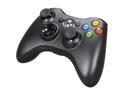
Pros: * Plug and Play - nothing to figure out, just connect to a USB port and it works * Vibration works * Games instantly recognize it * Little to no learning curve * Super long cord, perfect for those of us who PC game in our living rooms or home theaters
Cons: NONE
Overall Review: For years I used a Logitech Playstation-style controller, and had to put up with the many games it never worked with, as well as the games it only semi-worked with or I had to install emulators to get it to work sort of. Why why why didn't i just buy one of these sooner? If you're a Logitech Gamepad owner, don't put up with that garbage any second longer, get this controller you will never look back.
**BEST** MMO or RTS mouse out there
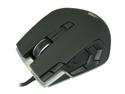
Pros: - Absolute top-notch quality. NOTHING cheap or plasticky about this mouse. From the cord to the metal construction to the cover materials to the scroll wheels and buttons, everything about this mouse is solid, it says "i am the Cadillac of mice". - The shape is very comfortable for claw and palm-grip users. It looks short in the one pic for some reason, but IT IS A NORMAL SIZED MOUSE, feels great in my man-sized hands. - The weight of this mouse is perfect. Not too light and cheap, not too heavy to be burdensome, but just right: solid enough to indicate quality construction without being a pain to use after several hours. - The software is not hard at all, I dont know what some of these guys are talking about. It is MUCH easier to use than Razer's Synapse. It literally took me 5 minutes to understand it, and the only things I had to look up was how to do Macros and how to save profiles to the mouse. - Buttons: best placement EVER. It only took me two gaming sessions in GuildWars 2 to get used to and proficient at using the buttons. They are very easy to learn and distinguish. No accidental clicks at all! - The lighting on this mouse is SICK. It is all about quality and class, not cheesy "i'm trying too hard to look edgy". - This mouse can do anything a Naga can do, only easier and better.
Cons: - I wish it had the ability to natively control volume on the mouse, but very few mice can do that so I wasn't bummed that it can't - just wish there was a tiny nub on each thumb button like on the "J" and "F" keys. It *is* much easier to find and distinguish the buttons than any other mouse I've tried, and is definitely usable the way it is, but little nubs would make it perfect.
Overall Review: I've owned the Razer Naga and this mouse blows it out of the water in every respect. I wanted a G600 but I'm sick and tired of Logitech products failing on me, and plus I was afraid I'd run into the same problem with the button orientation that I had on the Naga. So I can't tell you how incredibly happy I am with the mouse. I do not often come across a purchase that has everything I'm looking for and is of such high quality. Even the clamshell packaging? - Corsair figured out a simple and brilliant way to make it easy to open (perforated opening on the back). Highly, highly, highly recommend this mouse.
Good mouse except ONE major flaw
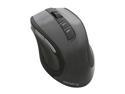
Pros: -Comfortable -Good weight, doesn't feel cheap -Can do claw or palm grip depending on hand size -Only takes one battery, so saving 50% on replacements -No problems with missing clicks or intermittent tracking - BUT see cons!
Cons: -As soon as I take the mouse any farther than a foot from the tiny receiver, I start experiencing the missing mouse clicks and intermittent tracking that others have stated. So I put my receiver on a USB extension cable so that it sits within inches of my mouse, and it works perfect. Needing a cable for a **wireless** mouse to work right is a major major design flaw. Only two eggs because at least it works great when using it as a "wired" mouse.
Overall Review: FOR THE PEOPLE MISSING CLICKS OR LOSING TRACKING: it seems to me the probable cause is the wireless receiver is too far from the mouse. Move it to within 12" and see if your problems disappear.


