

Your Browsing History


John H.
Joined on 11/29/07
0
0
100%
100%
product reviews
- 108
Works Great

Rosewill RCN-SC206 Monitor Cleaning (Smaller cleaning size) w/ 100ml Solution
Pros: No mess, No fuss, No residue, Works a lot better than glass cleaner. No scratches. Spray it on. Wipe it off with the applicator and your through. One shot does the trick.
Cons: Little pricey
Overall Review: Cleaned the TV set with it. Wife said "What happened to the picture? It's so much brighter!". I told her "I did your job", then I went out back and ate dinner with the dogs.
4/20/2008See more detail
Cheap Case
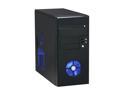
Broadway Com Corp 1243MA-BLACK Glossy black Steel ATX Mini Tower Computer Case 500W Power Supply
Pros: Price Small Size, have limited space to put it and it fit. Black Shiney Finish Blue Front Intake Fan
Cons: Sharp edges throught. Intake fan does not blow across HD; Blows below it. Although it has unobstructed air flow to the inside. DVD drive bay has a door on it that always hangs. To me its useless No side air duct. Power Supply is a joke. Failed after 1 week of use. and I am only pulling 277watts full load.
Overall Review: Added 80mm Rear exhaust fan. Seems to be ample air flow with my system. Can't see any reason to add fans to the side door. To many fans can create dead spaces and there is not enough room to more exhaust fans New the PSU was going to be a problem. Was hopeing it would last a month or two before I had to replace it. Was I wrong. Replaced with Corsair 430watt. It is a cheap case. At the time it was the best I could do for the room I had to put it. Not overwhelmed with it at all. It works.
7/31/2011See more detail
Raspberry Pi NAS drive
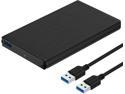
Sabrent USB 3.0 to 2.5" SSD/SATA External Hard Drive Aluminum Enclosure, Black (EC-UK30)
Pros: Small and thin fits SSD very wellComes with 2 screws for the end plate and a screwdriverAlso included is a short USB 3.0 A to A cableEasy to install SSD. Plug it into the end cap and secure with 2 screws. Connect to Pi with USB 3.0. Pi has enough power to power a SSD without a separate power adapter.
Cons: No Bells or Whistles just straight SSD enclosure
Overall Review: Got this to replace a USB 3.0 external HDD I had connected to my Raspberry Pi 4B Network Server. Installed a 250 GB Samsung 860 EVO SSD in it which is more than enough for my needs; mainly downloading Torrents and storing backups
4/12/2021See more detail
Replacement
![Rosewill RCSC-18002 [3-Pack] SATA Cable 90 Degree Right Angle SATA III 6.0 Gbps, SATA Cable 18 Inches, SATA 3 Cable - 18 Inches, Blue, 3-Pack](https://c1.neweggimages.com/ProductImageCompressAll125/12-119-904-V01.jpg)
Rosewill RCSC-18002 [3-Pack] SATA Cable 90 Degree Right Angle SATA III 6.0 Gbps, SATA Cable 18 Inches, SATA 3 Cable - 18 Inches, Blue, 3-Pack
Pros: Straight to 90 with Latch3 in Package18 inches longSATA 6Gb/S
Cons: None
Overall Review: Got these for a replacement for my 3 disk drives in my PC. i had some long mismatched cables before. These are shorter with out the extra cable lying around. The 90 degree end is connected to the drives because of clearance issues with my case. Straight end to the motherboard which in my case was a tight fit. Blue makes it nice to now which connection they are. I have Red ones on my DVD Drives
4/12/2021See more detail
Fantastic Monitor
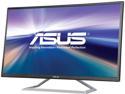
ASUS VA325H Black 32" (31.5" viewable) Widescreen IPS Monitor, ASCR 100,000,000:1 (1,200:1) 250 cd/m2, Dual Built-in Speakers, HDMI, VGA
Pros: Excellent for every day home use Large Screen making it easier to seeBuilt in SpeakersSupports HDMI Audio with HDMI connectionResume from standby is very fastSide Menu buttons instead of under the bottom
Cons: No VESA Mount. Sit on a desk onlyInternal Speakers are adequate. No rich soundNo DVI connection
Overall Review: Got this to replace my 10 year old 24 inch Asus Monitor which was starting to give me trouble. It was hard to start from a power failure. Resume from standby was slow.Needed a larger monitor that was easier to see. Had the old one pulled up on my desk to see it. This one sets back and gives more desk room.Had to use my existing soundbar for audio as the internal speakers are usable but quality playing music is poor.Used HDMI connection as my Graphic Card does not have a D-Sub connection and I did not have a DVI to D-Sub adapter.Menu slightly hard for me to navigate due to my age. Use Standard Mode with Blu Light on setting 2 and Volume on 0. Not a Gamer so Game mode is useless to me. Other adjustments were set on defaults.
4/12/2021See more detail
System Drive
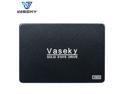
Vaseky 2.5'' SATA3 III SSD MLC Noiseless Hotless Shockproof SSD 500G 350G 240G 256G 120G 64G Solid State Drive Disk For Desktop (V800 64GB)
Pros: It works and comes with screws
Cons: Came from China Took 20 days to get
Overall Review: Replaced a very old HDD in a Media Center PC running LibreELEC. Using just as a system drive as I have a 4Tb storage drive
5/19/2020See more detail