

Your Browsing History


Nathan H.
Joined on 12/03/07
0
0
product reviews
- 68
Great high speed USB3 drive

CORSAIR Voyager GT 64GB USB 3.0 Flash Drive CMFVYGT3A-64GB
Pros: I have wanted to get a USB3 drive for a while now, and this is my first one. I can say that I am thoroughly impressed with this Corsair drive. I have owned a few Corsair products in the past and I have never been disappointed in them. This is one heck of a fast USB thumb drive, and like all Corsair stuff the quality is there as well. I had a lot of work to do using thumb drives, and I was very excited to get this one. I have been installing Windows and installing utilities from my USB sticks for years and everything installs so much faster from this drive. I also use thumb drives for moving raw images for our photography business, and multiple medium files on my old drive took forever to copy. Now with this drive my copy time is 1/10 what it was. I am seriously going to buy more of these drives, and upgrade any storage device to USB 3.0. From what I can tell, this drive is also durable. I found it outside covered in sticky stuff in child’s sand box. I cleaned it up and it still works great. I love this drive.
Cons: I find it hard to find anything wrong with this drive. It is bigger than some of my USB drives, but it has a nice feel to it. The cap could get lost, and after some use the drive gets a little warm. I don’t know if the heat is caused by the memory or the LED light.
Overall Review: I did some benchmarking with this drive and multiple file sizes. 17.7GB mkv movie: Read@203MB/s average, Write@96MB/s average 16GB of raw images (33MB each) Read@171MB/s Write@60MB/s 4.13GB Windows7 installation directory. Read@111MB/s Write@60MB/s You will need to have a solid state drive in order to use this USB drive’s full potential. Running this on my WD Blue hard disk drive produces slower transfer speeds because the hard drive can’t go any faster. This USB stick is faster than the standard computer hard drives, and that is just awesome.
9/24/2012See more detail
a bit irritated
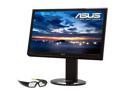
Asus VG236H 23" 1920 x 1080 Full HD HDMI Multimedia Height & Swivel Adjustable WideScreen LCD 120Hz 3D Monitor 400 cd/m2 100,000:1 (ASCR)
Pros: The color and 3D are great. Really fun to play games on.
Cons: About a week into ownership I big red stuck pixel showed up. A few days later, some flickering problems cropped up.
Overall Review: Newegg is replacing, so hopefully the second will be better
8/28/2010See more detail
Great ECC Ram for Nas
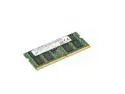
Crucial 16GB DDR4 2666 (PC4-21300) CL19 ECC Unbuffered SODIMM CT16G4TFD8266
Overall Review: Ordered two sticks for my 1621+. The Nas booted quickly and I have no warnings about unsupported memory. I don't think I have ever had a problem with Crucial memory.
2/24/2022See more detail
Nice Laptop, runs VR well
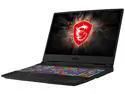
MSI GL Series - 15.6" FHD 144 Hz - Intel Core i7-9750H - GeForce RTX 2060 - 16GB Memory DDR4 2666 - 512GB NVMe SSD - Windows 10 Home 64-bit ()
Pros: I bought this laptop mostly to run my Oculus Rift S, and go with me when I troubleshoot networks. It's fairly small for a gaming laptop. The performance is fantastic, and it runs the Rift S great. Some how Rift S seems like it runs smoother on this laptop than on my desktop despite my desktop being way more powerful (Ryzen 3900x, RTX 2080ti, NVme Drives). Perhaps something to do with USB as the tracking system seems to run better. RGB is kinda cool, and you can turn it off. The Screen is amazing.
Cons: Mine ran pretty hot when running the Rift S. It would get into the upper 90s and occasionally hit 100c. I don't like that. I set a custom fan control that was a bit more aggressive and that helped keep it under 90. I noticed that the CPU voltage would get pretty high too. I used Throttle stop, and was able to undervolt the CPU by 145mv. With the undervolt I have the same performance but temps are 65c to 75c while gaming and the fans are much quieter. The undervolt aslo increased my battery life. I know there is variation in CPUs, and these things are set for basically the worst case scenario. You can make yours run better with a bit of tweaking.
Overall Review: Very Happy with this laptop. Runs VR great. Price was excellent for 9th gen i7 and rtx 2060.
2/2/2020See more detail
Great budget board for 3900x
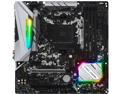
ASRock B450M Steel Legend AM4 AMD Promontory B450 Micro ATX AMD Motherboard
Pros: I was a bit weary of the reviews of the MATX x570 boards, so I figured I would give this a try, AsRock boards have been good to me in the past. The motherboard came Ryzen 3000 ready, and booted with no issues with the x3900. After setting the voltage manually to 1.235v, I was able to set my 3900x at 4.3Ghz on all cores. I have 64Gb (4x16Gb) Crucial Ballistix 3200 running at 3600mhz. Add in my RTx 2080 and the system is running very stable. It has made much faster work of my 4k video compressions.
Cons: I don't know what the CPU voltage was doing on stock settings, it was higher than my liking. This is not just a issue with this AsRock board, but seems to affect other manufactures boards. I don't know if it is the board or AMD, but I recommend setting the CPU voltage manually.
Overall Review: Great board. It surpassed my expectations overclocking my 3900x and Ram. I really can't see a need to go for a x570 board.
12/23/2019See more detail
Cool little device.
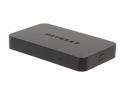
NETGEAR PTV3000-100NAS Push2TV Wireless Display Adapter
Pros: This is a pretty neat idea, and I have already found many uses for this. This is great for connecting a phone to a TV to show off pictures and home video, and I can see this being very handy for a presentation in a work environment as well. The PTV3000 is quite small and the device is easily hidden. I first tried connecting my TV to my Samsung Galaxy S3, and the setup literally too me 15 seconds. Plug-in, turn on TV, connect phone. It was as simple as that. I played a few games, and played a full 1080p mp4 movie file from my phone and all worked great. I was able to connect my Lenovo laptop running Windows 8 without issue as well. I did notice that there was a slight delay with my laptop to my TV, but I did not find that a problem because at that point I was only watching the TV. With both the phone and Laptop I did not notice any display problems with choppy frame rates, or degraded image quality while watching full 1080p movies, However; this is not a suitable device to use as a wireless monitor connection for games because my laptop only wants to use the Intel integrated graphics, and I cannot switch it to the gtx660m for gaming. If you are going to play a game that requires power and would be affected by the delay it is best to just use an HDMI cable from laptop to the TV. I have also used this to hook my phone up to and Asus monitor and my Epson overhead projector, and both worked without issue. So far I am enjoying the usefulness of the PTV3000 and I am pleased with the device overall.
Cons: I would have liked the PTV3000 to come with an HDMI cabl, but the only real issue that I have had was connecting the PTV3000 to my Denon receiver. I was able to see the connection screen being outputted from my receiver to my TV, but every time my phone or laptop connected the connection would close and it would just go back to the connection screen. I am not docking an egg for this as my Denon receiver has been picky with HDMI handshakes before, and seeing as this is the only combination that did not work I put the problem with my AVR-1911 receiver.
6/6/2013See more detail