

Your Browsing History


Craig H.
Joined on 04/26/04
0
0
product reviews
- 38
Works as advertised
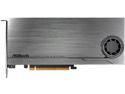
ASRock ULTRA QUAD M.2 CARD PCI-e to 4x M.2 Card
Pros: Can install 4 NVMe drives in one PCIe slot. When installed properly, all drives do show up in the BOIS. I am running this in an X399 mobo and I now have 5 (just ordered 2 more) NVMe drives. Despite what ASRock says, this can be used in RAID, (See Other Comments).
Cons: Not mentioned in the 1 page "manual" you must set your PCIe slot to Bifurcation, separating the channels. On my first attempt, with an older BIOS, I could only change PCIe slot #4 from X16 to X4/X4/X4/X4. To do this, you have to dig deep into the dark depths of the BIOS. After a small error on my part, the adapter only showed one drive and not two. I did a BIOS update and the system then let me adjust all PCIe slots to Bifurcation. After moving the card to the proper slot, all was working correctly. May or may not be a CON, but (for best/proper operation, requires 6 pin "GPU" power plug. The manual states only required when using more than 2 drives or if using Optane drives. I connected it just to be on the safe side, and I plan on installing 2 more drives.
Overall Review: As mentioned, the manufacturer says the adapter doesn't support RAID. For that, they are correct. HOWEVER, using Windows management, you can RAID 0 or RAID 1 the drives. The primary reason I purchased this was to install more than the 3 NVMe drives that the mobo can hold, and to run them in dual RAID 1's. (My first level of back-up) Other people have commented about the fan noise, I flipped the switch to were it uses 50% power and I don't hear it over my other fans, (2060RDX, twin 120's in AIO cooler top exhaust, two 120' on the front running about 1/3 speed and a 120 rear exhaust at 66% speed. When the side panel goes back on, 2 more 120's at 1/3 power for intake. Since everything appears to be running correctly, I haven't even looked at the included disk. Since it works how I want it to, I don't plan on installing the utility that is on the disk. Drives must be NVMe type and not SATA type. Other than 1 large HDD for second level back-up, I plan on using nothing but NVMe drives in my system.
3/8/2019See more detail
No tilt stand
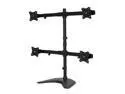
NavePoint Quad LCD Curved Monitor Mount Stand Free Standing With Adjustable Tilt Holds 4 Monitors Up To 27-Inches Black
Pros: Holds 4 28 inch monitors. Very stable and solidly built. Very nice left and right adjustment.
Cons: You have to completely assemble with monitors and then turn it around. Can't do any assembly from behind if your desk is against a wall. You cannot adjust vertical tilt. I recommend staying away from this stand.
Overall Review: The top bar feels it is angled upward and the bottom bar feels angled downward. Swap the two bars and still get the same effect.
10/22/2014See more detail
So far, So good
MDD (MDD22TS25672E) 22TB 7200RPM 256MB Cache SATA 6.0Gb/s 3.5inch Internal Enterprise Hard Drive
Pros: 22TB Working good in my DAS
Cons: Is a refurb
Overall Review: I have found that refurbished items are usually better than new. A fault was found, it was repaired and usually made better than new. I needed a 20TB, but none were available so went with 22TB
2/11/2026See more detail
So far so good
MDD (MDD20TGSA25672E) 20TB 7200 RPM 256MB Cache SATA 6.0Gb/s 3.5inch Internal Enterprise Hard Drive
Pros: 20TB Works good in my DAS
Cons: Not really a CON, is a refurbish
Overall Review: I have found that refurbished items are usually better than new. A fault was found, it was repaired and usually made better than new.
2/11/2026See more detail
Works great, but flimsy
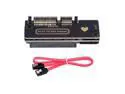
SATA to SAS Adapter for 2.5/3.5" SFF-8482 SAS Hard Disks to Motherboard SATA Converter Adapter
Pros: Does work to make SAS drive connect with SATA connector
Cons: Double checked the cable connection and it broke
Overall Review: Use baby hands when installing and never touch after it is working.
2/11/2026See more detail
Does not work
![Hannord SAS to SATA Adapter [2 Pack] SFF-8482 29Pin SAS Hard Disk Drive to Motherboard SATA 22Pin Converter Adapter](https://c1.neweggimages.com/ProductImageCompressAll125/APY9S2507090LJEQ197.jpg)
Hannord SAS to SATA Adapter [2 Pack] SFF-8482 29Pin SAS Hard Disk Drive to Motherboard SATA 22Pin Converter Adapter
Pros: Yes it connects to a SAS drive
Cons: Does not work.
Overall Review: Don't waste your money
2/11/2026See more detail
seller reviews
- 5
Not tgrackable
After receiving tracking information, whenever I checked the status , it was always in "packaging". I checked in the morning and it was, 10 days later, still in packaging. However, it was delivered that afternoon. Don't understand why they have such difficulty sending tracking information.
On-time
Delivery
Product
Accuracy
Customer Service
Satisfactory
9/19/2017See more detail
Never Shipped
For some stupid reason, they cancelled my order and I have not received it.
On-time
Delivery
Product
Accuracy
Customer Service
Satisfactory
9/19/2017See more detail
3 business day delivery took a week.
Ordered on Friday early afternoon. It said 3 business day would arrive on Wednesday. Didn't arrive until Friday. Why pay extra if you aren't going to honor it? I'm also talking about you newegg.com. Your part of the order that was to arrive on Wednesday didn't arrive until Thursday?
On-time
Delivery
Product
Accuracy
Customer Service
Satisfactory
8/30/2017See more detail