




 here!
here!
I’m your shopping assistant for PC builds, upgrades, and everything tech.
Got questions? Ask away!
Start a conversation
here!
I’m your shopping assistant for PC builds, upgrades, and everything tech.
Got questions? Ask away!
Start a conversation

Joined on 12/22/06
Best in it's Class
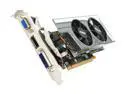
Pros: While the 9800GT is similair in performance this card uses less power and has less heat, and it also does not require a 6pin power cable. The benefits are great for those people looking to upgrade a slimline PC from OEM's with low power PSU's (250w-300w) and those without the ability to add a 6pin adapter. It's basically this or spending an additional 130 dollars on a 5750 LP (or GTS 250 LP) and 300w TFX power supply.
Cons: None given the stipulations: 250w PSU, no additional 6 pin cable without the ability to even use one.
Overall Review: With the ATI 6000 series of cards basically just around the corner this is the best you can muster for what it is but Caicos should start shipping Q1 2001. I'm hoping for 5750 level performance without the 6pin but it might not happen.
Best available Ryzen 7000 memory
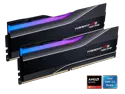
Pros: - used Actually Hardcore Overclocking (YouTube) tuned settings and it worked flawlessly. No change to voltage. - passed y-cruncher with GPU stress testing for 48 hrs. - Aida memory latency is 65.2 ns which I thought would be better. - Drastically increased some titles 0.1% lows with a 7700 with PBO enabled just like the Hardware Unboxed videos showed.
Overall Review: If youre going to go with a Ryzen setup this is probably the best memory you can get unless you really want to dive into overclocking more so than someone doing it for you and you just imputing the sub-timings like I did. I have not personally tried 6200 or 6400 because its in an HTPC and the wife wont allow me to spend hours getting it dialed in any better. As others have noted discussing memory testing with Ryzen, if youre going to buy a Ryzen 7000 setup theres literally no point in getting any other memory kit given the costs. You should just buy this kit or the no RGB version as both the M-die and A-die kits should all easily be capable of the tuned timings thats publicly available on tech sites. I previously had Samsung memory (the other G.Skill memory thats a tier below this kit with 36-36-36 and there is a sizable difference between avg fps and more importantly the 1% and 0.1% lows with this kit on the games I play. Its only 15.00 USD more and worth the cost.
Great cost/performance
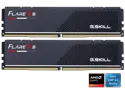
Overall Review: Given this kit costs less than most yet still offers fairly good timings it a winner in my book. Booted up and passed memtest after 36 hrs no issues.
Great card
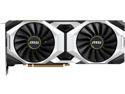
Pros: Removed the fan shroud for a Node 202 install with 2 Noctua 120mm High Pressure fans. Without the case top the card would never go above 60c using Furmark. With the top it took 10 mins to finally hit thermal throttling. I cut a hole on top of the GPU side using a black mesh and rounding the edges sanding everything down. Hits 69c a max load using Furmark for 5 hour burn in. Boosts to 1995Mhz the entire time.
Cons: There is a bit of cool whine but with a 90% power limit in MSI Afterburner it’s far more tolerable, with no noticeable loss of boost.
Good short depth case with hot swappable bays.
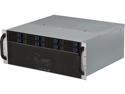
Pros: This is one of a very small selection hot swappable short depth rackmount cases. If looking at this case you have a 600mm or less rackmount setup. Mine is 600mm and there is about 6 inches in the back with the front of the case being 2" from the front of the rack mount. Folks have commented on the airflow for the hard drives and I can confirm it's not great. I had to use some of the cardboard from the newegg box to cover 85% of the front grill. The grill can come off but its going to take you 30 minutes to remove all of the small screws and basically disassemble the entire case. It's not that serious because its a server case, just get it done. Before the HDs were hovering around 40-44c and afterwards they are 37-41c or so. The cardboard was able to fit in between the case and grill after removing the air filter, you cant see the cardboard at all so don't worry about it.
Cons: Oddly, the underside of the hard drive bays is completely wasted space if you use an ATX or smaller motherboard. It goes under it around 2" but there is a lot more room under there for all sorts of options had they done something with it. The front grill does NOT fit 120mm fans it's literally only a few mms off from being able to hold them. I don't think it would matter anyway because I doubt they would improve temps for the hard drives given them HD enclosure is almost completely sealed. The EVGA 850 G2 is the EXACT size to barely fit the cabling + HD enclosure once everything is connected. Depending on your PSU or the cables they use it might not fit so keep that in mind. The rear of the molex connectors are literally touching each other (PSU side and 4pin side connected to HD enclosure) the cabling was able to be moved around thankfully.
Overall Review: I don't believe anyone has mentioned this but the USB3/activity lights cable are connected and on my mother board it was one or the other. There is only about 3" if that to connect the USB3 cables and I needed more so it's just hanging there. I needed SF8087 cables just like everyone else. I gave the case 4 stars because its a 4u 8x hot swappable case that's short depth, the only other ones I could find were from a company in the UK that didn't ship to the US.
Ethereum Mining
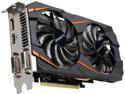
Pros: I've ordered 5 of these cards for mining purposes and they all came with Samsung memory. 2 overclock to +650 and 3 overclock to +850 on the memory. At -200 core, +650 a single card will get you 22/23 Mhs, at +850 you'll get 23/24. Power was set to -60 on all. Pulling 440w from the wall with all 5 cards.
Cons: Some of these guys run warmer than I would like. The ones that clock at +650 run 4-5c warmer than the ones that are set to +850. I'm assuming I could replace the thermal paste but it's not a big deal.
Overall Review: The plastic shroud can come off I believe while leaving the fans on, I'm not positive but if they can come off it would easily make it breath better under load.


