




 here!
here!
I’m your shopping assistant for PC builds, upgrades, and everything tech.
Got questions? Ask away!
Start a conversation
here!
I’m your shopping assistant for PC builds, upgrades, and everything tech.
Got questions? Ask away!
Start a conversation

Joined on 12/07/04
Had the card for almost 3 months now - Still Very Satisfied
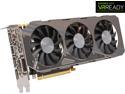
Pros: I've had the card for almost 3 months now and my initial thoughts about the card are unchanged. The card is very solid in built quality, and the performance is astonishing. I constantly debated whether I want to go with a GTX 980 instead to future proof my gaming capabilities, but the GTX 970 is just a perfect balance for today's and tomorrow's games. As long as you're not gaming on a triple monitor or 4K monitor, a single GTX 970 will last you a long time. I'm maxing out games left and right and never had any issues with slow performance. The fan noise remains quite even after using the card for a few months, and I couldn't be happier. I'm an audiophile, and any background noise that would ruin my music, movies, or gaming is a big deal breaker for me. I do not use headphones like some gamers do, and as a result, I want a card that won't be loud during full load and gaming. The ZOTAC ZT-90106-10P GTX 970 4GB AMP! Omega Core Edition Video Card does just that!
Cons: Even after 3 months of using it, I have no complains and nothing in particular to dislike about the card. The video output connectors are a bit of a inconvenience as you have to buy the appropriate cables if you have a multi-monitor setup, but the card does not disappoint in its performance, power consumption and cooling (quiet and cool).
Beast of a card
Pros: Plays all games maxed out flawlessly at FullHD (1920x1080) resolution and most likely even at higher resolutions, Runs extremely cool: 28-30C idle, 60-67C at full load depending on game, Comes with backplate, keeping the PCB and components of the card cool, and helps the card stay stiff, rather than bend as some heavy long video cards do. Overclocks like a champ (250MHz+ on Core Clock, 200MHz+ on Memory with some voltage tweaks through MSI Afterburner), Low Power Consumption
Cons: None that I can see, besides the 3.5GB memory problem brought to our attention by tech forums and sites. Not really a problem at 1080p gaming, but might be an issue for gamers at 4K or Surround.
Overall Review: System Specs: * Intel Core i7-3820 @ Stock Speeds (3.6Ghz) * 16GB DDR3 1600Mhz * 1TB Samsung 840 Evo SSD * ASUS W9X79 WS Pro Motherboard Benchmark Results (All maxed out with PhysX and AA at 1080p) Metro Last Light AVG: 45.67FPS Tomb Raider Min: 32FPS Max: 66FPS Avg: 45.5FPS Batman Arkham Asylum Avg: 60 FPS (VSync on) Battlefield 4 (Ultra Settings) Avg: 80FPS ------------------------------------------ In all honesty, the ZOTAC GTX 970 AMP! Omega Core Edition video card is probably one of the best bang for the buck video cards you will own that money can buy. The quality of the card is superb, backplate keeps the card stiff, cools the components, and keeps the PCB cool as well. The Fans could never be heard, even though my system is silent and I was gaming for over an hour in Battlefield 4. Used to use GTX 690 in my previous setup, but decided to get this card to save on electricity bill, since I game a couple of hours a day for sure. GTX 690 is an excellent card, but uses double if not even more power than the ZOTAC GTX 970, but performs a big faster or about the same in most games. It's important to keep in mind that the GTX 970 is a Single GPU card, so it performs better (smoother) in general than what you will get with an SLI setup (random jitters, even when the FPS is high). I'm happy with my buying decision and will keep you guys informed a couple of weeks later on how the card is holding up.
Very Simple and Fast
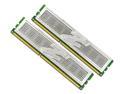
Pros: The Memory is very fast. with 7-7-6-24 timings this memory kit blows the socks off of other memories that share the same speed. With a low price and large capacity, this is trully the best possible buy you could go with.
Cons: None so far.
Overall Review: I have my processor (Q9400) overclocked to 3.84Ghz and even though I had customized setttig already aplied in the BIOS, I just snapped in the memories and it booted fine. I never had any booting or stability problems with this memory. I highly recommend it!
Very nice enclosure!
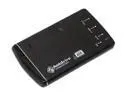
Pros: Very easy to assemble and easy to set up. I like the leather case and the double USB cable. This allows you to power up the hard drive without any other power sources.
Cons: Does not come with screws that you can use to attach it to the enclosure. The power cable does not fit in all the way and gets stuck half way into the whole. It does work, although it is kind of awkward. Also it is kind of slanted. No biggie though, since the USB can give enough power to power up the whole unit.
Overall Review: Haven't tried the E-SATA yet, although will be in the future. Got a 35.5MB/s average transfer speed in HDTach though USB. I have a 80GB 5400RPM hard drive in it.
Very fast and large amount of space.
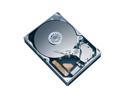
Pros: Had no problem cloning my old 80GB 5400RPM hard drive to this 320GB 7200RPM hard drive. I have noticed a performance increase right away from the RPM difference. I am impressed. Video editing works much faster now and load times are shorter. In my opinion, it doesn't run any hotter than my old hard drive and I cannot even hear it even when it is outside of the computer.
Cons: None that I can think of.
Works!
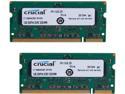
Pros: Works without any problems. My Dell Inspiron E1405 recognized it without any problems and works perfectly. I did see a performance increase from a 533Mhz memory to this one.
Cons: Could have had a heatspreader, but that's not a big deal.


