

Your Browsing History


Jeff S.
Joined on 09/08/16
0
0
product reviews
- 2
Worthwhile upgrade for my system
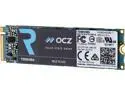
Toshiba OCZ RD400 M.2 1TB PCI-Express 3.0 x 4 MLC Internal Solid State Drive (SSD) RVD400-22280-1T
Pros: Large capacity, MLC endurance, true NVMe speeds, and Toshiba's advanced warranty program can't be beat
Cons: Pricey compared to the Samsung 960 Evo that has better benchmarks, but at least this one is available. Double sided SSD which may not work well in some laptop applications.
Overall Review: This drive was bought as a replacement for the 128GB PM851 M.2 SSD that came standard in my Asus GL702VM. Installation was a breeze and I had no issues whatsoever doing a fresh install of Windows 10 Pro from a USB. I am using the OCZ drivers as well as the SSD management software and haven't had any problems. I wasn't sure if there would be a noticeable difference going from the SATA SSD to the NVMe but my system is much faster during startup, shutdown, and file transfers. I think a lot of it has to do with the small capacity SSD that was originally installed. If you already have a large capacity SATA SSD it might not be worth the cost but for me it was money well spent. I was initially worried about heat management and thermal throttling in such a small thin laptop but so far the SSD hasn't gone above 60C during any file transfers or gaming I have thrown at it. It was a little more than I initially wanted to pay but with the Nand memory shortage it's not like high end SSD pricing and availability are going to get any better any time soon. Overall I am very happy with this purchase and would highly recommend this product to anyone with a system that can take advantage of the performance this drive can offer.
12/28/2016See more detail
Works with my 9800X3D and X670E build

G.SKILL Trident Z5 Neo Series 64GB (2 x 32GB) 288-Pin PC RAM DDR5 6000 (PC5 48000) Desktop Memory Model F5-6000J2636G32GX2-TZ5NRW
Pros: Stable on default EXPO 1 Profile. After initial memory training system boots fast, even with Fast Boot disabled. Seems to have fixed the 0d error code and hang-ups on my Asus board when rebooting system. Listed on the G.Skill QVL for compatibility with ASUS X670E-E
Cons: Pricey. Not necessarily needed with an X3D CPU, but I like to tinker. Initial installation resulted in EC error and fail to POST. Resolved by installing 1stick at a time. Can get toasty. Not listed on ASUS QVL for compatibility with X670E-E.
Overall Review: Running 64GB (2x32) dual rank RAM on a 9800X3D and ASUS X670E-E has been hit or miss. I tried a G.Skill 64GB 6000MHz CL 30 kit with no love. 64GB (2x32) G.Skill 6000MHz CL 36 kit was stable, Samsung die at 1.35V is apparently more forgiving with the 9800X3D memory controller. I saw this was actually in stock with a discount and decided to give it a go. After an initial fail to POST with an EC error code I removed one of the sticks and it booted just fine. Shut down and installed the 2nd DIMM and after about 5-10 minutes of memory training system booted just fine. Enabled Default EXPO profile with no issues. Ran y-cruncher, OCCT, and 3000% coverage with KARHU and zero errors across the board. DIMM closest to the CPU would get to 77C vs. the other DIMM peaking at 73C. For reference I'm on ASUS X670E-E BIOS v2806 in an Antec C8 Curve Wood case with lots of fans and a 360mm AIO on the CPU. Overall I am very happy with this kit.
3/18/2025See more detail