

Your Browsing History


John P.
Joined on 01/10/19
0
0


product reviews
- 9
Does the job!
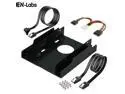
SSD Adapter Kit - 2PCS 18 inch SATA III Data Cable & Molex to 2 x SATA 15-pin Power Splitter w/ Dual Bay 2.5-Inch HDD/SSD to 3.5" Floppy Drive Bay Internal Hard Drive Adapter Plastic Mounting Bracket
Pros: Solid support for a 2 1/2 inch SATA SSD
Cons: Very tight fit in floppy bay
Overall Review: This package really does come with everything you need to install two SSDs (I only installed one): screws, data cables, power cables, and of course the frame itself. Was a very tight fit in my Lenovo's floppy bay, though. Not all of the floppy bay holes lined up, either; but given how tight the fit is, that shouldn't be a problem.
7/9/2021See more detail
Works perfectly

Seagate BarraCuda NE-ST8000DM004 8TB 5400 RPM 256MB Cache SATA 6.0Gb/s 3.5" Internal Hard Drive Bare Drive
Pros: - Lots of storage - Relatively inexpensive
Overall Review: I was able to use this drive to consolidate the contents of four old HDs I'd been accumulating over the years. One problem: at first, I installed it in the old PC I'm using as an improvised file server. Completely forgot about the old 2 TB limit that SATA controllers used to have. The PC became very unhappy trying to manage 8 TB! But I put it into a more modern external enclosure, and everybody is happy again.
7/20/2021See more detail
Working as desired
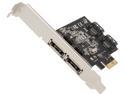
StarTech.com PEXESAT322I PCI-Express x1 Low Profile Ready SATA III (6.0Gb/s) 2 Int/2 Ext SATA Controller Card
Pros: - Fits in any PCIe slot
Cons: - Need to confirm the settings of 8 jumpers before installing (maybe not really a con, but be aware)
Overall Review: This is an extremely convenient card, able to fit in pretty much any PCIe slot on any machine with expansion slots (either full size or low-profile). And it can provide internal SATA or external eSATA. The only real constraint is that it can only support at most two ports at any one time; the jumper settings control which two of the four available ports are active. I'm using mine right now with an internal SATA with no problems. With luck (and assuming I have no heating issues in my PC), I'll add one more in the upcoming weeks. If not, I'll probably change the jumpers and hook up an eSATA drive...
7/14/2021See more detail
Classic Lenovo Quality
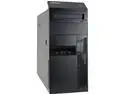
Lenovo A Grade Desktop Computer M93P Intel Core i5-4570 8 GB 2TB HDD Intel HD Graphics 4600 Windows 10 Pro 64-bit
Pros: - Everything in fine condition (other than the HD) - Very clean interior and exterior - It's a Lenovo!
Cons: - Slight problem with the HD (thus minus one egg) - Came with very very cheap mouse & keyboard
Overall Review: Personally, I just love old Lenovos. These things are high quality and built to last, and this one arrived in fine condition. (I am writing this review on it right now.) It appears that this particular reseller is refurbishing older PCs, throwing old HDs into them, adding a cheap keyboard and mouse, and selling the entire package as usable out of the box. I haven't even tried using the keyboard or mouse it came with yet, they are both apparently very flimsy... The HD worked for the most part, but seemed to have a problem idling. (Rather than parking the drive head, it would make a continuous "whirrr... clunk. whirr... clunk." noise. I'm still evaluating to see if I can do anything with it.) Luckily, I was planning on using this m93p tower to contain a number of older drives I've got lying around, so I didn't really need the drive it came with. Otherwise, this machine is quiet, powerful, and easy to maintain. I've opened it up and poked at its guts a dozen times already. Lenovo provides detailed spec sheets and user manuals for each of their products, and even has dozens of videos available (even on Youtube) showing in excruciating detail exactly how to perform almost any maintenance or upgrade activity on any model. And the fourth-gen i5 CPU on this particular machine is still plenty powerful. Honestly, old Lenovos like this one should be marketed differently, in my opinion; instead of trying to cobble together a minimally functional machine with cheap iffy parts, these Lenovos should be sold as the base of a "build-it-yourself" system. These PCs are rock-solid, well documented, and amenable to inexpert handling, and the lower prices on older RAM and HDs would make it easier for newbie PC builders to get their feet wet updating these things before laying out the kind of cash needed for modern PC builds. Anyway, just my two cents...
7/14/2021See more detail
Best keyboard ever designed?
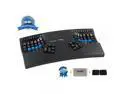
Kinesis KB600 Advantage2 USB Contoured Keyboard (Black) with SmartSet Programming Technology for PC and MAC Plus Advantage Palm Pads And Jestik Microfiber - VALUE BUNDLE
Pros: - Amazingly comfortable - Use your thumbs for more than just hitting a spacebar! - Takes up less desk space than ordinary keyboards - Surprisingly useful for gaming
Cons: - This is an unusual keyboard. It takes time to get used to.
Overall Review: I've been hooked on the Kinesis Advantage keyboards for a very, very long time. They are strange looking, but if you take the time to acclimate to the differences, it really is easier to type with these things -- the concave "keywells" mean you don't have to move your fingers far to go from key to key, and the "thumb clusters" mean that your thumbs can do actual work while typing, rather than just sitting idly on the spacebar. These advantages also become relevant when gaming, if you are into that sort of thing. Completely configurable, you can customize the keys for use with Windows, MacOS, Linux, or really any device that can support a USB keyboard. Or customize the entire keyboard for individual applications, if you want. These keyboards are very expensive, no doubt about that. However, take into consideration that they use the Cherry MX Brown mechanical key switches; not only are the keys comfortable to use, they are amazingly durable. I just purchased a new Advantage keyboard this week (I added a photo of it to this review) to replace one that has finally started to act strangely on occasion (although that one still types just fine most of the time). I can't even remember when I bought the older one, but it has the date "2002" stamped on the bottom. I know it was one of the first USB keyboards I ever owned, and that I've used the heck out of it. Given that I am writing this in 2021, I can state with certainty that these keyboards can last you a very, very long time!
7/9/2021See more detail
Better than I expected
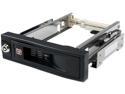
StarTech.com HSB100SATBK 5.25in Trayless Hot Swap Mobile Rack for 3.5in Hard Drive - Internal SATA Backplane Enclosure
Pros: Very simple installation Easy to use
Cons: Doesn't take up all the space that a normal 5 1/4 device does; so, need to take care sliding it into a drive rack like my Lenovo has, as it can slip out of alignment.
Overall Review: I was a little nervous when I first pulled this unit out of the box, as the frame seemed to flex way too much. It took me a moment to notice that the flanges that attach to the 5 1/4 bay walls are isolated from the rest of the frame by rubber pads. Good for isolating vibrations! The door to the bay does all the work -- you only push a drive so far in until the door starts to close. After that, swing the door shut, and the drive will be engaged. Unlatch and open the door, and the drive is ejected. No need to force the drive in or pry it out. Very simple. I read one older review which mentioned that SATA cables don't click into place on this unit. Well, they do now; the cable clicked right into place on mine.
7/8/2021See more detail
seller reviews
- 3
Excellent transaction
I received the keyboard I ordered rapidly and in excellent condition. (I'm typing this review with it right now.) I would purchase from them again!
On-time
Delivery
Product
Accuracy
Customer Service
Satisfactory
7/9/2021See more detail
Fine seller
Big Warehouse did a fine job making an international purchase fast and easy. Would buy from them again.
On-time
Delivery
Product
Accuracy
Customer Service
Satisfactory
11/11/2019See more detail
Quality refurbished PC!
The company shipped the product on time, well-protected within the box with layers of bubble-wrap. And one thing I can't get over is the condition of the machine; it is absolutely gorgeous, both inside and out. You'd never be able to tell it was ever used, except for a few tiny scratches... These guys know how to refurbish PCs. Would certainly do business with this company again.
On-time
Delivery
Product
Accuracy
Customer Service
Satisfactory
1/17/2019See more detail