

Your Browsing History


Julio C.
Joined on 10/22/04
0
0
product reviews
- 16
Terrific when used to its full potential

Microsoft Windows XP Media Center 2005 SP2B for System Builders
Pros: This OS, when set up with an MCE compliant hardware setup, is probably the best version of Windows xp that MS has put out. The AverMedia M870 that I got was detected right away and helps make the Media Center what it is.
Cons: The Install is a bit more complicated than a standard xp install, but as long as you know where SP2 is located (Disc 1), and install the required .net files prior to the rollup 2 disc (also on Disc 1 - look for a folder called dotnetfx), it should be a smooth install. You can only get HD content via Over-the-air ATSC HD tuners. Unless MS helps the "little guy" (the enthusiast builder), and does something to address the issue of getting HD content on the Media Center, this OS, and Vista MC for that matter, will be nothing but a toy incapable of reaching its potential to more than a select few.
Overall Review: Aside from the critical updates, get Windows Media Player 11 - it will really make the Media Sharing feature of MCE much better! Also, download the WMP 10 Energy Bliss visualization from the MS website. It looks great on a TV screen while your music is playing. Setup: ASUS P5N32-E SLI, Intel C2D E6600, 2GB Kingston HyperX DDR2-800, 2*eVGA 8600GTS Superclocked (SLI), SB X-Fi Elite Pro, Ultra X2 550W, ULtra ALuminus case, Avermedia M870 hybrid dual-tuner, Windows MCE 2005.
7/22/2007See more detail
LOVE this case!
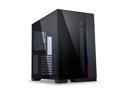
LIAN LI O11 Dynamic EVO O11DEX Black Aluminum / Steel / Tempered Glass ATX Mid Tower Computer Case
Pros: - Very roomy - A lot of configuration options. - Fantastic modern look - Quality construction
Cons: - Tempered glass is very delicate - Switching to Reverse Mode is pretty complex -Depending on your cabling, it can get a little cramped behind the cable management plate
Overall Review: I know, this case is bordering on cliche at this point, but I have to be honest, Lian-Li and their association with De8auer has a winner here! The case has a very clean aesthetic, was very roomy to work with, and has great airflow, especially if you opt for the front mesh grill, which I did. Having said that, I ended up shattering my tempered glass front panel as I was trying to put it away. It was a slight tap with the corner of the panel on my kitchen counter that did it in. Honestly, I was shocked that such a light tap would make it break, but those are the breaks, I guess (no pun intended). Good thing it was the front panel, and not the side panel that I shattered, since I was opting for the mesh front panel instead. Because this rig was going to be placed under the left side of my desk, I opted to go for the reverse mode configuration. While I love the fact that this case offers that option, I will say that for anyone wanting to go that route, it's a pretty complex process to reconfigure, so you'll just have to be patient and follow the instructions in the manual carefully. The fact that I also opted to install the optional top IO panel added that little bit of extra complexity. In the end, I was very pleased with how the build turned out. My only snub might be in the cable management, but I think that had more to do with the length of the cables that came with my Corsair RM1000X PSU than anything else. I've already ordered a set of CableMod cables at custom lengths to take care of all the extra cabling I had to cram behind the plate. Overall, I'm really glad I went with this case. I would definitely go this route with another build if the opportunity comes along!
8/5/2023See more detail
First Build, First Crosshair in 15 years!
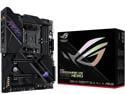
ASUS ROG Crosshair VIII Dark Hero AM4 AMD X570S SATA 6Gb/s ATX AMD Motherboard
Pros: - Sharp looking motherboard, great aesthetic - Full-featured, as one would expect with a top-tier board - Quality finish - plenty of fan header options - Looks BEAUTIFUL when decked out with aRGB memory!
Cons: - Still pricey, even with X670 now out - Only one 3.0 header (was enough for my O11 Dynamic EVO case) - only 2 2.0 USB headers - CPU fan header is pretty far from the socket for my application.
Overall Review: I bought this over a year ago, well before AM5 hardware dropped. Due to other commitments, I didn't get around to actually putting my build together until last month... Still, AM4 is pretty viable performance wise, so I don't expect to get an itch for building another rig anytime soon. Paired it up with a Ryzen 9 5800X, since this machine will be used as a hybrid gaming and dev machine. getting the bord installed and set up was a breeze, and the onboard start button made it easy to bench test once I got everything installed and connected. Booted up the first time, no problem! After about a month of usage, it brought back fond memories of when my Crosshair IV build was brand new. After these two experiences, If I get the chance to build another high-end rig, a Crosshair motherboard will definitely be on my radar if I choose to go AMD again, which I probably will. Due to post-pandemic inventory woes last year, I felt lucky to get an RTX 3070 at MSRP... I definitely want to get a newer GPU to let this rig stretch its legs, but WOW, the GPU market is so "Meh" right now... Anyway, this combo runs really cool in a O11 Dynamic EVO with mesh front panel. I've only got a Corsair H170 Elite XT 360 AIO installed on the side with the fans exhausting out (no other fans yet), and the CPU barely ever gets over 60 if that (AIO temps max out at 36)... I'm sure it'll run even cooler when I finish out the fan layout. Oh, one big CON that's really due to "optional" software installed - Armoury Crate was a BEAR to deal with! It kept failing to update the latest HAL component driver that was available, and it was creating a a conflict with iCue. It FINALLY decided to update 2 weeks later, and all is well with my RGB now. It was really the only headache I've had with the new rig so far.
8/5/2023See more detail
Quick setup, works like a charm!
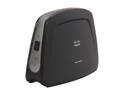
Linksys WUMC710 Wi-Fi Wireless AC1300 5GHz Universal Media Connector Bridge Adapter 802.11ac with 4-Port Switch
Pros: If your router supports WPS, you can literally be connected in 30 seconds. Once linked, plug in the Ethernet cables for your devices, and you're good to go! I've been running the new setup for 3 days without a hiccup so far - better yet, it resolved the problem that my XBOX 360 S model has connecting over 802.11n on the WRT 1900AC's 2.4GHz band. I literally had to force the 2.4GHz band into b/g only mode in order to prevent connectivity issues on the 360 S - a problem that seems to prevalent with this console and a few of the newer routers on the market, after doing some additional research.
Cons: None that I can think of - my older PS3 that uses 802.11g can now download at 24Mbps over Ethernet via the Bridge.
Overall Review: Not a Con, but I hate it when devices don't have an On/Off switch - I hate plugging things in "hot". I like the minimalist design of the bridge, which looks exactly like the WET610N that it replaced in one of my media hubs. Given that this device is 1300AC, I really hope that Belkin/Linksys relaease a 1900AC version of this bridge to take advantage of the speed potential offered by my WRT 1900AC. Given the CES announcement of the WRT 1200AC, these bridges would partner nicely with that router.
1/8/2015See more detail
The only thing missing is the deep rumble...
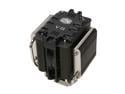
COOLER MASTER V8 RR-UV8-XBU1-GP 120mm Rifle CPU Cooler Compatible with Intel 1366/1155/775 and AMD AM3/AM2+/AM2
Pros: This thing is great!!! I already knew that this cooler had good reviews when I was considering the purchase of one, but since my intention was to build a machine primarily for my SimRacing and gaming, this was a natural! I haven't checked yet, but just based on how the quiet the case fans are, too much heat is definitely not a problem... You will be impressed as to how great it looks after it's installed.
Cons: You will most likely need a hand installing this cooler. Even a case with a hole on the motherboard tray under the proecessor. It's just the nature of the beast, but still worth the effort! Also, the Red LED's on the case just aren't as bright as the packaging would lead you to believe... or maybe I just got a bum fan. It doesn't affect performance, so it doesn't merit losing an egg. Oh, and it's one of the tallest coolers I've seen. Make sure you measure your case height before ordering.
Overall Review: A GREAT looking cooler, with the performance to match! System Specs: ASUS Crosshair IV AMD Phenom II 965BE (125W) XFX ATI Radeon 5870 8GB OCZ 1600MHz DDR3 memory (AMD Black Edition Ready) Ultra X4 PSU (1050W)
5/29/2010See more detail
All the benefits of a HAF 932, with an AMD touch to it...
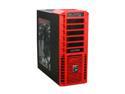
Cooler Master HAF 932 AMD Limited Edition AM-932-RWN1-GP Red Steel / Plastic / Mesh bezel ATX Full Tower Computer Case
Pros: This case is huge, and with 2 200mm fans providing the airflow, air cooling shouldn't be a problem... and heck, if you need more, there's room for a few more fans. Even better, this case is equipped to handle a liquid cooling system as well, so that's a bonus. An ATX motherboard with a large graphics card looks small after it's been installed in this thing! The side door really lets you show off your system, and the translucent AMD Dragon "fusion" graphic looks great! The fans, despite being large, are very quiet. much quieter than my previous build.
Cons: I have to admit, the front panel's red is a little loud, and doesn't quite match the typical red color you'd see on an ATI graphics card, for example. It's not really a con for me, but some might not like it. Also, the overlay on the I/O panel didn't quite stick on the right-side edge, so I have to knock CM a little on the quality control there - Sorry, CM.
Overall Review: If you want a box that screams "I have an AMD machine!", then this is the case for you. Since that was my plan, it was perfect for me... I also just noticed on the CM website that there is an AMD edition Sniper Scout that is/will be available (will it, newegg?). If this case is a little too big for you, but you want the AMD look, you might want to look into that one. System specs: ASUS Crosshair IV AMD Phenom II 965BE (125W) 8GB OCZ 1600MHz Memory (AMD Black Edition) XFX ATI Radeon 5870 ULTRA X4 PSU (1050W)
5/29/2010See more detail