


Your Browsing History


William D.
Joined on 02/10/01
0
0
product reviews
- 7
Good Product.
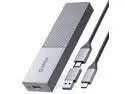
ORICO M.2 NVMe SATA SSD Enclosure Adapter, Tool Free USB C 3.2 Gen 2 10Gbps NVMe Case, 5Gbps NGFF SATA Reader Aluminum for PCIe M-Key(B+M Key) 2230/2242/2260/2280 SSDs, Support UASP Trim Smart
Pros: I like the USB C to USB A adapter is included and tethered. I tend to still just use USB A 3.0 ports. I am currently using a SSD M.2 but like that it supports both SSD and NVME (provided they fit the keys in the description). Getting really good speeds.
Cons: The card is secured with a rubber pin. All of a sudden, my "drive" was detected but gave a device error and the partition wasn't detected. Diskmanager did not show any space or partitions. I thought I might have lost my work. I opened up drive intended to move it to my other unit (I bought two) and saw that the board slipped out. The rubber anchor was in place but the connectors were noticeably backed off. I reseated the SSD and all my data was intact. I guess me moving it and unplugging it must have had enough inertia to disconnect the device. So possibly including a metal screw and anchor option might be nice.
Overall Review: So far so good.
12/6/2022See more detail
Very nice laptop
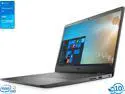
Dell Inspiron 3501 Notebook, 15.6" FHD Display, Intel Core i3-1115G4 Upto 4.1GHz, 8GB RAM, 256GB NVMe SSD, HDMI, Card Reader, Wi-Fi, Bluetooth, Windows 10 Pro
Pros: Good speed, light-weight, and good display. More than adequate for a work laptop. The nvme has a small footprint (maybe 2240 or smaller), but looks like it has the space for a 2280 if I wanted to replace it some day.
Cons: 1. I could not get an additional SSD working with the nvme. I did not extensively troubleshoot, but I did attempt to add a SSD in the available 2.5" bay. The system would only recognize the SSD while it was installed and ignored the nvme drive. I did some bios changes, but gave up as the included nvme is plenty big. I didn't research, so I assume this is shared port or I missed a bios setting. 2. No ethernet port. The picture of the left side and description show an ethernet port, but what I received did not have one. I did purchase this laptop instead of other similar spec'd and priced laptops because I wanted the built in Lan, but I had a USB lan so not worth sending back in. I chose this slightly higher priced model for that reason, and might have gone with the lesser priced ones given this laptop ended up not having one.
Overall Review: Nice laptop for the price. Had to deduct an egg for the lack of the advertised integrated ethernet port.
5/11/2023See more detail
Really great deal - nice build and mostly plug and play
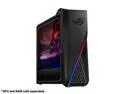
ASUS ROG Strix G15DK Gaming Desktop PC, AMD Ryzen 5 5600X, 1TB HDD, Wi-Fi 6, RAM & GPU Sold Separately, Windows 11 Pro, GA15DK-MH501
Pros: Very nicely system - fast processor, and nice options, and likely more than adequate power supply with two 8 pin PCIe connectors. This is overkill for what I generally use this PC for, but at the price, I would call it nice overkill. It is really responsive. Got this on sale - almost a steal for how good this is for the price I paid from newegg. I see the regular price now and it is a fair deal for what it is. Very clean cable management
Cons: 1. Issues with older and low end PCIe video cards - but makes sense given the generation gaps of these and this newer tech. I bought this to upgrade one of my other PCs. Before tearing into the PC I was going to upgrade, I attempted to use several low end bench PCIe video cards to test. The system would not post. The CPU does not have integrated video, which was fine, I just didn't expect it to have issues with the low end video cards so I did spend a little time moving the ram around and swapping video cards. I ended up taking the Geforce 1060 from my target PC and the Asus PC fired right up. So not worth knocking an egg off, but this might be helpful in that a older video cards might not work - so you might want to do more research if you intend to upgrade a web build using a low end video card. In the end, I was not gonna leave the bench video cards in the final build. 2. I had some issues with Windows 10 Pro - I couldn't get the bluetooth and Wifi drivers to work. I attempted Windows 10 just for kicks. I could not get the drivers for the bluetooth/wifi combo to work. I dont use them, but either I could have pulled them out or go back to Windows 11. I didnt want to go with any devices without proper drivers, even though I dont use wifi or bluetooth. This came with Windows 11 Pro, so not fair to take any eggs off. This works perfectly fine with Windows 11 Pro- at least as well as windows 11 pro works. 3. The bluetooth/wifi does occupy one of the nvme slots, but not a biggie - I assume I can remove the card if I want to and install another nvme, but the SATA ports work just fine with my SSDs laying around, so no need. The Pcie4 nvme slot was available and works great with Crystalmark showing full PCIe4 speed and specs. 4. The case is a full size ATX case with a micro ATX motherboard Nice for having room for ventilation and room for larger motherboards. I would have preferred a smaller case, but can change it out if I want to. Still a nice case. Cons are more I feel I got more than what I paid for, in a good way.
Overall Review: Very pleased with this offer. I like Asus products, and this does not disappoint. For reference, the parts that I used to complete the build was GeIL ORION RGB AMD Edition 32GB (2 x 16GB) 288-Pin PC RAM DDR4 3200 (PC4 25600) Desktop Memory Model GAOSR432GB3200C16BDC and SAMSUNG 980 PRO Heatsink M.2 2280 1TB PCI-Express 4.0 x4 V6(12xL) V-NAND 3bit MLC Internal Solid State Drive (SSD) MZ-V8P1T0CW and Asus 1060 video card
5/11/2023See more detail
Good product
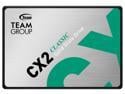
Team Group CX2 2.5" 2TB SATA III 3D TLC Internal Solid State Drive (SSD) T253X6002T0C101
Pros: Good speed for an SSD. Dont expect NVME speeds. Lots of good speed storage.
Overall Review: Highly recommend if can get at a good price. I have many SSD and this is close enough to being among the fastest. I could run benchmarks if i want to find out the minute speed differences, but this feels a good speed for an SSD.
10/7/2022See more detail
Very fast and stable motherboard with great features.

ASRock Z390 PHANTOM GAMING 7 LGA 1151 (300 Series) Intel Z390 ATX Intel Motherboard
Pros: Motherboard layout is very good. I was able to make a nice and clean build. Motherboard has been completely stable with no issues. NVMe is working great on the Samsung. I have always had good performance, stability, and features for the price with Asrock motherboards. This did not disappoint. ARGB effects are nice - have lots of ARGB (fans, video card support bracket, and LED strips) all controlled by motherboard using an ARGB hub. The Asrock software or bios can be used to control the effects.
Cons: Very minor - it would be nice to have slightly longer ARGB pins on the header - mine are kinda short and maybe smaller gauge than what seems to be common with ARGB cables - when connecting the cables that came with my many ARGB kits, each cable would slip out with little effort as they barely engaged the pins. Given the cables that came with my ARGB kits from many manufactures had this problem, I have to kind of blame the header. I ended up using a smaller connector from my spare parts bin and got a stable connection with a slightly smaller gauge connector/wire. I then connected this to an ARGB hub to connect the other devices. The gauge of pins for the power switch/hdd leds, etc are the same gauge of the wires - the ARGB is slightly shorter and smaller gauge... Easy fix, and now perfect. Also, neat to have 2500Mbps Lan; just dont see any affordable 2500Mbps Switches... yet...
Overall Review: I built this with an I9-9900K CPU, a MSI GeForce RTX 2080 DirectX 12 RTX 2080 SEA HAWK X 8GB 256-Bit GDDR6 PCI Express 3.0 x16 HDCP video card, 500GB Samsung 970 Plus Nvme, Intel 1GB 960 Nvme, OLOy WarHawk RGB 16GB (2 x 8GB) 288-Pin Intel/AMD Ready DDR4 3200 (PC4 25600) Desktop Memory all in a Phanteks Enthoo Pro with Antec HCG1000 Extreme 1000W powersupply. CPU cooled by Thermaltake Water 3.0 360 ARGB Sync Edition CL-W234-PL12SW-A Water Cooler and added lots of RGB cooling. All parts from newegg. I had my buddy buy the same parts from newegg and I built it. Both of ours are awesome.
2/6/2020See more detail
Awesome HTPC
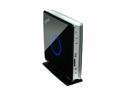
Zotac ZBOX HD-ID11-U Intel Atom D510 NM10 Chipset 1 x 200Pin Next-Gen NVIDIA ION GPU Mini / Booksize Barebone System
Pros: Has everything I was looking for in a media PC and more! Small, quiet, fast video, HDMI with HD audio, Optical HD audio, DVI video (and VGA with included adaptor), eSATA! Gigabit lan, SD reader, plenty of USB, on and on.
Cons: Only one memory slot, so buying the combo of 2GB RAM maxes the slots, but not the max memory supported. Doesn't matter for my purposes - the 2GB of RAM is plenty. Also, the included VESA mount is for PC monitors. Will need to get adaptor plate to mount to the larger TV Vesa mounting spots.
Overall Review: Running dual boot Win 7 and XBMC. Rarely boot Win7. Win 7 worked easily. XBMC Live CD install needed video and sound drivers installed to enable HDMI and optical HD audio. Little tricky as forum instructions did not work. After mucking around, I finally succeeded in installing Nvidia drivers and ALSA and now perfect sound and video, DTS, 1080P, etc. Bought combo (ram+HDD), but used 30GB SSD instead. Superfast bootup. Never tried integrated Wireless N since Gigabit is fine for me. Booted fine on USB memory stick and USB DVDRW for OS installs.
5/17/2011See more detail