

Your Browsing History


JEFF H.
Joined on 08/23/06
0
0
product reviews
- 34
Works very well
Rosewill RNX-56USB - Modem - Conexant Hardware-Based 56Kbps USB (Plug & Play) V.92 Data / Fax / TAM – Windows 7 Ready
Pros: No software driver needed. Works on any OS with USB support. Don't have to worry about the manufacturer not supporting a new Windows release or deal with third-party reverse-engineered Linux drivers. Works great on Ubuntu 9.10 (Karmic Koala) with Gnome-PPP.
Cons: Should get rid of the driver CD and telephone cable. Drivers aren't needed and most people have extra cords already.
Overall Review: On Linux the modem device was /dev/ttyACM0. If you are using Ubuntu (or Debian) and your dialer can't connect to it, remove modemmanager. It's for mobile broadband modems only and may grab USB analog modems by mistake (Ubuntu bug #496206). Gnome-PPP may set the DTE speed too high (460800 baud) and the modem gets annoyed and will only connect at 9600 baud. Unless you're nostalgic for an '80s Internet experience you'll want to set it to 230400 baud maximum. I didn't test facsimile.
1/12/2010See more detail
Didn't get along with my GA-MA770-DS3
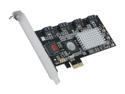
SYBA SY-PEX40008 PCI Express Low Profile Ready SATA II (3.0Gb/s) Software RAID Controller Card
Pros: Small, cheap, good heat sink.
Cons: Didn't seem to get along with my MB BIOS (latest from Gigabyte). Updated the card to the latest BIOS (6.6.00). Often it's BIOS wouldn't load, or the system would hang during POST, or reboot when it tried to load GRUB. Ubuntu would lock up randomly during boot. Sometimes it would boot off a LiveCD fully but the drive devices wouldn't be present. Sometimes they would exist but the system would freeze as soon as I tried fdisk on them. Inserting the kernel sata_sil module or setting noapic or irqpoll didn't seem to change anything. Very unpredictable. Tried disabling the MB SATA controller (SB600), resetting CMOS, changing slot positions.
Overall Review: I've seen reports by other Linux users where they didn't have problems. It may be something wrong with my MB.
8/13/2011See more detail
Excellent
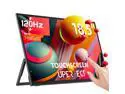
UPERFECT Portable Monitor 18.5-inch 120HZ Touchscreen 100% sRGB FHD FreeSync IPS HDR w/VESA & Stand 180° Adjustable Ultra-Slim & Lightweight Frameless Gaming Display, Travel Second Monitor for Laptop
Pros: Worked perfectly on Xubuntu Linux 24.04 and Win11.
Cons: Included mounting screws are very short and didn't work with my Vivo wall mount arm. I found some M4-0.7x6mm SS button heads that fit.
Overall Review: I also needed 90 degree (right-angle) cables for my installation. USB-C cables are easy to obtain but finding a mini HDMI cable, with the long side of the plug towards the screen, was difficult. Can't use an adapter because the space between the mini HDMI and USB-C connectors is very tight. I found a JSAUX cable elsewhere but it's no longer available.
4/4/2026See more detail
Works perfectly with Xubuntu Linux
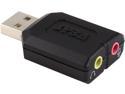
SYBA External USB Stereo Sound Adapter for Windows, Mac, Linux Extra Audio Source with 3.5mm Audio Mic Jack C-Media Chipset SD-CM-UAUD
Pros: Plugged it in and it immediately showed up in the Xfce volume control utility (pavucontrol). Was able to switch the output of Parole Media Player to it and back without problems. Microphone input worked also.
Cons: Could be a bit shorter.
Overall Review: lsusb reports: ID 0d8c:0008 C-Media Electronics, Inc.
11/17/2017See more detail
Works perfectly with Xubuntu Linux
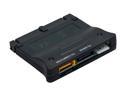
SYBA SD-ADA50016 SATA II to IDE ATA133 Bi-directional Adapter
Pros: No problems with Xubuntu 16.04 when connecting an IDE/PATA drive to an eSATA port. Was able to check SMART status with smartctl (from smartmontools package).
Cons: Would have preferred an eSATA connection for external usage but a Rosewill SATA/eSATA cable (RC-3.28-SATA-MM-BK) solved that problem.
Overall Review: Tested on an AMD Phenom 9550 system with an Asus M3A78-EM motherboard. Used externally so it was powered using a Flypower (Shenzhen Flypower Tech) SPP34-12.0/5.0-2000 SATA IDE MOLEX power supply. This supply has both a 4-pin Molex and SATA power connector along with an in-line power switch. Output voltage within 5% of spec. Highly recommended. Note that the "SPP34-12.0/5.0-2000" portion of the model number is shared with a wide range of supplies with different connectors so you have to search specifically for "SATA" and/or "Molex" to find it.
11/17/2017See more detail
No problems with Xubuntu Linux 16.04
![ORICO SuperSpeed USB3.0 & eSATA to SATA External Hard Drive Docking Station for 2.5" & 3.5" HDD, SSD Enclosure 12V2.5A Power Adapter and eSATA Data Cable Included [Support 8TB] - Black (6619SUS3-BK)](https://c1.neweggimages.com/ProductImageCompressAll125/AAMW_1320231488983930872svkAWgNrd.jpg)
ORICO SuperSpeed USB3.0 & eSATA to SATA External Hard Drive Docking Station for 2.5" & 3.5" HDD, SSD Enclosure 12V2.5A Power Adapter and eSATA Data Cable Included [Support 8TB] - Black (6619SUS3-BK)
Pros: Worked perfectly with eSATA and USB 3. Able to check drive SMART status with smartctl (from smartmontools package) with either connection.
Cons: Could use a dust cover on top to protect the SATA connectors.
Overall Review: Tested USB with a PCIe card based on the VIA Technologies VL805 controller, eSATA on AMD SB700.
11/17/2017See more detail