

Your Browsing History


Thomas K.
Joined on 08/06/01
0
0


product reviews
- 37
Fast. Cool. Expensive. Overclocking is a bit limited.
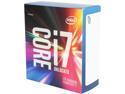
Intel Core i7-6800K - Core i7 6th Gen 6-Core 3.4 GHz LGA 2011-v3 140W Desktop Processor - BX80671I76800K
Pros: - 6 cores, 12 threads is great for gaming and heavily multi-threaded applications. - Runs cool.
Cons: - Expensive - Performance difference from 5820K is minimal - Not the greatest overclocker
Overall Review: I "side-graded" from my 5820K. I wasn't expecting a vast performance difference, just wanted to play with the latest and greatest technology. I can only manage 4.3Ghz stable on my ASUS X99-PRO @ 1.300v. The system would immediately crash at 4.4Ghz @ 1.325v. I could have tried cranking the voltage up really high, but I didn't think it was worth it. From what I've read, 4.2-4.3Ghz seems the normal range for this particular chip. This CPU is running noticeably cooler than my old 5820K, despite running at higher voltage. Idle temp is about 32C, and goes up to about 46C during gaming. Impressive. System Specs: 6800K @ 4.3Ghz ASUS X99-PRO Corsair H110 16GB G.Skill PC2800 DDR4 MSI Gaming 980 Ti 500GB Samsung 850 EVO EVGA 850w Platinum Dell U3011 Jonsbo W2 Case NOTE: I happened to get this CPU on sale, and with a gift code for $399.99. At the regular price of $439.99 I think it's overpriced compared to the 5820K.
7/17/2016See more detail
Good, simple card that is held back by low power limit and fan noise.
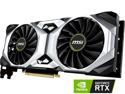
MSI GeForce RTX 2080 Ti 11GB GDDR6 PCI Express 3.0 x16 SLI Support Graphics Card RTX 2080 Ti VENTUS 11G
Pros: 1. Compact length. The Ventus is the same length as Nvidia 2080Ti FE cards, with makes it easier to fit into most cases. This was a big selling point for me, since my case can only accommodate cards up to 11.0 inches in length. 2. Good cooling performance. The large fans and beefy 2.5 slot heatsink do a good job at keeping temps low, as long as you run the fans at a moderate speed. 3. Simple, industrial design. There are no flashy LED's on this card, which I personally prefer. The design is very simple, yet sophisticated. It's all a matter of preference though.
Cons: 1. Low power limit of 112%, which is even lower than Nvidia FE cards. Having a low power limit will keep your card from maintaining peak GPU speeds while overclocking, which I noticed on my card. If you're into overclocking you may want to opt for a brand with a higher power limit, like Gigabyte or EVGA cards. I don't believe MSI offers an updated BIOS with a higher power limit for this card, unfortunately. 2. Fans have an annoying hum/whine above 50% speed. It was very noticeable. I had to keep the fan speed low because of this, which of course meant accepting slightly higher temps. If you prioritize cooling over noise, and you're willing to deal with the hum, then this may not make much difference for you.
Overall Review: The Ventus is a good "no-nonsense" 2080 Ti card that offers good cooling in a compact, sophisticated design. The main drawbacks are the whine of the fans when over 50% and the very low power limit which restricts top performance compared to other brands. I would recommend it only if you can get one that doesn't suffer from fan whine, and only at about the $1,200.00 price point. If spending $1,250.00 - $1,300.00 I would consider a brand with a higher default power limit. i7-7820X @ 4.7Ghz AsRock X299 Taichi 32GB PC3200 CL14 DDR4 1TB Samsung 960 EVO Corsair H115 EVGA P2 850W ACER Predator HXB31HK 32" G-Sync Windows 10 64bit
11/4/2018See more detail
Gaming Beast! Running @ 5.33Ghz on Asrock X870E Nova Wifi
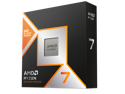
AMD Ryzen 7 9800X3D - Ryzen 7 9000 Series Zen 5 8-Core 5.2 GHz - Socket AM5 120W - AMD Radeon Graphics Desktop Processor - 100-100001084WOF
Pros: I upgraded from an Intel i9-10900K, which was holding back my RTX 4090 by quite a bit. The 9800X3D has been noticeably faster with much better 1% lows, especially when running with DLSS to maximize higher framerates. The 9800X3D scores 40% faster in single-core performance and 20% faster in multi-core performance over my old 10900K, while using half as much power. - Fastest gaming CPU, hands down. - Allows for overclocking. - Runs at ~65w during gaming.
Cons: - I cannot get it stable at 5.4Ghz without crashing in games. I've only been able to bump the CPU frequency by +125Mhz with a -10 Curve Optimizer. Pushing the frequency up higher, or setting a lower Curve Optimizer results in crashing. This may be down to silicon lottery. Most reviewers seem to be getting higher overclocks, and pushing +200Mhz with ease. Your mileage may vary. - CPU temp gets to 83C under load with 360mm AIO, due to having to run a higher than expected core voltage while overclocked (1.31v). - 8C/16T may become a limiting factor in games down the road. - Expensive for an 8-core CPU.
Overall Review: I would recommend a 9800X3D if you're coming from CPU's that are at least 2 generations older (Ryzen 5000 series or Intel 12th gen, or older). It's not just about maximum framerates, but higher sustained 1% lows where you'll notice a smoother gaming experience. System Specs: CPU: Ryzen 9800X3D @ 5.33Ghz MOBO: Asrock X870E Nova Wifi RAM: G.Skill 64GB (2x32GB) PC6400, CL-32-38-38 DDR5 SSD: Crucial T700 4TB PCIE-5 NVME GPU: MSI SuprimX Liquid RTX 4090 HSF: Arctic Liquid Freezer III 360mm AIO PSU: EVGA Supernova T2 1000W Case: Lian Li Lancool II OS: Windows 11 Pro
11/17/2024See more detail
Works at XMP (6400 CL 32-38-38) on Ryzen 9800X3D w/ Asrock X870E Nova Wifi
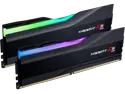
G.SKILL Trident Z5 RGB Series 64GB (2 x 32GB) 288-Pin PC RAM DDR5 6400 (PC5 51200) Desktop Memory Model F5-6400J3239G32GX2-TZ5RK
Pros: - Runs at XMP settings out of the box with 9800X3D. - Attractive RBG lighting that isn't "over the top". - High quality finish to the heat spreaders. - Fairly priced ($189.99 after rebate at time of review).
Cons: - Isn't the cheapest memory around, but you get what you pay for.
Overall Review: I purchased this ram kit 64GB (2X32GB) of PC6400, CL32 to go with my new Ryzen 9800X3D system. So far, it's running stable on a Ryzen 9800X3D with Asrock X870E Nova Wifi at XMP settings, 6400 CL 32-38-38 with a 1:1 ratio. This is pretty much the sweet spot for Ryzen without having to drop to a 2:1 ratio, especially with dual-rank memory. I read a lot of mixed reviews lately on this particular RAM kit and was a bit hesitant, but fortunately it worked without a hitch. I've used G.Skill in the past, and have always been pleased with their quality. I'd recommend this kit if you're using a 9800X3D and an Asrock X870/E motherboard. System Specs: CPU: Ryzen 9800X3D @ 5.35Ghz MOBO: Asrock X870E Nova Wifi RAM: G.Skill 64GB (2x32GB) PC 6400, CL 32-38-38 DDR5 GPU: MSI SuprimX Liquid RTX 4090 SSD: 4TB Crucial T700 PCIE-5 NVME HSF: Arctic Liquid Freezer III 360mm AIO PSU: EVGA Supernova P2 1000W Case: Lian Li Lancool II OS: Windows 11 Pro
11/17/2024See more detail
Great performance, quiet operation, awesome temps, beautiful design...but coil whine
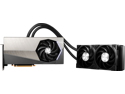
MSI Suprim GeForce RTX 4090 24GB GDDR6X PCI Express 4.0 Graphics Card RTX 4090 SUPRIM LIQUID X 24G
Pros: - Sleek design - can fit into most cases with no space issues. No risk of GPU sag. - Quiet operation - fans turn off when card is idle, stays whisper quiet during gaming. - No thermal throttling - runs at full GPU speed all the time. - Voltage adjustment up to 1.100V
Cons: - Noticeable coil whine when fully stressed - common issue amongst all users. - Only +10% power limit adjustment - limits overclocking potential. - Expensive - $1,800.00 USD for a video card is an investment for the long haul.
Overall Review: I've overclocked the card to +135 core and +1500 memory. Core temp stays to around 55C during regular gaming, and about 63C while benchmarking. Hot spot is around 60-65C and memory temp is about the same. The default fan curve works very well, and I haven't felt a need to do any custom fan curves. I would recommend this card highly to anyone who wants a top-performing RTX 4090 that is super quiet and runs cool. The card is only 10.6 inches (27cm) in length, so it will fit into any tower case without issue. The only drawbacks are the coil whine and that its full potential is neutered by a mere +10% power limit adjustment. Fortunately, the coil whine cannot be heard with headphones on. System Specs: CPU: Intel i9-10900K GPU: MSI SUPRIM LIQUID X 4090 Mobo: MSI Unify Z490 Mobo RAM: G.Skill 32GB PC3200 CL14 DDR4 HDD: 1TB Samsung 980 Pro NvME PSU: EVGA 1000W P2 Cooler: ARCTIC Liquid Freezer II 280mm AIO Case: Lian Li LANCOOL II Monitor: Acer Predator X321HK 32" 4K OS: Windows 10
1/21/2023See more detail
Great for Gaming and Multi-tasking. Runs hotter than expected.
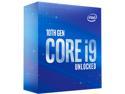
Intel Core i9-10900K - Core i9 10th Gen 10-Core 3.7 GHz LGA 1200 125W Intel UHD Graphics 630 Desktop CPU Processor - BX8070110900K
Pros: This CPU is running smoothly at 5.2Ghz @ 1.295v on an MSI Z490 Unify. Temperatures run about 34C at idle, but unfortunately get very hot at 95C under full load with a 280mm AIO. I'm not sure if I just got unlucky silicon, or if I need a better AIO, but temps are higher than I've been hearing from others. The CPU is pulling about 255W of power under full load with Cinebench R20. With 10 cores and 20 threads the 10900K can handle gaming and multi-tasking with ease. Though, it will likely soon be outclassed by the Ryzen 4000 series later in 2020. Cinebench R20 @ 5.2Ghz: Single Core: 542 Multi Core: 6748
Cons: - PCI-E 4.0 not supported by the CPU. - Uses a lot of power. - Lags behind in multi-threaded work compared to the cheaper 3900X.
Overall Review: Intel i9-10900K @ 5.2Ghz MSI Z490 Unify 32GB PC3600 CL16 DDR4 ASUS GeForce 2080Ti Ultra 1TB Samsung 960 EVO nVME Corsair H115i 280mm EVGA 850W Platinum PSU Acer Predator 32" 4K Monitor w/G-Sync Windows 10 Pro
7/18/2020See more detail
seller reviews
- 2
Item as described. Good quality. Wish I had gotten something longer though.
I purchased a 15.7 inch 4pin TX4 PWM Fan Power Extension Cable. The cable is good quality, however I completely over-estimated how long 15.7 inches would be inside a case. The cable is still way too short to route from my top exhaust fand down the low motherboard fan header. If you're buying a fax extension like this one, I would highly recommend getting something longer just to cover your bases.
On-time
Delivery
Product
Accuracy
Customer Service
Satisfactory
10/24/2025See more detail
Fraudulent Seller! 1 month later and item still hasn't arrived! Stay away from this company.
I should have looked at the user reviews prior to using this seller. They are located in China. I placed my order on 12/03/2018 and it is now 1/03/2019 and my item still hasn't arrived. The tracking number they gave me only shows my item processed on 12/12/2018, but nothing after that. This is ridiculous. Don't order anything from this company. Newegg needs to look at all the poor reviews about his vendor and ban them from doing business on Newegg.com
On-time
Delivery
Product
Accuracy
Customer Service
Satisfactory
1/3/2019See more detail