

Your Browsing History


Jonas W.
Joined on 01/27/08
0
0
product reviews
- 57
Nice.
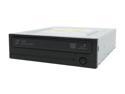
SAMSUNG 20X DVD±R DVD Burner with LightScribe 20X DVD+R 8X DVD+RW 16X DVD+R DL 20X DVD-R 6X DVD-RW 16X DVD-ROM 48X CD-R 32X CD-RW 48X CD-ROM Black PATA Model SH-S202N LightScribe Support
Pros: Quiet, quick, lightweight and easy to install. Can burn CDs, DVDs, and make Lightscribe labels...All for alittle over 30$! Truely a fine deal! Great for movies, you can hardly even hear the drive reading the disk.
Cons: Comes with a suite of WAY to many Nero programs(over 1GB intall!). Use custom install.
Overall Review: The drive it alittle smaller in size than my other original Manufacter drive. The drive tray is thinner than most, but it won't break unless you karate chop it.
1/30/2008See more detail
Eh...Works...Bad temp monitors.
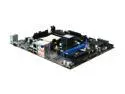
MSI 760GM-P33 AM3 AMD 760G Micro ATX AMD Motherboard
Pros: Works ok, has overclocking settings, small.
Cons: VGA only output? What is this 1998? Can we get some DVI love please? The BIOS CPU temp monitor is whack. The CPU temp flys up and down to 35C, 48C, and 65C within seconds. So naturally the CPU fan acts erratically. Oddly enough when I stress test the CPU it sticks at 32C. The DVD supplied does not install the drivers correctly, you have to go in and install all the drivers manually.(on XP at least)
Overall Review: I bought this Motherboard to run a sound production rig I built. So the fan control thing is really annoying.
5/4/2011See more detail
Best Value for a gaming style Mech Keyboard!
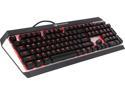
COUGAR ATTACK X3 Premium Gaming Mechanical Keyboard with Aluminum Brushed Structure and Cherry Brown Switches
Pros: This is my first mechanical keyboard. I was using a Saitek Eclipse II before this. The Saitek was a good board but due to heavy gaming over the years the G and F key stopped working. On to the review.... This thing has style, the lights look great and brushed aluminum front panel look nice. Typing on it....What can I say? Its dreamy. The keys feel great and the brown switches are perfect for typing and gaming. I can honestly say I don't want to go back to another old keyboard. How is it for gaming? It takes some getting used too....Why? Well the keys feel a bit hyper responsive at first due to the fact that mechanical keyswitches don't have to be bottomed out to register a keypress. But once you get used to it its way better.
Cons: The keyboard sit high up in the air. Definitely could use a wrist rest. But I'm the type who like my keybaord flat on the table not angled. Only one Windows key and its on the right side....I use WIN + R(shortcut) to load run a lot so its messed me up a bit not to have Win key on the left side. I'm just being nitpicky I guess.
Overall Review: For the price you can't go wrong. The other mechanical keyboards were either too pricey for what you get or....just well... too pricey. For 90$ you get a solid Keyboard with great looks.
1/19/2016See more detail
Dead after 6 months of light use
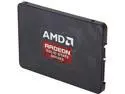
AMD Radeon SSD Radeon R7 2.5" 120GB SATA III MLC Internal Solid State Drive (SSD) RADEON-R7SSD-120G
Pros: Was fast when it worked, ran on a Windows 10 machine without any issues.
Cons: Dead now, I will be contacting OCZ to see how the next one does. I used it on a very basic web browser only PC. The most strenuous the PC did was stream Video and download windows updates(lol). The case was large, had airflow out the wazzoo, no reason the drive should have died.
Overall Review: Don't know if its just me but I have had way more SSD failures than HDD failures. I don't know the reason. The give no warning then they just die. I've bad luck with OCZ and terrible luck with Mushkin. I ordered 3 Mushkin drives and 2 out of 3 were DOA. Another died in a year. Quality control is definitely an issue. Its easy to get an RMA though....its just inconvenient for something rated at so many hours to die in half a year. :P The best drives are the Intel ones(I'm not even an Intel guy either), followed by HyperX and Crucial.
12/16/2015See more detail
Mediocre
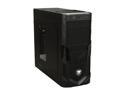
COUGAR Volant Black Steel ATX Mid Tower Computer Case
Pros: Roomy and sturdy enough but their are better cases in this class. Good looks, not overly flashy and not dull.
Cons: Comes with one fan, mine doesn't work. Tool less drive mounts only work on one side so its not fully secure. You have to remove screws to take off the front panel. Overall its not bad, but its really not as great as the reviews on here say.
Overall Review: Go with the Cooler Master Elite 430 if you want a cheap case with a bottom mounted PSU. Its much better.
7/20/2013See more detail
Don't dis it cause its different.

Microsoft Windows 8 64-bit (Full Version)
Pros: Its pretty much like Windows 7, only perhaps a bit more stable. The new interface is interesting, but I dunno if its any more efficient than the old one. It sure boots up fast compared to Win 7 though. Its different but its not a bad different. You can use to it for everyday use and actually like it. It might take you 15 minutes to figure out what the heck is going on when you first boot it up but the interface works well. Windows OS has been the same since 1995, you can see why they are trying to change some things. Don't hate just because its different, the OS actually works very well.
Cons: They have moved a lot of things around, it will take some getting used to. It would be nice if they at least had a native way to restore the start button.
Overall Review: Just remember as with any OS you will have to track down drivers on the internet. I just bought a new motherboard and it did not include Win 8 drivers.
3/29/2013See more detail