
Your Browsing History


Guido K.
Joined on 07/13/05
0
0
product reviews
- 12
Good headphones, at a good price
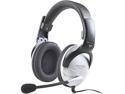
KOSS SB45 3.5mm Connector Circumaural Communication Headset
Pros: The headphones sound pretty good, you can hear a lot of detail in the music / game. The earcups seal very well against my head, and block out a lot of external sound (sounds similar to wearing shooting-style hearing protection). They seem very sturdy built, nothing seems too cheap, flimsy, or easy to break. The mic boom is flexible and easy to position, and can be rotated up out of the way when not in use. They are very comfortable, with plenty of plush padding in contact areas. The cord is long. I like that they DON'T have a mic/volume switch, because I've always had those break on me. Good buy for $30.
Cons: I like to chew gum, and the headphones put enough pressure on the top of my jaw to make chewing gum akward. It isn't painful, just try opening and closing your mouth while pushing with your fingers below your ears. I like the headset enough though (and for $30) to just avoid chewing gum while using them. Some might not like that they don't have a mic/volume switch. I think it's good, because I've had to replace a couple pair of headphones that had those switches break, or had to leave them in one position because touching it messed with the connection.
Overall Review: I haven't had a lot of time to try out the quality of the mic, from a sound perpective. Assuming it works decently well (it's supposed to be noise-cancelling too), I'm definately going to keep these. With the ease of mic positioning, I don't forsee problems. I'm no audiophile. These headphones sound fine to me. I can hear people talking, hear things happen in my game, listen to music clearly, etc. I'm happy. There may be people out there that can hear imperfections in the sound quality, but not me.
9/19/2007See more detail
Terrible. 3 DOA's in a row.
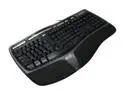
Microsoft Natural Ergonomic Keyboard 4000
Pros: Cool looking, ergonomic, multi-media keys.
Cons: The space bar is akward to push. If you don't press it more in the center (as opposed to the outer thirds) it doesn't depress smoothly, but seems to get bound up on the internal guides. I bought this keyboard, and the first one the V, M, and Y keys didn't work. I returned it, which cost me 10 dollars, only to get one that the C key didn't work. I returned that one, for 10 dollars shipping more, just to get one that the K and G keys didn't work. I got sick of paying shipping so I went and bought the same one at the local electronics chain store, and returned the bad one there.
Overall Review: Maybe these are refurbs, they got a bad batch, or they are somehow seconds.
6/30/2008See more detail
Good card, but abnormally thick
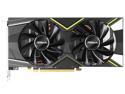
ASRock Challenger D Radeon RX 5600 XT RX5600XT CLD 6GO 6GB (14Gbps) 192-Bit GDDR6 PCI Express 4.0 x16 HDCP Ready Video Card
Pros: Good performance for the price
Cons: This card is more than 2 slots wide, so it will block the next slot on most motherboards.
Overall Review: If you have the room, this card is a good performance value for the price.
5/4/2020See more detail
W00T!
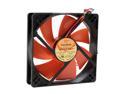
Thermaltake A2029 120mm Case Fan
Pros: - Variable speed with knob. - Great airflow with good static pressure. - Included a quality "extras" kit (e.g. screws, washers, control knob on PCI backplate, temp sensor, thermal tape, 3-to-4 pin power adapter, INSTRUCTIONS!) - Fan is well balanced, free from plastic imperfections, and seem to be very good quality.
Cons: - At maximum RPM, the fan gets loud. But, come on, 95 CFM For The Win! - The connectors that extend from the side to attach the thermal probe or control knob are on very short stubby wires, which makes them difficult to move out of the way if you need to fit the fan in a fan-cage designed to hold 120mm fans. - The control knob switch is held to the PCI backplate by being sandwiched between to metal tabs (instead of having a threaded shaft with a nut on the protruding knob side. This makes customization more difficult. - With lots of these, your case may spontaneously take flight, while simultaneosly causing a blizzard.
Overall Review: I ordered 10 of these fans for my CoolerMaster 830 Stacker (4 in the side door, 1 on top, 1 in back, 2 out the bottom, 2 in front). The problem? Who has 10 PCI slots open for all the switches? So I a 5.25" bay cover and drilled holes in it. But the switches mount in a U-shaped bend of metal with detents in little holes, instead of some threaded shaft mechanism. A trip to the hobby store got me some square balsa-wood strips which I glued on the back of the cover plate to align the switches, then I glued the face of the switch to the back of the faceplate. Look great now!
7/16/2008See more detail
Also fits PHENOM!
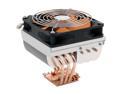
Thermaltake CL-P0114 120mm Big Typhoon CPU Cooler
Pros: N/A
Cons: N/A
Overall Review: I don't own this yet, but simply wanted to point out that the manufacturer's website now lists Phenom compatibility as well: Pentium 4 (Socket LGA775) Pentium 4 Prescott FMB 1.5 (Socket 478) Phenom (Socket AM2, AM2+) Athlon 64 / Athlon 64 FX (Socket 939) Athlon XP (Socket 462/A) Sempron (Socket 754)
7/16/2008See more detail
Nice card, nice price.
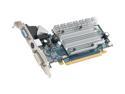
SAPPHIRE Radeon HD 3450 256MB GDDR2 PCI Express 2.0 x16 CrossFireX Support Graphics Card 100233L
Pros: I bought 2. They work good. In Crossfire they hold decent framerates in most modest games. I haven't tried Crysis or anything crazy like that. PCIe 2.0 is nice, and it's backward compatible (you can stick it in a PCIe 1.0 slot if you don't have 2.0 ones). The PCIe 2.0 cards are cheaper than the 1.0 cards for some reason. No fans to fail, no extra power cables needed!
Cons: They don't include the Crossfire cables. So now I need to spend $20+shipping on 2 Crossfire cables for $65 worth of video cards? How stupid is that? You can do software-Crossfire without the cables, but the cables really improve performance.
7/7/2008See more detail