

Your Browsing History


Gregory D.
Joined on 01/26/06
0
0
product reviews
- 10
Destroyed my Expectations
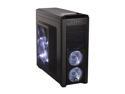
Corsair Carbide Series 500R Black Steel structure with molded ABS plastic accent pieces ATX Mid Tower Computer Case Compatible with ATX (not included) Power Supply
Pros: What can I say, I have had a dozen or so cases in the past 10 years from thermaltake, antec, lian li, amongst others; and I have never been so impressed by a case, especially for the money. This case has many features my more expensive cases have had and many more that they have not had. Plenty of spacing inside the case for big motherboards/graphic cards/water cooling. Comes with 4 fans, two white LED 120mm front fans, one side white LED 200mm and one rear 120mm fan no LED; all are very quiet especially the front two. I have already replaced them all but the front two, running H100 up top with two 140mm ins, two 140 mm side exhaust and 120mm exhaust in rear and 140mm intake on bottom. PSU can intake filtered air from bottom of the case nice touch. You can also either put 120mm fans on the HDD bays or remove the bays entirely. USB 3.0 on front with MB connector not rear panel pass through. 3.5 tool-less bays work like a charm and have 2.5 mounting holes for SSDs....
Cons: More Pros - Cable Management was the best I have experienced in a budget case by far, everything looks super tidy and airflow is superb. The Interior is also painted black as are the front panel wires(That's worth six eggs in my book). I also enjoy that all these high end features come in a subtle case look where some other cases just look obnoxious these days. Now a few nit picks -Wish there was a tad more space behind the motherboard for cable management took me a few tried to get everything tied down where the back cover would close without pressure. Tool-less 5.25 Bays still need to be screw'ed in to keep things secure making the tool-less system a little pointless for your Disc/Controller/Etc Bays. Front panel a little bit of a pain to get off for cleaning or what not. Almost all the fan screw holes have rubber grommets except the 140mm rear mount, no idea why they did not do this one. None of these cons are major for me just wanted to point them out for others.
Overall Review: Three white LED fans use proprietary connections so they wont be usable in another case without splicing(easy 1 wire 12v 1 wire LED 1 wire ground). Textured surfaces still show fingerprints it seems and its a little tough to clean so wash hands frequently when assembling/use gloves. Thumbscrews for removing side panels stay in place when unfastened which is super nice but its also easy to strip if you don't pay attention when screwing them back in, so pay attention. Rubber grommets for cable management are very welcomed and are of high quality, however two spots I would have also liked to see them is there is a small hole above the 5.25 bays I ran the front panel connectors through and there is another small hole at the top rear which I used for the 8 pin motherboard connector. Comes with some zip ties and cable clips but do yourself a favor and buy some extras. But overall I recommend this case to anyone from novice to entry-enthusiast, this case starts a great home build!
1/22/2012See more detail
Good filler, Needs redesign
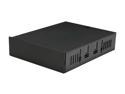
Scythe KC02 - MBK - 5 Kama Cabinet Pro Storage Box for a 5.25" Bay
Pros: Great use of an empty bay. 2 USBs that plug into MB header as compared to rear panel pass through. Nice felted interior to reduce scratching of stored items and comes with a few plastic dividers. Bright white LEDs light interior of drawer.
Cons: If you pull out the drawer to far it comes off its tracks and can be a pain to get back and such USBs are very hard to reach(I am using it for Wireless Keyboard dongle). The USB header wire connects directly to the back of the drawer not the housing and as others have stated it can easily bind up but after a little fiddling and rerouting I got it so it opens perfectly each time now. Personally I would have paid $10 more for a redesigned model that addresses the flaws. Eggs lost for drawer tracking and usb wiring.
Overall Review: It is very long, and is the longest item in my 5.25 bays including the BluRay Burner. I don't use the drawer for a lot so a couple of inches shorter would be appreciated. Wire Mesh design does not match any of the four cases I own that have a Wire Mesh front, while not very noticeable it bugs me. Others have mentioned that it is flimsy, while it is cheaper plastic, it does the job and seems to be sturdy enough to get the job done for years.
1/22/2012See more detail
It's good but I expected more
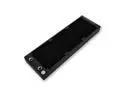
EKWB EK-CoolStream PE 360 Radiator, Triple, Black
Pros: Tons of surface area and provides great cooling. From a performance standpoint this would be five eggs in my opinion. Materials used for construction are great and no residue seeping into fluid.
Cons: While the materials are great the build quality is a little underwhelming. I also bought the slim triple which has a great fit and finish but this one has a wobble when moving around in your hand. Nothing rattles once installed so I guess its not a big deal. I did have to drop off one egg due to the included hardware. Screws are provided for fans on one side and the case mounting on the other. This is expected for the slim but not the full size radiator. Need to buy more screws for push pull. Also the slim triple seemed to include better screws and allen wrench and port plugs. Again nothing that affects performance but just underwhelming as this costs a bit more than the slim triple.
Overall Review: Also the slim triple made its way to the top of the case so logo orientation was no big deal, but this one fits at the front of the case. With the hose connections at the top to prevent air being trapped inside the EK CoolStream branding is now upside down and in bright white. Just a nit pick and I will probably find a way to cover it up but would have preferred just a simple EK badge on the radiator. Would have loved a tiny magnet badge that I could have re-oriented the right way.
4/15/2017See more detail
So Far So Good
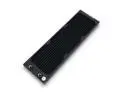
EKWB EK-CoolStream SE 360 (Slim Triple) High Performance Radiator
Pros: Slim design allows the radiator to fit above the motherboard in my case with a set of fans. Includes mounting screws and allen wrench for 3 fans on one side with long screws and attaching to the case with short screws. A ton of surface area for cooling in a tight space! Build quality is actually very good and a reasonable price.
Cons: Does not come with screws for push pull but I dont have room where this radiator is being placed so no egg loss there for me.
4/15/2017See more detail
Hardware is better than the Software

M.M.O. 7 Gaming Mouse Cyborg CCB437130002/04/1 Black 13 Buttons 1 x Wheel USB Wired Laser 6400 dpi
Pros: Very adjustable like other Cyborg mice. See other thoughts. Buttons galore!! Unlike the naga all the buttons are in places you can logically slide your fingers to press. It has back and forward buttons on the inside of your thumb, a 4 way D-pad with middle click, another button on the tip of your thumb and one more at the heel, and finally one more large button on the outside of your thumb. It also has a scrollwheel that is underneath your pointer finger that can be slid by your thumb. There is a small button on the pinky side that can be pressed by your ring finger. There are your typical left and right clicks that are very large and click easily and an excellent scroll wheel with center click. There are three smaller buttons below the scroll wheel and finally one last button on the outside of your pointer finger. DPI is very precise and picks up very slight movements. Braided cord is a sweet touch as is the gold tip. Mouse finish does not show prints/sweat and it feels sturdy!
Cons: Software! While the thumb buttons can be configured through the clunky interface all the top buttons cannot. All the top buttons are useless 90% of the time. The center button is for DPI adjustments but there is also a precision aim button so a little redundant for FPS but totally useless for MMO. The left and right buttons can be "held down" with the corresponding center buttons, for FPS this is mostly useless and for MMOs this is totally useless. The button to the outside of your pointer finger changes between three loadouts and the button under your ring finger changes to another alternate loadout. Ugh redundant, I only need one of the Alt layouts, I would have much rather used that pointer finger button for an Oh P**p ability. The software is built for doing macros which is nice but trying to just remap buttons means you need to create a single click macro just a little tedious. You cannot disable any of the special buttons, so if you accidentally hit the action lock, good luck!
Overall Review: The thumb pad can move forward and back as does the palm rest. The pinky rest is interchangeable as is the palm rest. You can also adjust the weight of the mouse. The thumb rest does not go far enough forward for me and in other Cyborg models it can be swiveled out and locked, this one swivels but can't be locked. The pinky rest should be adjustable light the thumb rest as it is just a little to far forward for me. The mouse is very uncomfortable to right click with your middle finger, it seems like it was designed for the ring finger, just takes some getting used to. More with the software the LED light control RGB does not even come remotely close to the color that the LEDs actually produce, so you just have to eyeball it. Not a big deal, but it is so far off I had to mention it. I know I ranted on the mouse, but I really do like it, but if the software was better I would say it was the BEST FR*CK*N MOUSE EVER!!!!
4/2/2012See more detail
Everything you need!
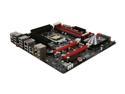
ASUS Maximus IV Gene-Z LGA 1155 Intel Z68 HDMI USB 3.0 Micro ATX Intel Motherboard
Pros: Hot dang this motherboard looked great on paper, it is even better in your house, overclocks like a dream(i7-2700k 4.8 w/H100), SLI on a micro ATX, UEFI bios is amazing, plenty of fan headers, spacing and layout is Goldilocks, Tons of USBs on the back panel for a mATX board, Rear IO Shield is very nice and well made, USB 3.0 Header, Virtu green support for doing encoding, Intel LAN which is very quick, Solid Caps, Onboard power/reset, Error Code Readout, Post LEDs, ROG USB connect although I have never used it, Voltage points for multimeter checking when overclocking, PS/2 port for those devices you just can't throw away, This board has everything!!! Everything installed like a dream no issues with parts bumping and could easily manage cables coming off the board, very impressed especially considering the small size of the board. Also the manual is super large and super detailed for those that may reference it.
Cons: Really wish it had more onboard SATA with very limited PCIe slots its tough to sacrifice something for a SATA card, Speccy and other HW monitors always report the MB temp as 60*C not a huge deal since I have never overheated a MB but still would be nice to have accurate data, Error code readout gets slightly covered up when you run SLI as do the on board power/reset, Onboard audio is MFG by realtek which is compatable with all the Soundblaster features - Just be aware of this Soundblaster does not MFG MB chips so that is why it is a realtek chip just wanted to point out in case any Soundblaster fanatics think they are getting a SB chip but go Xonar anyways if you are an audiophile, Not that I would ever use it but my giant sticker they include got folded from the packaging/shipping. Why are black SLI bridges impossible to find, wish they were included here.
Overall Review: You get all the features of a full size ATX board in a small form factor that comes with a small price too!! Originally I was planning a Black & Red build but with a beefy GPU and RAM all you see is black so dont be afraid to go Black/Green Black/Orange Black/White or (yawn) Black/Blue. Asus Q Connects for the front panel connection, nothing huge but a very nice touch, if you have not used it you basically connect your Power SW, Reset SW, HDD LED, Power LED to this block then the block connects to the motherboard, just makes things a little easier. This was my first UEFI bios, when I saw the mouse cursor on the screen I slowly reached over to my mouse, gave it a wiggle, saw the pointer wiggle, and that made me giggle in a nerdy way :)
2/5/2012See more detail