

Your Browsing History


Joshua G.
Joined on 01/08/06
0
0
product reviews
- 23
Budget Motherboard
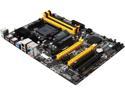
BIOSTAR TA970 Ver. 5.3 AM3+ AMD 970 + SB950 USB 3.0 ATX AMD Motherboard with UEFI BIOS
Pros: $65 for a 970 Northbridge around 4/2013. Bios settings are large, bios update was easy All six SATA III. Motherboard runs cool. CPU was super easy to install. The RAID boots really really fast. The whole bios boot loads very fast (this is the part of a computer bootup that precedes the OS bootup).
Cons: I got lucky and saw the bios reset pin and fallen out. I replaced it and didn't think anything of it. Apparently from the other reviews, this will prevent your motherboard from posting. It falls out very easily and is buried under the GPU and close to the SATA connections. Icky for over clockers in need of a reset. There are only 2 3.0 USB. They are NOT NOT NOT where they are advertised to be (next to the LAN), they are right next to it. They are the ones with the blue internals. But that's not the worst part. The worst part is that the connections are only external on the back side of the motherboard. Oh, if you download the driver file for USB 3.0, rename it to .zip; then unzip it to extract the .exe file. That wasted 1/2 hour of my life figuring out. The SATA connections face each other so forget using elbows. This is problematic with my long GPU card.
Overall Review: The bios update is for all versions of motherboards, which doesn't seem to be an issue even though I think I have a slightly older version. To pair off your memory, remember to space them apart like the motherboard booklet says. Leave HPC off, that is for turning off half the cores so you can over clock the ones that are left for gaming. Up to you ultimately, if you feel you need it in 2015.
4/13/2013See more detail
Useless
AMD Gift
Pros: It's free! But you get what you pay for.
Cons: There is some copy-protection or something that preventsthe game from running. I get to a splash screen and then nothing.
Overall Review: My system is solid, I have tried updating the game. Nothing works. The game is non-US and there is no supporting documentation. The website is bleak at best.
4/26/2009See more detail
APU Fail
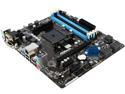
ASRock FM2A88M PRO3+ FM2+ 95W / FM2 100W AMD A88X (Bolton D4) USB 3.0 HDMI Micro ATX AMD Motherboard
Pros: Great everything if it supported my APU fully.
Cons: I am using no discrete graphics card. I am using an APU, A8-7670k. Everything works fine unless the onboard graphics gets turned on in the bios and any AMD driver is. Currently to keep the computer usable and avoid endless crashing, I have the onboard graphics turned off. I can still use the computer, just nothing with 3-D requirements. The problem will likely go away when they update the bios. Asrock uses the same bios as their brother company, Asus. So it's just a matter of time. But in the meantime I can't use computer for much.
Overall Review: I have tried everything possible and spent a week working on this computer. I have been building computers for 20 years so I know what I am doing. This problem lies with the manufacturer not updating their bios with new hardware they are claiming is supported, namely this specific APU. Grounds for a lawsuit perhaps? The bios might get fixed tomorrow but it also might be 6 months out. I really don't want to buy a discrete graphics card.
11/10/2015See more detail
OC'ed Ram
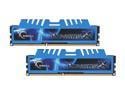
G.SKILL Ripjaws X Series 16GB (2 x 8GB) 240-Pin PC RAM DDR3 1600 (PC3 12800) Desktop Memory Model F3-1600C9D-16GXM
Pros: Settings are 9-9-9-24-40. I could probably get 8-9-9-22-21-31 but I am not going to bother for now. Actual size: 16,384MBytes I am considering a 10G ramdisk but everything runs so fast already that I will put it off for now.
Cons: none
Overall Review: The MOTHERBOARD won't automatically put this at 1600, but that is because 1600 is considered overclocked per DDR3 standards. So to get the rated 1600, you have to go into the bios and manually over clock it. If this is too hard for you, go buy an Apple. BEWARE: Windows 7 will not let you go above 16G without upgrading to professional version.
4/13/2013See more detail
Cold CPU
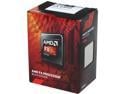
AMD FX-6300 - FX-6000 Series 6-Core 3.5 GHz Socket AM3+ 95W Desktop Processor - FD6300WMHKBOX
Pros: This is an upgrade to my old quad core 940BE. This is the best 95W CPU that AMD makes. This thing is cold. I turned the bios settings way down for the fan. Under normal operation this thing is barely above room temperature. Yes, it's a budget CPU and Intel makes better CPU's, but it will just be wasted computing power. This CPU + decent graphics card = running anything on high settings.
Cons: The heat sink. Why do they even sell it with it? Why not spend the extra money and give you a good heat sink? Or save you the money and skip the heat sink?
Overall Review: Windows likes to boot up with only 1 CPU and then bring the others online. As such, I forced Windows to boot with all 4 of my old CPU's at once. Unfortunately when I installed this one, Windows tried to keep it at 4 CPU's so I had to turn that feature off and then back on for the 6 cores. Even so, WEI doesn't think this CPU is an upgrade. From my experience multitasking, this is a great CPU. I AM VERY HAPPY WITH IT. Protip: when you apply thermal paste, use as little as possible. Thermal paste doesn't conduct heat as well as Cu, so the idea is to use thermal paste to fill in the micro-cracks you can't see even if you lap your CPU & heatsink. Wipe away the excess paste with a straight edge. What little is left will only fill the micro-cracks. Worst case scenario is that it will get too hot and not work (won't happen).
4/13/2013See more detail
Great
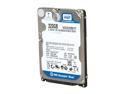
Western Digital Scorpio Blue WD3200BEVT 320GB 5400 RPM 8MB Cache SATA 3.0Gb/s 2.5" Internal Notebook Hard Drive Bare Drive
Pros: Windows 7 rating of 7.1 before I used a jumper to turn on "reduced power spinup". After installing the jumper, it fell to 5.8 The hard drive is fast and works as intended. The old hard drive on the tablet was havinga SMART error. I did a small partition on this one and installed Vista x64 Ultimate and then upgraded Home Windows 7 x64 on the other partition. The other jumper location allows for spread spectrum, if you're into that sort of thing.
Cons: The jumpers pins are small and none of my jumpers worked. I had to use some pliers to remove the plastic coating on a regular jumper and then crush it to size. It works well but I fail to see why they can't give you a jumper in a neutral position and also label the jumper pins on the hard drive. I had to look up the jumper locations.
Overall Review: Upgrading and creating a dual boot for Vista and 7 was a breeze. This was my first time changing a laptop hard drive and it was as easy could be. I might put on Linux next. Anyone could swap out their hard drive provided they feel comfortable reinstalling an OS.
11/20/2009See more detail