




 here!
here!
I’m your shopping assistant for PC builds, upgrades, and everything tech.
Got questions? Ask away!
Start a conversation
here!
I’m your shopping assistant for PC builds, upgrades, and everything tech.
Got questions? Ask away!
Start a conversation

Joined on 12/03/13
It's G.Skill RAM!
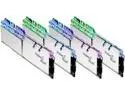
Pros: Looks fancy, RGB lights are very bright. You can set the color or just keep it RGB. Over-clocks easily and stable. I used gloves to install them on the motherboard so that I didn't leave fingerprints on them. Aesthetics you know!?
Cons: No real cons from me.
Overall Review: I put these on a buddies build and let me tell ya, I was impressed and might buy some for my next build. I've always used G.Skill for my builds as I feel they are well built and the PCB seems to be well built and sturdy.
Works Great but...
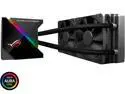
Pros: -Keeps my CPU cool -Has a fan on the water block that blows air around the VRMs and also helps cool the water block. -Noctua fans for the radiator -LiveDash screen is nice (if I could ever get it to work) -long braided hoses -Overall, it works great, would recommend it, hopefully you can get the livedash panel to work.
Cons: -wires on the USB connector came loose after installing it causing it not to work properly. Very disappointing considering it is a ROG product. -hoses can be too long for some cases -hiding all the wires can be a pain too as they all come off the right hand side of the waterblock
Overall Review: I bought this one for a friend as I was building him a gaming computer. I bought mine off of a different website as they had a sale on them about 3 months back. Mine has worked perfectly as far as keeping my CPU cool. Only issue I've had is not being able to get the livedash panel to actually work. it's stuck on displaying the ROG eye which i'm not too worried about. I've followed the steps on how to get it to work and when I download the file off the Asus website it doesn't download the program. Maybe I'm just not doing it right.
Awesome case, you won't be disappointed!
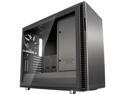
Pros: Has a lot of room to work with. Modular to make things look organized and tidy. Cable management was easy and only wires visible are the ones that connect to the graphics card. The tempered glass panel is an awesome touch. It shows everything really well. I really was impressed on how well this case was built. It is sturdy and well built. The padded panels also make it a bit more silent, which is a nice touch.
Cons: Not really a con, as it is easily fixed, but make sure you have adequate airflow or you will run into some heat issues. I had only one exhaust fan and 3 intake fans and my graphics card reached 82° C. My cpu Temps were at 50° C with an AIO. I could literally feel the heat coming from the glass and the case was getting got. I installed 4 more fans. Two more on the radiator making it a push/pull config (which I installed on the front of the case)and two on top to exhaust. One on the bottom as intake and the rear one. With this setup my graphics card dropped down to no more than 62° and cpu to max of 45°. This was while playing The Witcher 3. The fan hub in the rear is nice but seems to be like the 3 pin fan headers are set at a slow speed. Still no real complaints on it.
Overall Review: I would like to use the vertical riser cable for my GPU but it is no where to be found. I really recommend this case to anyone who wants a clean silent build.
Follow up Review after 5 years
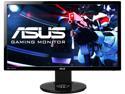
Pros: I have had this monitor since 2014. Images are still nice and doing well. Able to run high FPS with all my games such as Elder Scrolls Online, Mass Effect Andromeda, BO4 and others. Read Other Comments.
Cons: It's a TN panel so the colors are not all the right shade but with some tweaking you can make it look how you want. Also, the other issue I've had is when the DisplayPort is connected, I get a no signal and it shuts down. How you fix this is, turn on your computer, let the no signal sign come up and then unplug the monitor from the outlet and let it power cycle and then plug it back in and it should bring up work just right.
Overall Review: Other than the "No Signal" issue, I have been very happy with this monitor. I don't plan to upgrade for a bit. if you have a beefy graphics card, like a RTX 2080Ti, some games allow you to set the resolution to 4k and then it brings it down to provide a phenomenal image on the monitor. I highly recommend this monitor for gaming. I do plan to upgrade my monitor but not sure if I want 2k or 4k. We shall see.
Awesome Graphics card
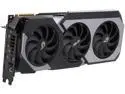
Pros: - Overclock well, mine got up to 2055 Mhz - RGB is bright and the infinity mirror looks cool. - Sturdy build - Has Samsung memory modules so no issues. - Stays cooler than my Matrix 980ti
Cons: Only con I have, and I'm not sure if it is a software issue or card issue, when the Aura was set for the RGB, and I set the overclock on GPU tweak, it makes the RGBs turn blue and white and blink. Not sure what is going on there.
Overall Review: If you have the money to buy one, do it and you will be happy. Hopefully you don't have the same issue I did the with LED's and Aura
Awesome headset and impressive surround sound
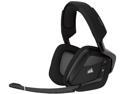
Pros: - Wireless and has some distance - Not tight around the ears, reduces fatigue in my opinion. I like the loose feel around my head. Also, though they are loose, they still muffle the outside noise enough to where you still feel like you're immersed in the game but still can hear your daughter ask you a question. - ears don't sweat like the pleather style - They sound great, you can choose your sound style, does require iCue software from Corsair. - They are also RGB, so pick your favorite color or keep it RGB.
Cons: Battery doesn't last very long, I'd say 4 to 5 hours maybe. I don't usually game that long unless I don't have my daughter than I might go for a while but to me that's the only downside is very short battery life. Not a reason to take an egg from the headset though in my opinion. Just remember, the battery has to power and drive these little speakers so it's expected to have a short life span. Just my opinion though
Overall Review: If you hate wires, these are a great addition to any PC gamer.


