


 All CategoriesAll CategoriesAll Categories
Shipped by Newegg

Make informed decisions with expert advice. Learn More


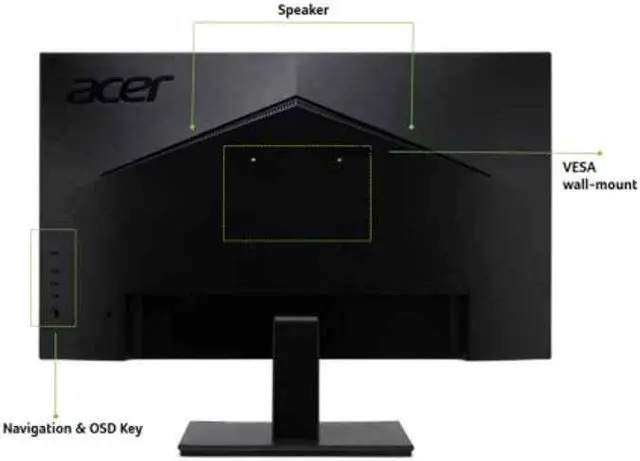


Find the perfect position for your viewing needs with this sturdy yet flexible design.
What a ViewGet the most out of your viewing experience with high resolution colors and innovative eye care technology.
Warranty Notice:
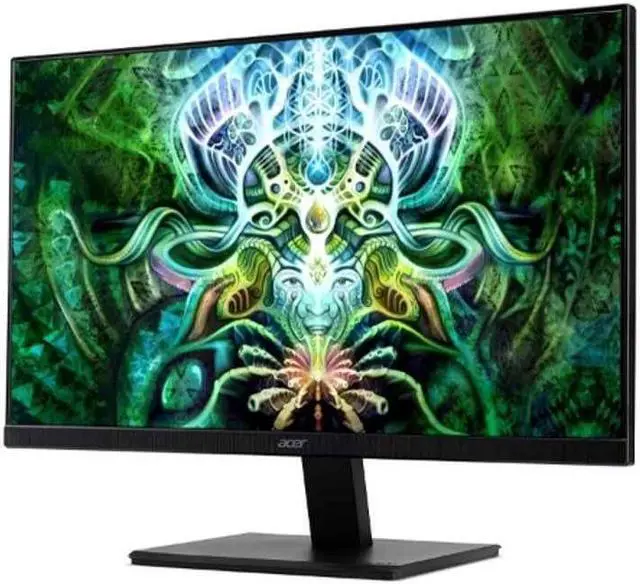
This product does not include manufacturer warranty when purchased or used outside of its designated sales region. By purchasing internationally, you acknowledge that warranty support from the manufacturer will not be available.The Acer Vero V7 V227Q H is a 21.5-inch Full HD VA monitor with a 100 Hz refresh rate and FreeSync, suited to everyday desktop use and casual gaming where smoother motion is useful.
| Attribute | Value |
|---|---|
| Best For | Desktop use where a Full HD display with HDMI, DisplayPort, and VGA connectivity is needed |
| Panel And Resolution | 21.5-inch viewable LCD with a VA panel, Full HD 1920 × 1080 resolution, 16:9 aspect ratio, 178-degree viewing angle, and 0.241 pixel pitch |
| Refresh Rate And Response | 100 Hz refresh rate, 4 ms response time, and FreeSync adaptive sync |
| Ports And Connectivity | One HDMI port, plus DisplayPort, VGA, and headphone connectivity; no USB or Thunderbolt ports |
| Image And Audio Features | Supports 16.7 million colors with 72% NTSC color gamut, a listed 100,000,000:1 contrast ratio, built-in speakers, and Acer EyeCare picture enhancement; glossy screen finish |
| Mounting And Controls | Wall-mountable, with vertical orientation and button controls |
| Size And Weight | 19.3 in wide × 15.6 in high × 7.3 in deep; item weight 8.4 lb |
| Included Components | Monitor, HDMI cable, and US power cord |
| Model Identifiers | Acer Vero V7 V227Q H; cabinet color: black |
Q: Acer Vero V7 V227Q H vs V227Q E1: which should I choose?
A: Choose the V227Q H for its VA panel and 3,000:1 native contrast, or the V227Q E1 for an IPS panel, 300-nit brightness, and built-in speakers. Both are 21.5-inch Full HD monitors that support up to 100Hz over HDMI and DisplayPort.
Q: Is the Acer Vero V7 V227Q H a refresh-rate upgrade over the older V227Q?
A: Yes. The older V227Q supports up to 75Hz at Full HD, while the V227Q H supports up to 100Hz over HDMI and DisplayPort. Choose the V227Q H if you want the higher supported refresh rate in a 21.5-inch Full HD Acer Vero V7 monitor.
Q: Acer Vero V7 V227Q H vs V247Y E: is the larger screen worth choosing?
A: Choose the V247Y E if you prefer a 23.8-inch IPS screen; choose the V227Q H for a more compact 21.5-inch VA screen with 3,000:1 native contrast. Both are Full HD, support up to 100Hz, and include FreeSync.
Q: Is this monitor suitable for everyday office work?
A: Yes. Its 21.5-inch Full HD screen is suitable for common tasks such as email, documents, and web browsing. The compact screen size may be limiting if you want several large windows open side by side.
Q: Is it good for casual gaming?
A: It is suited to casual gaming: it supports Full HD at up to 100 Hz and lists AMD FreeSync and a 4 ms response time. It is less suited to buyers prioritizing refresh rates above 100 Hz.
Q: Can I connect it to a laptop or desktop?
A: Yes, if the computer has a compatible video output. The monitor lists HDMI, DisplayPort, and VGA inputs; if the computer lacks a matching port, you may need an appropriate adapter.
Q: Can the V227Q H develop intermittent black-screen issues?
A: One Reddit owner reported intermittent black screens on their V227Q H. That single report does not establish how common the issue is or prove a model-wide defect. If you buy one, check the return and warranty terms; the product specifications alone cannot establish long-term reliability.