
Your Browsing History


Jonathan L.
Joined on 10/24/06
0
0
product reviews
- 9
Ridiculously fast.
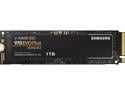
SAMSUNG 970 EVO PLUS M.2 2280 1TB PCIe Gen 3.0 x4, NVMe 1.3 V-NAND Internal Solid State Drive (SSD) MZ-V7S1T0B/AM
Pros: Installed Windows 10 Pro from USB from installation start to being at the "Cortana" introduction was about three and half minutes. Fastest Windows install I have ever done. Also amazing that you don't have to worry about cables at all - makes building a system that much easier.
Cons: None really
Overall Review: Go for a Samsung EVO or Pro, they are worth the money over competitors.
5/2/2019See more detail
Decent for WoW
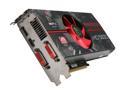
XFX Radeon HD 5830 1GB DDR5 PCI Express 2.1 x16 CrossFireX Support Graphics Card HD-583X-ZAFV
Pros: When I purchased the card right after it came out, it was priced significantly higher than it is now. Overall the card is good and performs decently. I was able to push the clock to about 875MHz, and the RAM to 1275 (stock of 800.1000) I could probably have gone higher if I wanted to manually turn the fan up more, but I felt that keeping the fan about 50% with this modest overclock was a good compromise. Stayed fairly cool, around 60c-65c under load @ 50% fan speed. The heatsink on this card is good and seems to have a good design enough to keep up if you really wanted to push the card.
Cons: No real cons, I have used XFX for along time, I am just upset they don't do nVidia cards anymore.
Overall Review: I am primarily a WoW player and this card does decent, and I have been using this card since around June 2010. Windows 7, 4GB RAM, Intel 80GB SSD, and this card running @ 1680 x 1050 does well, and I consistently see framerates around 60-80, at times in Org I can see it drop down to 40-50 . I enabled DX11 in the config file and saw a modest increase, not the 20-25% boost that Toms Hardware claimed they got on an ATi card enabling DX11 in WoW. I personally feel I could have done better buying an nVidia 460 GTX and overclocking it for performance, as nVidia cards do better in WoW than ATi cards from my experience and benchmarks I have seen. If you are willing to push this card to the limits and bounce the fan speed to 100% you can probably overclock this card a bit more than my modest speeds I was attaining.
12/21/2010See more detail
Extremely good power supply - Used in Bitcoin mining
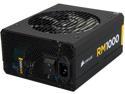
CORSAIR RM Series RM1000 1000 W ATX12V v2.4 and EPS 2.92 80 PLUS GOLD Certified Full Modular Active PFC Power Supply
Pros: I currently run 2 1/2 Antminer S1's on a single RM1000 unit. I have two units running all five Antminer S1 (Overclocked to 200GH/s each). Stays constant under load and getting a full 1TH out of the units. It is a bit more expensive than using a bunch of cheap 650W PSU's but at the end of the day a RM1000 unit will have better resell value than a 650W PSU. Comes with a huge assortment of cables at great length which is nice since you need to stretch some of the cables to connect the Antminers
Cons: Haven't really found any yet.
Overall Review: It is nice that I will be able to continue to use these PSU's for other mining equipment down the road as well after the Antminer S1's are no longer profitable.
4/24/2014See more detail
Awesome
RCA ANT1450B Flat Antenna With Amplifier in Black Finish
Pros: Works extremely well - the antenna is flat and doesn't look half bad in an entertainment center. Cheap amplified antenna.
Cons: None so far.
8/23/2011See more detail
Steno Book is a solid purchase

Ampad 25-274 Spiral Steno Book, Gregg Rule, 6 x 9, Green Tint, 80 Sheets
Pros: The Steno Book is sure going to make some heads turn. The Steno Book is very sleek coming in at a slick 6x9 profile - it is sure to make all those iPad users do a double take when you whip this bad boy out. This Gregg Ruled tablet with a green tint to it certainly says "I am a totally conscious of the environment" with its ultra-low power consumption. You also don't need to buy one of those expensive add on covers like this iPad users do as this one is built in with a stylish spiral hinge. It is pretty nice the extra details that these engineers took in designing the Steno Book.
Cons: They did NOT send a stylus with this thing - was this an oversight on the manufacturers part? Also at times retrieving the information from the Steno Book can be slow, maybe there is a firmware update?
Overall Review: The great thing about the Steno Book is that you can kick it old school for so little. I am positive there is no other substitute out there that says "I reject modern day society" as much as the Steno Book does.
5/9/2011See more detail
It's a monster....
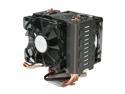
Cooler Master Hyper N520 - CPU Cooler with Copper Base and 5 Heatpipes
Pros: Well... it does an amazing job cooling the CPU. I have a Sandy Bridge i5 2500K (normally 3.3GHz, running @ 4.7GHz) and it keeps it nice and cool. Idle temperature is around 23c - it will run under 55c under normal load which is pretty amazing. Only when I run Intel Burn Test do I even get up to 60-63c range.
Cons: It is huge.... I can't stress this enough. This is *NOT* for small cases. I have a NZXT Vulcan mATX case and it does fit, but there is not a lot of headroom for clearance. MAKE SURE YOU MEASURE YOUR CASE BEFORE YOU BUY.
Overall Review: Weighs a lot, and can be kind of clunky to install because of the weight / bracket that you have to mount on the back of the motherboard. Getting the pins in position to fit the socket 1156/1155 position can be tricky since it is right in the middle. That is the problem with coolers that are made to be universal is that it can be cumbersome to install with all the brackets they provide.
2/8/2011See more detail